



 Knowledge
On this page
What Is an Embroidery Mockup Generator?
An embroidery mockup generator turns a flat design, usually a PNG, into a realistic stitched-thread preview on a product like a hat, polo, hoodie, or tote, without sewing a single physical sample. You upload your artwork, choose a product, and get a listing-ready image that reads like real embroidery. Caps are the hardest surface to get right, so if hats are your product, follow our embroidered hat mockup walkthrough.
That skips the cost and the wait of ordering a sewn-out sample just to check whether a design works.
It matters right now, too. The custom apparel market is projected to grow by $2.45 billion between 2024 and 2029, an 8.4% annual clip, and embroidered hats, hoodies, and totes are a big slice of that. Embroidery sits at the center of that growth, and our print-on-demand embroidery guide covers the whole workflow from artwork to listing.
But not every “embroidery mockup” is built the same way.
There are three things sellers call embroidery mockups, and only one is truly made from thread:
- Real stitch preview: rendered from stitch data, so you see actual thread paths, direction, and texture.
- Embroidery effect filter: a flat Photoshop or Canva style dropped over your PNG to fake a raised look.
- Staged photo scene: a stock photo of an embroidered garment with your design pasted in.
The flat effect and the staged scene can look convincing in a thumbnail. Neither one knows how your design would actually stitch out.
So here’s what most sellers really need an embroidery mockup to do:
- Sell the listing: a photoreal preview that earns the click and the sale.
- Stitch the product: a production-ready machine file, so the design can go on a real garment.
That second job is where the machine file comes in. A DST file, short for Data Stitch Tajima, is one of the most widely supported embroidery machine formats, and it stores the actual stitch commands a machine follows. If you want to learn more about the DST format, visit our blog about it.
Most tools handle the first job. Very few touch the second.
Dynamic Mockups is the top pick because it does both from one upload, and we score all seven options in full below.
How We Scored the Best Embroidery Mockup Generators
We scored every embroidery mockup generator on what matters when the product is thread rather than ink.
- Thread realism: does the preview render real stitches, or only fake the look?
- Machine file export: can you download a production file like DST, or just an image?
- Price: free tier, subscription, or per-file fees.
- Ease of use: browser-based with no Photoshop, or a steep climb.
- Best for: the seller each tool actually suits.
Whether you call it an embroidery mockup generator or an embroidery mockup maker, the same gap shows up: here’s why generic tools often fall short for embroidery.
Most were built to stage a scene, so they drop your PNG onto a photo of a garment or lay a flat texture on top. That works well for a printed design.
Embroidery is physical. A flat overlay can hide the exact things, tiny text, hairline strokes, smooth gradients, that break down once a machine tries to sew them. Those are the same details behind the most common embroidery digitizing mistakes that make finished stitching pucker or read as mush.
Every tool below does something well, and we say what. The ratings are about fit, not favoritism.
| Tool | Thread Realism | Machine File (DST) | Price | Best For |
|---|---|---|---|---|
| Dynamic Mockups | ✅ Real stitch data | ✅ Tajima DST | Free plan, paid tiers | Both jobs from one artwork upload |
| Placeit | ⚠️ Staged scenes | ❌ | Subscription | Scene variety, lifestyle shots |
| Printful preview | ⚠️ Digitized preview | ⚠️ Made, not exported | Free preview, pay per order | Preview tied to fulfillment |
| Embricity (Shopify) | ⚠️ On-store preview | ❌ | App subscription | Live personalization on-store |
| Mediamodifier | ⚠️ Templates + effect | ❌ | Free + paid | Fast template mockups |
| AI art generator | ❌ Imagined look | ❌ | Varies | Concept art and ideas |
| Canva / Photoshop PSD | ❌ Flat effect | ❌ | Subscription | Hands-on designers |
The 7 Best Embroidery Mockup Generators in 2026
Seven tools, ranked by how well they cover both jobs: the sellable preview and the stitchable file.
1. Dynamic Mockups
Dynamic Mockups is the only pick here that renders a photoreal preview from real stitch data and exports a machine file from the same upload.
You upload a PNG, our Stitch AI agent digitizes it into a realistic embroidery preview as a human digitizer would do with his expertise and creativity, and you attach that to any product mockup you like.
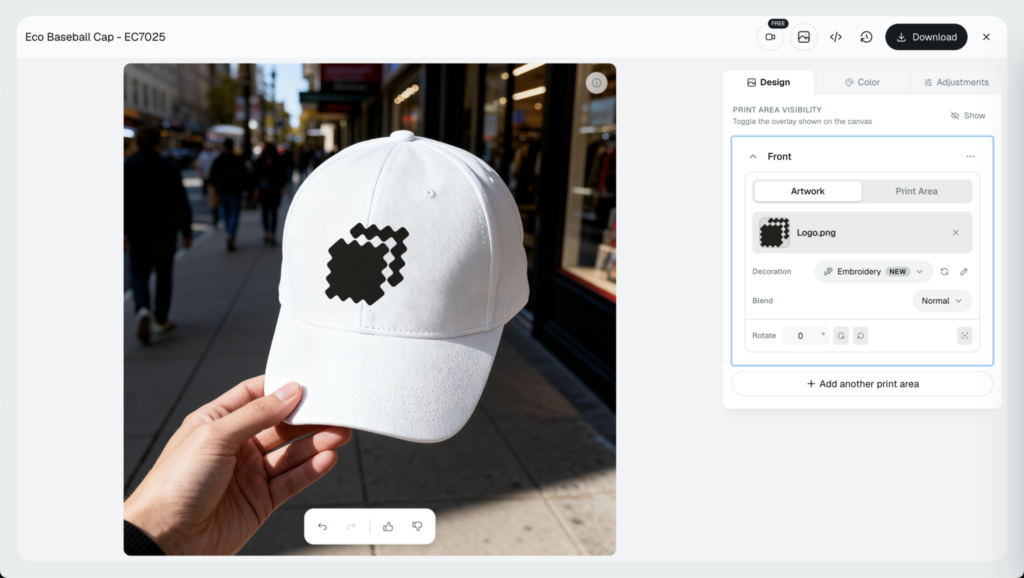
When the preview looks right, you download a ready-to-stitch Tajima DST file. One upload covers the listing image and the production file.
- Thread realism: high, built from actual stitch data.
- Machine file: yes, Tajima DST and other formats.
- Price: free to start, paid plans add volume and automation.
Best for sellers who want the preview and the machine file without paying a separate digitizer or juggling two apps.
2. Placeit
Placeit is strong on scene variety. It has a deep library of embroidery-style mockups across beanies, snapbacks, polos, and totes, with models of different ages and looks.
The catch: these are staged photo scenes, so your design sits on a pre-shot embroidered garment rather than being stitched from your file. There’s no machine file to download.
Pricing is subscription-based, billed monthly or yearly.
Best for sellers who want a wide range of lifestyle mockups fast and don’t need a production file.
3. Printful (Built-In Embroidery Preview)
Printful ties the preview to fulfillment, which is its real edge. You upload artwork, Printful digitizes it for embroidery, and you see a preview before anything ships (Printful).
The digitized file lives inside Printful’s system for production, so you’re not exporting a DST to use elsewhere. The preview sits closer to an effect than a full stitch render.
It’s free to design and preview, and you pay per product when an order comes in.
Best for sellers who want print-on-demand embroidery handled end to end, from preview to doorstep.
4. Embricity (Shopify Embroidery App)
Apps like Embricity live on your Shopify store and let shoppers personalize embroidery, names, monograms, and small logos, then preview it live before buying.
That on-store preview is great for custom orders. It’s built for storefront personalization, not for producing a downloadable DST or a batch of listing images.
Pricing is a monthly app subscription.
Best for Shopify brands selling personalized embroidered products who want the preview right on the product page.
5. Mediamodifier
Mediamodifier offers a large mockup library with embroidery and patch templates you can customize in the browser.
Like most template tools, it stages your design on a photographed product or applies an effect, so the thread look is approximate and there’s no machine file.
It has a free tier plus paid plans for more templates and downloads.
Best for quick, budget-friendly template mockups when you just need a clean product shot.
6. General AI Art Generator
A text-to-image AI tool can imagine an embroidered look from a prompt, which is handy for early concepts and mood boards.
But it invents pixels. It doesn’t read your design or produce stitchable data, so the result is unpredictable and never a production file. We saw the same thing when we asked ChatGPT for a DST file and it handed back a flat picture instead.
Pricing varies by tool, from free tiers to monthly plans.
Best for brainstorming ideas, not for listing images you sell from or files you stitch.
7. Canva or Photoshop PSD Embroidery Effect
A Canva template or a Photoshop PSD embroidery mockup applies a flat stitch effect over your artwork for a raised, threaded look.
You get full manual control, but you also do all the work, and the effect is cosmetic: no stitch data and no machine file.
Costs come through a Canva Pro or Adobe subscription.
Best for hands-on designers who want to art-direct every pixel and don’t mind the manual effort.
How Dynamic Mockups Turns a PNG Into a Stitched Preview and Machine File
Here’s the whole flow, from a flat file to a sellable image and a stitchable one. It runs in the browser.
Step 1: Upload Your PNG and Let Stitch AI Digitize It
Pick the embroidery decoration method in the mockup editor and upload your design as a PNG.
Our Stitch AI, an AI agent that digitizes your art like a real human digitizer with high expertise and creativity, converts the flat file into a realistic embroidery preview. It’s part of our AI mockup generator toolset, tuned for thread.
Step 2: Attach It to Any Product and Fine-Tune
Drop the stitched design onto any mockup you choose, a cap, a polo, a hoodie, a tote.
Then you can easily adjust placement, scale, and the stitched result until it looks right.
Step 3: Download the Machine File
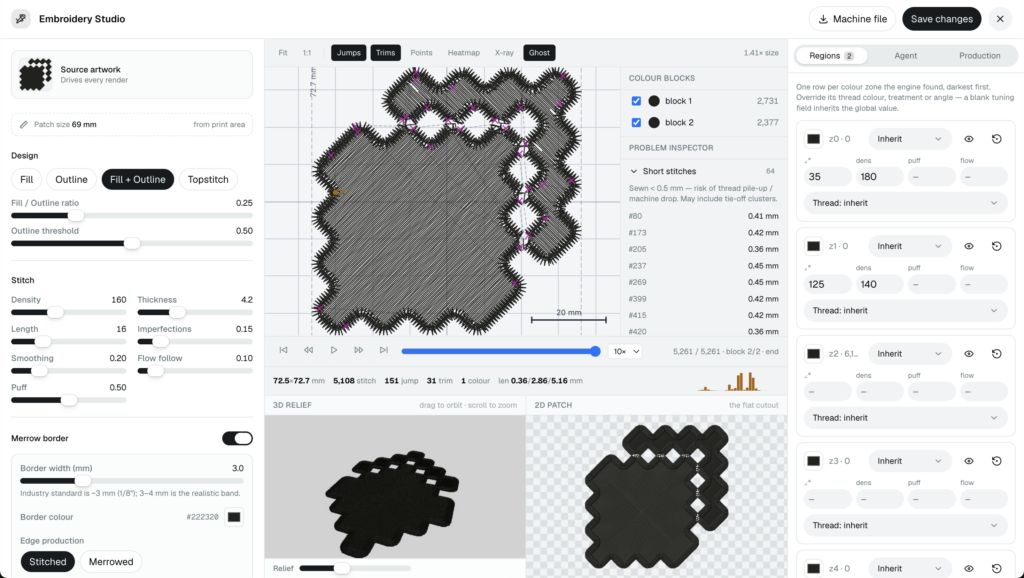
Once the preview is approved, download a ready-to-stitch Tajima DST file from the same design.
That’s the payoff: a listing-ready preview and a production file from one upload. You skip the separate digitizer and the second app.
Digitizing a single design through a service usually runs $10 to $30 for something simple and up to $150 for a complex one (Digitizing USA). Doing it inside the same tool that builds your mockup saves that line item on every design.
💡 Pro tip: Try the whole flow free, no credit card required, then re-skin the same design across more products in a few clicks.
Is There a Free Embroidery Mockup Generator?
Yes. Dynamic Mockups lets you create embroidery mockups free using the embroidery decoration method inside the mockup editor.
You can upload a design, generate a stitched preview, and test the export before you pay anything.
That’s not how most rivals handle it. Many gate embroidery behind watermarks, a paid subscription before you can export, or a per-file digitizing fee for the machine file.
Here’s where the free line sits with us:
- Free covers: the embroidery decoration method, stitched previews, and access to our free mockup template library of 100,000+ templates.
- Paid adds: higher volume, bulk generation, and automation for sellers producing at scale.
So a genuinely free embroidery mockup generator does exist, and you can test the preview and the export on it before committing.
If you want to see exactly what each tier includes, you can compare pricing plans side by side.
The low-pressure move is simple: make one embroidery mockup, preview it, and export it before you decide.
How to Choose the Right Embroidery Mockup Generator for You
The right tool depends on which job you need done, and for whom.
Match the pick to your situation:
- Etsy and marketplace sellers: you need fast, realistic listing previews that earn the click, so a real stitch preview beats a flat effect here.
- Hat, polo, and apparel brands: you need a machine file for production, so prioritize DST export, not just a pretty image.
- Agencies and high-volume shops: you need client-ready sets and batch output, so weight volume and automation.
When is a flat effect good enough? If you only need a quick concept or a social post, a simple embroidered mockup tool that applies an effect will do the job.
When do you need the real thing? The moment you’re selling from the image or sending a design to a machine, you want real stitch data plus a downloadable machine file.
To get the best embroidery mockups for your listings, that combination is what to look for.
Demand is on your side either way. Personalized embroidery keeps climbing, according to Printful’s 2025 trend report, so realistic previews are worth getting right.
Building this into a store or app? Developers and store builders can use our API and embeddable editor to put on-site embroidery previews right on product pages.
The simplest next step: create your first embroidery mockup free, then export the machine file from the same design.
Showcase your e-commerce products like big brands, without costing a fortune. Sign up today. No credit card required. →
Frequently Asked Questions
Is there a free embroidery mockup generator?
Yes. Dynamic Mockups lets you create embroidery mockups free using the embroidery decoration method in the browser. You can upload a design, generate a stitched preview, and test the export before paying anything. Many rivals gate embroidery behind watermarks or a per-file digitizing fee. The free plan also includes access to a library of over 100,000 mockup templates, with no credit card required.
What is the best embroidery mockup generator in 2026?
Dynamic Mockups is our top pick for 2026 because it does both jobs from one upload. Its Stitch AI digitizes your PNG into a photoreal preview built from real stitch data, then exports a ready-to-stitch Tajima DST file. Placeit wins on scene variety and Printful on end-to-end fulfillment, but neither hands you a downloadable machine file the way Dynamic Mockups does.
Can an embroidery mockup generator export a machine file like DST?
Most cannot. Tools like Placeit, Mediamodifier, and Canva only produce an image, since they stage a scene or apply a flat effect. Printful digitizes your art but keeps the file inside its system for production. Dynamic Mockups is the exception here: it digitizes your PNG and lets you download a ready-to-stitch Tajima DST file from the same design.
Do embroidery mockups look realistic enough to sell from?
It depends on how they are made. A real stitch preview rendered from stitch data shows actual thread paths and texture, which reads as genuine embroidery in a listing. A flat Photoshop effect or a staged stock photo can look convincing in a thumbnail but often breaks down on close detail. For images you sell from, choose a preview built from real stitch data.
How much does an embroidery mockup generator cost?
It varies by model. Dynamic Mockups has a free plan with paid tiers that add volume and automation. Placeit, Mediamodifier, and Canva run on subscriptions, while Printful is free to preview and charges per product at order time. Watch for hidden costs too: digitizing a single design through a separate service usually runs $10 to $30 for simple art and up to $150 for complex work.
![Can ChatGPT Make an Embroidery File? We Tested It [2026]](https://dynamicmockups.com/wp-content/uploads/2026/10/can-chatgpt-make-embroidery-files-cover-768x403.png)