



 Ecommerce
On this page
Does Placeit Have an API? No, and Here’s Why
Placeit does not have a public API. There is no developer endpoint you can call to generate mockups programmatically, and Placeit confirms it in its own help center: at the moment, there is no Placeit API available.
So if you came here to create mockups at scale, the honest answer is that you can’t. At least not with Placeit.
That’s a hard stop for anyone trying to fold mockups into a build pipeline or a customer-facing feature.
Here is what it rules out:
- No scripting: you can’t generate mockups from code or a scheduled backend job.
- No bulk actions or automations: every image is a manual click, export, and download.
- No programmatic access: the template library lives inside the Placeit UI, not in your app or pipeline.
The closest thing Placeit offers is a free Mockups IFrame for partners, a widget you drop into a page so visitors can browse the library. It’s a UI embed, and it stops there. You can’t batch it, version it, or drive it from your own server.
Placeit has hinted that a full API is on the way, but there’s no live, documented endpoint you can build on today.
That’s the gap. If you planned to automate product visuals, you need a platform built API-first from the start.
The good news: one exists, it’s free to test and start with, and the rest of this post shows how to wire it up.
Why Developers Search for a Placeit API
Nobody types “placeit api” into Google for fun. You land there because clicking through a UI stopped scaling.
It’s usually one of these four reasons.
Bulk catalog generation. Hundreds of designs across dozens of products turns into thousands of listing images. Nobody wants to export those by hand, one download at a time.
Custom templates and PSDs. You’ve built branded scenes and Photoshop templates you want to reuse, but a UI can’t script them or keep them under version control.
Real-time personalization. You want a shopper to drop in a logo and see it on the product instantly, inside your store or app, with no designer in the loop.
Outgrowing the manual workflow. Your team doesn’t need more people clicking. It needs automation that scales with volume.
Picture 200 designs across 15 products. That’s 3,000 images before you add a single color variant, and every one still has to look sharp enough to sell.
There’s real money behind the search. Product visuals are what close the sale, and Baymard Institute research found that 67% of product pages don’t show the social media images shoppers seek out to feel more confident about buying. Each extra product, color, and variant is another image to produce, and past a certain point the only way to keep up is an API.
The Fast Placeit API Alternative: Dynamic Mockups API
The fix comes in two parts, and together they cover the exact things Placeit’s UI can’t touch.
Part one: turn any product photo or prompt into a mockup. Our MockAnything AI mockup generator takes a single product photo and turns it into a reusable, photorealistic mockup, warp and curves and shadows and all. Point it at a mug, a tote, a candle label, or a phone case, and you get a template you can render against again and again.
We create real lifestyle mockups of real manufacturable products. Even just from the prompt and you can easily ground it with chosen POD product you are interested in.
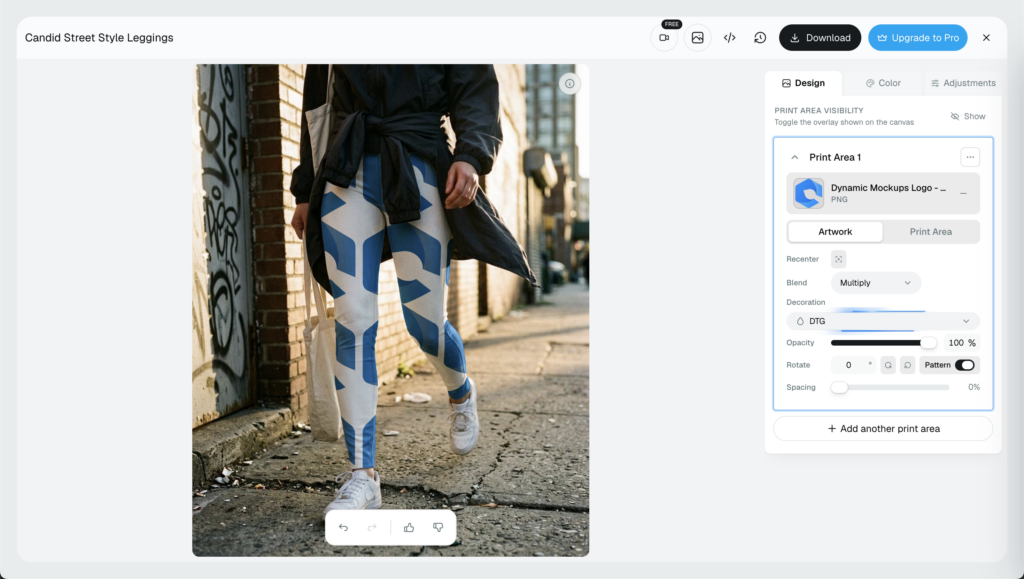
The template is yours to keep, so you can version it, create more using the same style, and reuse it across every new design without rebuilding a thing.
Part two: render it at high speed, at scale. Once you have a template, whether it’s a MockAnything mockup or your own custom PSD, the Render Mockup API drops in the design, sets the colors, and outputs the finished image. One call, one mockup. A thousand calls, a thousand mockups.
Each request is simple. Pass a design as an image, point it at the right layer, set colors and output size, and get a rendered image back, ready to drop into a listing or your CDN.
Speed is the part developers ask about first, so here are the numbers. We answer the rest of the throughput and credit questions in our mockup API rate limits FAQ.
Our engine renders 750 mockups in about 60 seconds. That works out to roughly 12.5 per second, or close to 800ms for a single render. Thanks to our custom built rendering engine and Batch Render Mockups API, not many tools out there can do the same, if any. We break down exactly what that number measures and how rival APIs compare in our fastest mockup API benchmark.
At that pace, a 5,000-image seasonal drop is a few minutes of compute, not an afternoon of clicking.
It’s a custom, in-house engine that renders in parallel batches, so 12.5 per second is the baseline, not the ceiling. Because renders run in parallel instead of crawling through one queue, a big catalog job finishes in the time a manual tool spends on its first few images. Throughput grows with your volume, and you can see that in action in how Matesy built e-commerce speed on our platform.
Getting started costs nothing. The Render Mockup API is documented in the open, there’s a free plan, and no credit card is required to begin testing. Yes, the watermark is there but for the testing phase that’s not the blocker anyhow.
See our Mockup Generator API page and get started.
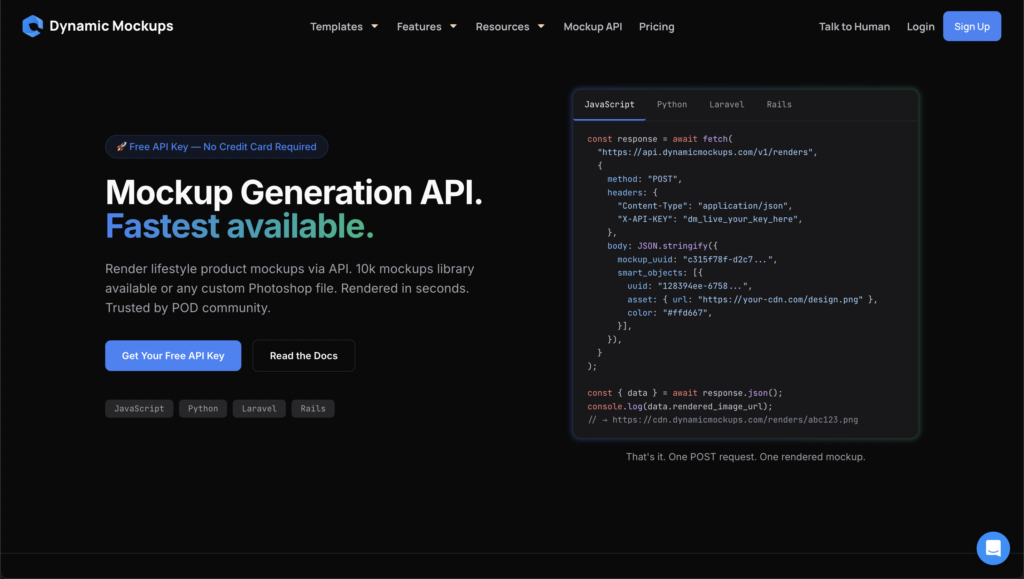
It also fits the stack you already run. The same API sits behind Shopify and Etsy workflows, connects through Zapier, and ships as an embeddable editor when you want the whole flow inside your own site. For the full endpoint walkthrough, start with our complete Mockup API guide.
Placeit vs Dynamic Mockups vs Printful and Printify [API Comparison]
“Placeit has no API” doesn’t mean no mockup API exists. Printful and Printify both offer one. The catch is what each will actually let you render.
Here’s how the three options stack up for anyone who wants to automate.
| Capability | Placeit | Printful & Printify | Dynamic Mockups |
|---|---|---|---|
| Public REST API | ❌ No API | ✅ Yes | ✅ Full REST API |
| Custom PSD or product photo | ❌ UI only | ⚠️ Own catalog only | ✅ PSD + Mock Anything |
| Bulk rendering | ❌ Manual export | ⚠️ Rate-limited | ✅ Bulk design sets |
| Render speed | ➖ Manual clicks | ⚠️ Async queue | ✅ ~12.5 per second |
| Free entry | ⚠️ Sub for full use | ✅ Free account | ✅ Free, no card |
Read the table by what matters to your build: whether you can render your own artwork, how fast it comes back, and what it costs to begin.
Placeit. No API, UI only. There’s no supported way to script mockup generation or pull templates into your own system.
Printful and Printify. A real API exists, and both can generate mockups programmatically, but it’s locked to their own print catalog.
Printful’s mockup generator runs as an async task tied to catalog products, under a general rate limit of 120 API calls per minute, with resource-heavy endpoints capped lower. Printify’s API works the same catalog-first way, with standard rate limits and a support-ticket process for heavy mockup usage.
Great if you sell their blanks. No help if you have your own PSD or a product photo they don’t stock. Let’s say that there’s also no way to generate the mockup just from the prompt but only using Dynamic Mockups.
Dynamic Mockups. A full REST API, plus custom PSD and Mock Anything photo or prompt generation support, the fastest render of the group, and a free plan to start. You bring the template, we render it, catalog not required.
How to Replace Placeit With an Automated Mockup Workflow
Replacing Placeit is less work than it sounds. It’s a two-step build, plus an optional embed when you want live preview.
Step 1: Build the Reusable Template
Start with the mockup itself. Upload a custom PSD you already own, or hand Mock Anything AI a single product photo, or just type the prompt about the mockup you want to get and let it generate a reusable lifestyle mockup, warp and curves included.
Mock Anything works from a plain product shot, so a clean, well-lit photo on a simple background gives the AI the most to work with. When we are talking about the prompt, you already have some prompt examples right in our web application you can use.
Either way, you end up with a template the API can render against. This is the same job you’d otherwise open Photoshop for, which is why teams reach for it as a Photoshop API alternative for mockups at scale.
Step 2: Call the Render Mockup API or Batch Render Mockups API if you want in bulk
Now automate the output. Send the API your template, a design, and any color or placement options, and it returns the finished mockup.
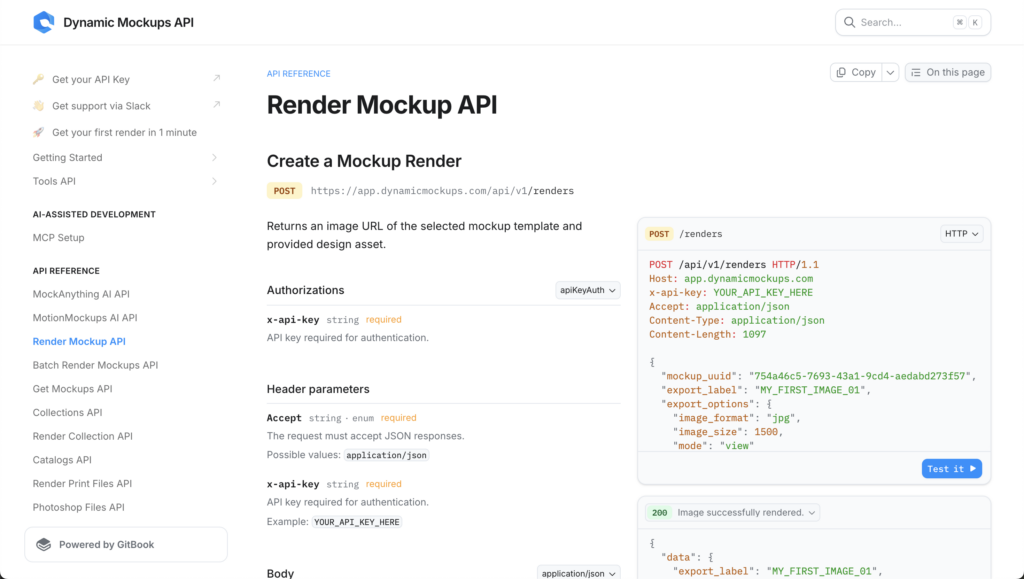
Render one at a time for live requests, or push a whole design set through at once for a full catalog. A design set is just your artwork mapped to the templates it belongs on, so one job can render a new collection across mugs, shirts, and totes in a single pass.
Outputs come back in the sizes and formats your listings expect, so there’s no second export step. This is where the 12.5-per-second throughput earns its keep.
💡 Pro tip: for no-code bulk runs, our Bulk Mockup Generator turns a folder of designs into a full set of mockups without a single line of code, and the same jobs are available through our public API docs when you’re ready to script them.
Step 3: Embed Live Preview (Optional)
Want shoppers to personalize on the spot? Embed the same rendering flow in your store or app, and a buyer can drop in their logo and watch it land on the product in about a second.
That’s the real-time personalization a Placeit iframe can’t drive, running on an API you control.
Should You Switch From Placeit to an API-First Workflow?
The switch pays off fastest for anyone rendering at volume:
- POD sellers scaling catalogs: thousands of listing images across products and variants, generated on a schedule instead of by hand.
- Marketplaces: every seller’s design rendered on every product, automatically.
- Promo and merch platforms: branded mockups for each client, on demand.
- App and SaaS builders: embedded previews so users see their own artwork the moment they upload it.
If any of those match your roadmap, a UI-only tool is the bottleneck you feel first.
To be fair, Placeit is still a solid pick for some people. If you’re a solo designer making one-off mockups and you never touch code, its library and one-click UI do the job well. There’s no reason to stand up an API for a handful of images a month.
Once mockups become a pipeline instead of a task, though, you need something you can call, batch, and embed. If you want the wider view first, here’s our full Placeit alternatives comparison.
Cost tends to be the last question, and it’s where an API-first tool pulls ahead. You start free, automate the busywork, and pay for volume only once the volume is real, rather than a flat subscription whether you render ten images or ten thousand. The bill tracks your output, so quiet months cost less and busy months are already covered.
Ready to test the API-first path? You can start on the free plan, no credit card required, and move up only when your numbers do. Check the free plan and pricing, grab an API key, and render your first mockup from code today.
Showcase your E-commerce products like big brands, without costing a fortune.
Sign up today. No credit card required. →
Frequently Asked Questions
Can you automate mockup creation in Placeit?
No. Placeit has no public API, so there is no way to script mockups or run bulk backend jobs. Every image is a manual click, export, and download inside the UI. If you need automated or programmatic mockup generation, you have to use an API-first platform like the Dynamic Mockups Render API, which renders from code and scales with volume.
Can developers integrate Placeit into their own website or app?
Only in a limited way. Placeit offers a free Mockups IFrame for partners, a widget you drop into a page so visitors can browse the library. It is a UI embed and nothing more. You cannot batch it, version it, or drive it from your own server. For true integration, developers use an API they control, like the Dynamic Mockups embeddable editor and Render API.
What is the best Placeit API alternative?
The Dynamic Mockups Render API is the fastest alternative. It gives you a full REST API, renders custom PSD templates or Mock Anything photo mockups, and outputs about 12.5 mockups per second. There is a free plan with no credit card required, plus Shopify, Etsy, and Zapier integrations. You bring the template, the API renders it, and no print catalog is required.
Can I use custom PSD mockups or product photos with a mockup API?
Yes, with the right platform. The Dynamic Mockups Render API accepts your own custom PSD templates, and Mock Anything AI turns a single product photo into a reusable mockup with warp, curves, and shadows. Printful and Printify APIs render only their own print catalog, so they cannot handle artwork or products they do not stock. Bring your template, and the API renders against it.
Is there a free mockup API to replace Placeit?
Yes. The Dynamic Mockups Render API has a free plan and no credit card is required to start testing. The docs are open, so you can grab an API key and render your first mockup from code today. Pricing tracks your output, so you pay for volume only once the volume is real, rather than a flat monthly subscription.
![Mockup API Rate Limits & Speed: 9 Questions Developers Ask [FAQ]](https://dynamicmockups.com/wp-content/uploads/2026/08/mockup-api-rate-limits-cover-768x403.png)