![Lookbook Maker: Create Interactive, Trackable Lookbooks [2026]](https://dynamicmockups.com/wp-content/uploads/2026/08/lookbook-maker-interactive-trackable-cover-768x403.png) Ecommerce
Ecommerce
On this page
What Is a Lookbook Maker for Promotional Products?
A lookbook maker for promotional products is a tool that turns blank promo items, tees, mugs, totes, caps, drinkware, and similar products, into branded, client-ready mockup presentations, with no physical samples.
It does two jobs. First, it applies a client’s logo or artwork to photorealistic product mockups. Then it assembles those mockups into a shareable presentation, usually a PDF you can send as a single link. A plain PDF can’t tell you who opened it, which is where an interactive, trackable lookbook maker pulls ahead.
That combination is built for a specific crowd: promo product distributors, merch and branding agencies, swag resellers, and corporate gifting sellers.
In other words, anyone who has to show a buyer what their brand looks like on real products before a single unit gets made.
The old way was slow. You either mocked things up by hand in Photoshop or ordered samples and waited. A lookbook maker collapses that into a few minutes in the browser.
The product range is also wider than most people expect. Apparel, drinkware, bags, tech accessories, office supplies, and event giveaways all sit under the same roof.
You can see the full spread of promotional merchandise mockups in one library, then pull whichever items fit the client in front of you.
That is the whole idea behind branded merchandise mockups: real products, the client’s brand, ready to pitch.
Client-ready is the phrase that matters. The buyer should open one file and picture the finished order, with no design skills and no imagination required on their end.
Why Fast, Professional Pitches Win Promo Product Clients in 2026
Here is the bottleneck most distributors know too well. A buyer asks to see their logo on a few products, and the usual answer is to order physical samples or hand the job to a freelance designer.
Both take days. Sometimes a week.
By the time the samples arrive, the deal is cold.
That delay costs more than time. A buyer who was excited on Monday has three other quotes by Thursday, and your slow, polished pitch now lands in a crowded inbox.
Meanwhile, the industry is speeding up. PPAI Research reports that 87% of PPAI 100 distributors and 92% of suppliers are already engaging with AI in their business operations.
Demand is strong on the other side of the table too. PPAI’s latest sales volume estimate has the industry reaching a new high, even through a shaky market.
So the buyers are there and the budgets are there. The open question is who reaches them first, and who looks good doing it.
Picture a real Monday. A regional bank wants branded gear for a hiring event two weeks out. The distributor who emails a polished lookbook that afternoon is deep in a pricing conversation while everyone else is still waiting on a sample box.
Remember that promo is a resale business. You and your competitor can quote the same blank tee from the same supplier, so the catalog itself is not your edge.
What separates you is how fast you can show a buyer their brand on that tee, and how good it looks when you do.
A fast, sharp pitch also says something about you. It tells a corporate buyer you are organized, easy to work with, and able to turn things around when a deadline is tight.
That impression is worth as much as the mockups. Swag buyers reorder from the distributor who makes them look good.
Speed plus polish wins the account. A good lookbook maker for promotional products gives you both, with no sample order and no freelancer on call.
What to Look for in Promo Product Presentation Software
Whether you call it a merch lookbook maker or promo product presentation software, the job is the same: brand real products fast and present them well. And if you are weighing which format to send a buyer, our guide to lookbook vs line sheet vs catalog covers what each one includes and when to use it.
Score any tool against this checklist before you commit.
✅ Photorealistic mockups: logos that wrap, curve, and shade like real print, not flat stickers pasted on top. ✅ A large template library: coverage across apparel, drinkware, bags, caps, and tech, not just a few shirt styles. ✅ Accurate placement: control over position, size, and how a design sits on seams and curves. ✅ Bulk generation: build a full promo product catalog at once instead of one item at a time. ✅ PDF or shareable export: send the lookbook as a file or link the buyer can open anywhere. ✅ A genuine free tier: test it on a real pitch before you pay a cent.
Now the warning signs. These are the tells of a tool that will let you down mid-pitch:
- Flat, fake-looking logo overlays that float on the product instead of printing into it.
- Tiny libraries that cover a couple of shirt styles and little else.
- Per-mockup paywalls that charge you every single time you export.
Score the options honestly. A fair tool clears most of these boxes for your product mix.
A weak one looks great in a demo, then buckles the moment you need fifty items branded by Friday.
Weight the first box heaviest. A logo that sits flat on a mug reads as a placeholder, and buyers can feel the difference even when they cannot name it.
The free tier matters more than it looks. Distributors pitch on spec all the time, so paying per mockup before you have even won the account eats your margin before the job starts.
One more step before you build. If you are not sure which products belong in the pitch, a quick list of branding merchandise ideas helps you pick the right mix for each client.
How to Create a Client-Ready Promo Lookbook in Minutes
Here is the workflow, start to finish. Five steps, minutes not days.
Step 1: Choose Your Promo Products
Pick the items that match the client and the occasion. Apparel for a team store, drinkware and totes for a conference, small giveaways to round out the set.
Start from the template library and build the selection for that specific brand. Match the products to how the client actually uses swag, whether that is onboarding kits, event handouts, or a customer thank-you box.
Step 2: Drop In the Client’s Logo or Artwork
Upload the logo and place it on each product. A good tool handles the hard part for you, wrapping the artwork around a mug, settling it into fabric, keeping it crisp on a curved cap.
Cheap tools give themselves away right here, so check that your promotional product mockups actually look printed and not stuck on.
Step 3: Generate the Mockups in Bulk
This is where minutes beat days. Instead of exporting one product at a time, bulk mockup generation applies the same logo across your whole selection in a single pass.
The full catalog comes back branded and ready to lay out.
A single client pitch can run twenty products or more once you add color and size variants. Doing that one export at a time is where an afternoon quietly disappears.
Step 4: Arrange Them Into a Branded Lookbook
Lay the mockups out as a clean, branded presentation. A cover, a page or two per product, and pricing if you choose to include it.
For the presentation detail, page layout, cover design, and pricing tables, our lookbooks make this extremely easy and fast for you.
Step 5: Share or Send
Export the promotional products lookbook as a PDF or a shareable link, then send it while the buyer is still warm.
💡 Pro tip: build one master lookbook per client tier, then swap in the next client’s logo to reuse it. Your second pitch takes even less time than your first, and your tenth is close to instant.
None of this needs a design background. If you can drag a logo and pick products off a grid, you can build the whole thing yourself.
Handle Any Promo Product With AI Mockups
Every template library has gaps. A client asks for their logo on a Bluetooth speaker, a soft cooler, a hardcover notebook, or some tech gadget you have never mocked up before, and the template list comes up empty.
That is where AI earns its place.
Our MockAnything AI tool turns any product photo, prompt, and manufacturable product into a reusable lifestyle mockup. Create a mockup, place where the design goes, and you have a template you can brand for this client and the next one who asks for the same thing.
Want the pitch to feel premium? Put the products in context and choose the style. Our mockup generator drops a branded tumbler onto a real desk or a tote into a lifestyle scene, so the buyer pictures the swag in daily use instead of floating on plain white.
Here is an example image of how lifestyle mockups can look in your lookbooks using Dynamic Mockups.
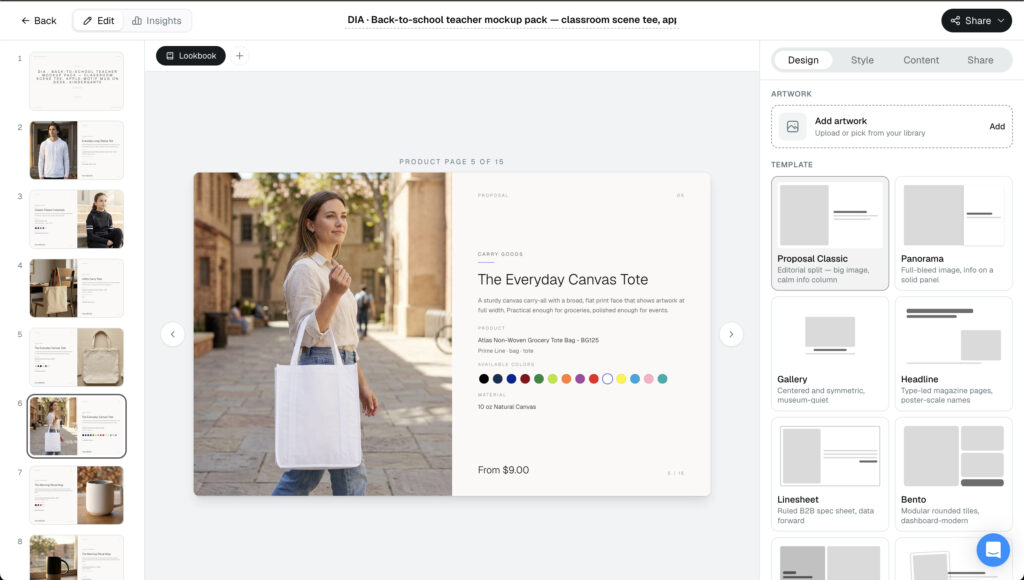
That is the quiet power of a lifestyle shot. Buyers do not study a product on a white square. They see themselves handing it out at the trade show or setting it on a new hire’s desk.
The reusable part is what saves you over time. Mock one niche item today and it joins your own library, so the next client who wants a branded tumbler is a two-minute job.
Keep a running set of the odd requests you get, branded golf umbrellas, enamel pins, that one specific water bottle. Each becomes a reusable asset the day you build it.
Because it all comes out of the same generator, the odd item still matches the rest of your lookbook instead of looking pasted in from a different source.
So when a client asks for something unusual, no product is off-limits. You prove it fits their brand in minutes, without waiting on a sample to show up and confirm it can be done.
How Dynamic Mockups Helps You Pitch Promotional Products Faster
Put it together and the whole pitch lives in one browser tab.
✨ 100,000+ templates: a library of 100,000+ free mockup templates across apparel, drinkware, bags, caps, and more.
✨ Bulk mockup generation: brand a full catalog, not one export at a time.
✨ Lookbooks feature: arrange your mockups into a branded presentation and send it as a link or download a PDF.
✨ Track analytics: Every lookbook you send tracks views, clicks, spent time on specific products, even clicks on the request a quote button.
Using the Dynamic Mockups lookbooks feature, you will get detailed analytics that will help you understand how your lookbooks perform, do A/B tests, and even understand what products attract the attention of your customers. Being able to measure how your lookbooks perform in depth is a huge advantage over your competitors.
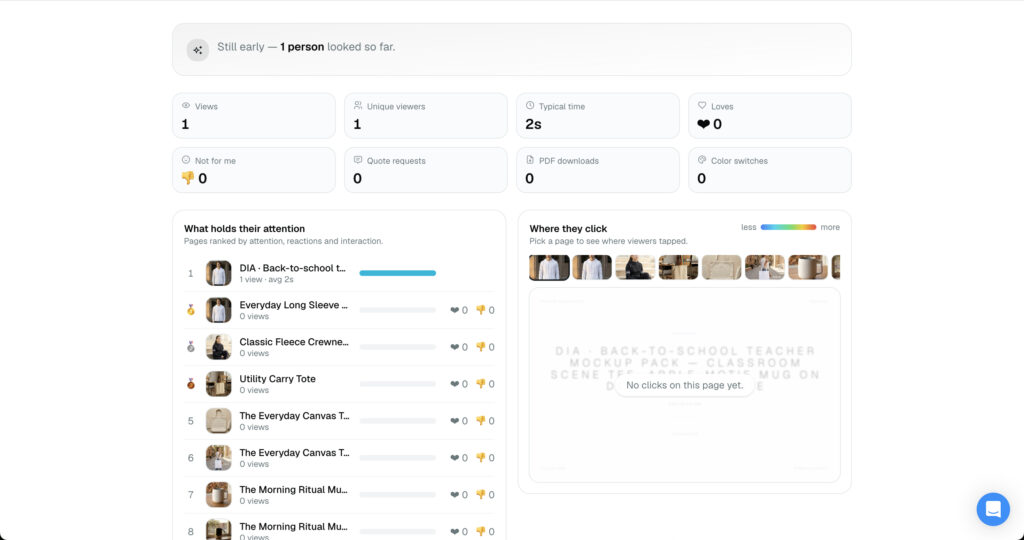
All of it is free to try out, and there is no credit card required. Book a demo to see how you can send promotional lookbooks faster than your competitors and win more clients.
So here is the move. Pick a client you have been meaning to pitch, build their promo lookbook today, and send it before your competitor has finished ordering samples.
Start creating your first promo lookbook for free.
Showcase your E-commerce products like big brands, without costing a fortune.
Sign up today. No credit card required.
Frequently Asked Questions
What is a lookbook for promotional products?
A lookbook for promotional products is a branded presentation showing a client’s logo on real items like tees, mugs, totes, and caps. It is usually a PDF or shareable link that lets a buyer picture a finished order before anything is made. Distributors, merch agencies, and swag resellers use it to pitch without ordering physical samples.
How do I make a promotional products lookbook without Photoshop?
Use a browser-based lookbook maker. Pick your promo products from a template library, upload the client’s logo, and the tool wraps it onto each item photorealistically. Generate the mockups in bulk, arrange them into a branded lookbook, and share the link or the PDF. No design skills needed. If you can drag a logo and pick products off a grid, you can build the whole thing.
What is the best software to present promo products to clients?
The best promo product presentation software brands items photorealistically, covers a wide range of products, and exports a shareable PDF lookbook. Score any tool against those boxes, plus bulk generation and a genuine free tier. Dynamic Mockups checks all of them with 100,000+ templates, bulk mockups, PDF lookbooks, and it’s free to start and see the demo right now.
Can I create a promo product lookbook for free?
Yes. Dynamic Mockups has a genuine free tier you can get when you book a demo, so you can build a real client pitch before you pay a cent. That matters for distributors, who often pitch on spec, since paying per mockup before you win the account eats your margin. Start free with no credit card, then upgrade only when you need more volume or automation.
How long does it take to build a client-ready promo lookbook?
Minutes, not days. Choosing products, dropping in the logo, generating mockups in bulk, and laying out the PDF can happen in one browser session. Bulk generation is the time-saver: it brands twenty-plus products in a single pass instead of one export at a time. Build one master lookbook per client tier and your next pitch is close to instant.