



 Knowledge
On this page
What Is a Lookbook Maker?
A lookbook maker is an online tool that turns a set of products into a shareable, interactive digital lookbook, with no design software required. You pick your products, choose a layout, and hand over a polished lookbook with a single link. Sometimes it’s called an online lookbook creator, but the job is the same: make your range look like it came from a big brand, and make it fast.
The old way looked like this: You exported mockup PNGs one at a time, dropped them into Canva or a slide deck or a PDF, lined everything up by hand, then exported the whole file again to share it. Change a single design and you started over.
By the time the file was ready, the buyer’s attention had usually moved on.
Presentation does a lot of the selling here. In Etsy’s own buyer surveys, 90 percent of shoppers rated photo quality as very or extremely important to their purchase decision. A lookbook is where that presentation either lands or falls apart.
A modern lookbook maker adds what a flat file cannot. You get interactive layouts a viewer clicks through, product images that render live instead of sitting there as fixed screenshots, and view tracking plus lead capture so you know exactly who looked.
Interactive means the viewer does something: clicks through pages, zooms in on a product, taps between colorways. A digital lookbook that responds to the person holds attention in a way a static grid of images does not.
Here’s the catch. Most tools sold as a lookbook maker are really page-flip PDF viewers in nicer packaging.
This guide is about the live-render kind, the sort that rebuilds your product images on the fly, and how to build one for free.
Static Page-Flip Makers vs a Live-Render Lookbook
Lookbook tools split into two camps, and the difference matters more than the marketing suggests.
The first is the static page-flip maker. Tools like Flipsnack, Issuu, and Canva take a finished PDF and wrap it in a flipbook viewer, so pages turn like a magazine. Whatever you exported is what your viewer sees, frozen in place.
The second is the live-render lookbook. Every product image is generated on the fly from your design and a template scene, so the catalog is built from live mockups rather than baked-in screenshots.
The gap shows up the second something changes.
| What you need | Page-Flip Makers | Live-Render Lookbook |
|---|---|---|
| Live product render | ❌ Fixed PDF | ✅ On the fly |
| View tracking | ⚠️ Paid tiers | ✅ Built in |
| Lead + logo capture | ❌ None | ✅ Yes |
| Edit after sharing | ❌ Re-export | ✅ Update once |
| Price | ⚠️ Pay for analytics | ✅ Free to start, paid for higher usage |
The core limit of page-flip tools is simple. They cannot re-render a product when a design or a logo changes, so you edit the source file, re-export, and re-upload every time. And most keep view analytics behind a paid tier, which means the tracking you actually want costs extra.
Picture a seasonal drop. New colorways land, prices shift, a client asks to swap their logo. With a page-flip file, each of those is a full rebuild and reupload. With live-render, the same link updates itself and every viewer sees the current version.
None of that makes them bad. A page-flip tool is a fine fit for a one-off, printed-style catalog you won’t touch again.
For a product-heavy lookbook you update often, or one built to capture leads, live-render wins.
What to Look for in a Lookbook Maker
You don’t need our tool to judge a tool. Here’s a short checklist you can run against any lookbook maker, ours included.
- Interactive viewing: a clickable, browsable layout rather than a file people download and forget.
- Live product rendering: images that regenerate the moment your design changes.
- View tracking: gated or trackable links that tell you who opened the lookbook.
- Built-in layouts and presets: ready-made styles so you skip the blank canvas.
- Viewer logo upload: the option for a prospect to see their own brand on your products.
- Pages analytics: See how each of your pages performed while your potential customer is reading it.
There’s a trade-off worth naming.
Full design-freedom tools let you place every pixel. That’s powerful, and it’s slow. Template-driven makers hand you fewer choices and a faster, on-brand result.
The right pick depends on how often your range changes. Sell a stable catalog and design freedom is fine. Refresh designs weekly and manual placement becomes the thing that holds you up.
For a time-poor seller or an agency running a dozen client catalogs, faster tends to win.
Special attention: rendering products live, and letting a prospect drop in their own logo. Keep both on the list. They are where a digital lookbook stops behaving like a PDF and starts behaving like a sales tool.
How to Make an Interactive Lookbook Step by Step
Here’s how to make a lookbook without Photoshop and without exporting a single PNG. Five steps, start to share.
Step 1: Pick Your Products
Start with a collection. Choose the items you want to feature and pull their scenes from the free mockup template library, which covers apparel, mugs, packaging, wall art, and more.
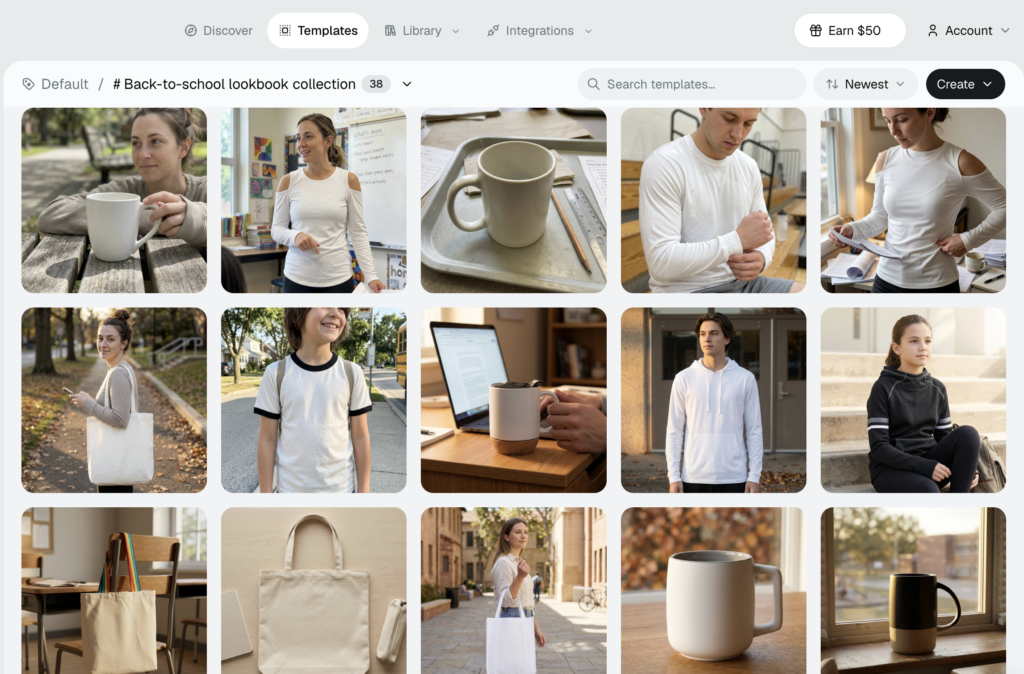
Group them the way a buyer would shop, by product type or by collection, so the lookbook reads in a logical order.
Step 2: Choose a Layout and a Style
Pick one of 10 built-in layouts, then set the mood with one of 10 style presets. This is the step where designing from scratch quietly disappears.
Layouts control the structure and presets control the look, and you can swap either one without rebuilding the products underneath.
Step 3: Let Every Image Render Live
Each product image renders live from your design and the template scene. Nothing is a flat screenshot, so the whole lookbook stays editable after you build it.
That’s also what keeps the quality consistent. Because every image comes from the same template scenes and lighting, the lookbook looks art-directed even if you have never picked up a camera.
Step 4: Share a Gated Link
Publish, then share one link. Gate it so you capture who is viewing, which is what turns a plain send into a trackable lookbook.
Step 5: Watch Views and See Who Engaged
Open your dashboard and watch the views come in, along with which prospects actually spent time inside. That’s your follow-up list, handed to you.
Share the same link anywhere: an email signature, a DM, a QR code on a trade-show stand, an embed on your site. The lookbook stays the single source of truth, so there’s only ever one version to keep current.
Here’s the part that saves the most time. Update a design once and the entire lookbook re-renders on its own. No re-export cycle, no reuploading, no version-two file sitting in your outbox.
The Standout Feature: Let Buyers See Their Own Logo
Here’s the feature no page-flip tool can match: viewer logo upload.
A prospect opens your lookbook, uploads their own logo as a PNG, JPEG, or WebP, and watches it render onto every product as they browse. Your products, their brand, in 5 seconds from upload.
Think about who that changes things for. Promotional product sellers, B2B merch suppliers, and print shops all sell one thing at heart: someone else’s logo on a physical item.
For those sellers, viewer logo upload does the selling for you. You send a catalog that mocks up the client’s own logo while they scroll, and a cold lead warms up before you have said a word.
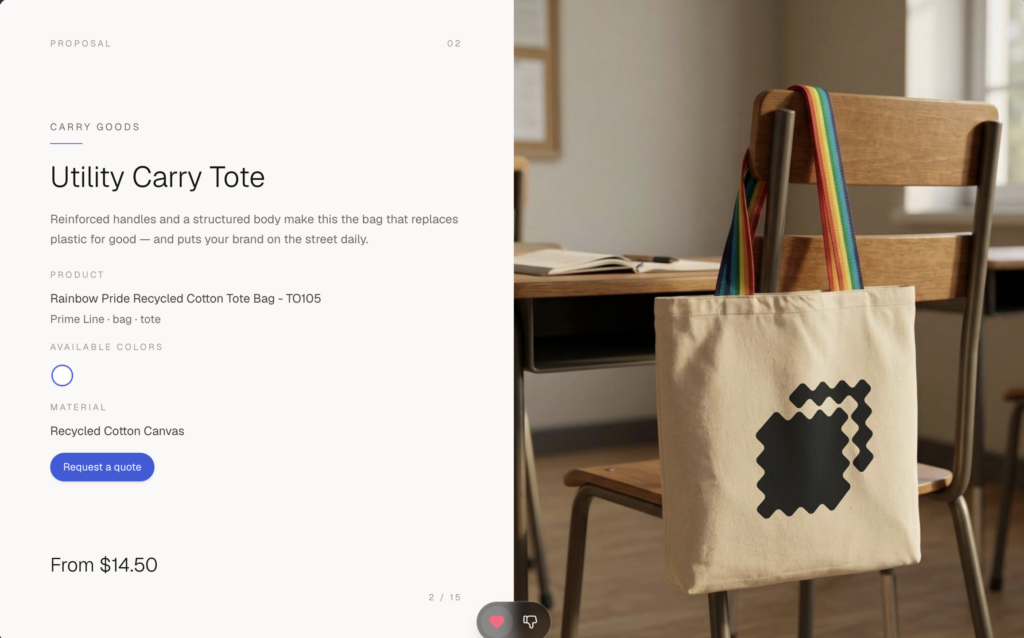
Say a print shop is pitching a local gym on branded hoodies and water bottles. Instead of describing the options, they send a lookbook, the gym drops in its logo, and the owner is suddenly looking at their own team kit. That’s a very different conversation from a spec sheet.
The timing is the point, because most of the buying happens before your pitch. Gartner has found that B2B buyers spend only 17% of their purchasing time meeting with potential suppliers. The rest is self-guided research, and a catalog that already shows their brand is the one they remember.
There’s real money attached to getting this right. The promotional products industry hit a record $26.6 billion in sales in 2024, according to ASI. A lot of that merch is chosen off the strength of a single visual.
A page-flip PDF can only ever show your samples. It will never show the buyer’s brand on the product, which is the exact image that closes a promo deal.
Pair viewer logo upload with view tracking and the follow-up writes itself. You can see which client opened the lookbook and which products held them longest, then reach out while the interest is still warm.
Want the segment-specific tactics? Read our playbook promo product lookbooks that win clients. 📌
How Dynamic Mockups Helps You Build a Lookbook Free
Here’s the full stack, in one place:
- 100,000+ templates: professional product scenes across every major category, free to use.
- Live-render lookbooks: every image built on the fly, never a flat screenshot.
- 10 layouts and 10 presets: a polished, on-brand result without hiring a designer.
- Gated shareable links: one link, with view tracking so you see who engaged.
- Viewer logo upload: let prospects see their own brand on your products as they browse.
All of it is free to start and we can even show you the live demo.
It’s built for the people who send catalogs for a living: print-on-demand sellers, Shopify and Etsy shops, and the merch agencies juggling one client after another.
Need more volume or automation for a team? Our free and paid plans scale from a single store up to an agency shipping client catalogs by the dozen.
Start creating your lookbook for free and get the feel. Showcase your E-commerce products like big brands, without costing a fortune. Sign up today, no credit card required. →
Frequently Asked Questions
What is a lookbook maker?
A lookbook maker is an online tool that turns a set of products into a shareable, interactive digital catalog, with no design software required. You pick your products, choose a layout, and hand over a polished lookbook with a single link. The best ones render product images live instead of freezing them as flat screenshots, so the catalog stays editable after you share it.
How do I make a lookbook for free?
Pick your products and pull their scenes from a free mockup template library, choose a built-in layout and style preset, then let every image render live from your design. Publish it as one gated link so you can track views. With Dynamic Mockups the whole flow is free, no Photoshop and no credit card, and updating a design re-renders the lookbook on its own.
Can I make an interactive lookbook without Photoshop or design skills?
Yes. A template-driven lookbook maker handles the design for you. You choose from ready-made layouts and style presets, and every product image renders from professional template scenes with consistent lighting, so the catalog looks art-directed even if you have never held a camera. There is no PNG exporting and no manual pixel placement, which is exactly what a static page-flip PDF still asks of you.
What is the best free lookbook maker in 2026?
Judge any lookbook maker on live product rendering, view tracking, viewer logo upload, built-in layouts, and a genuine free tier. Most tools sold as lookbook makers are page-flip PDF viewers that freeze your images and gate analytics behind paid plans. Dynamic Mockups covers all five for free, which is why it stands out for sellers whose catalogs change often.
Can a lookbook show a client’s own logo on the products?
Yes, if your lookbook maker supports viewer logo upload. A prospect opens the catalog, uploads their logo as a PNG, JPEG, or WebP, and watches it render onto every product as they browse. This is huge for promotional product sellers and merch suppliers, since it shows the buyer their own brand on the item before you have said a word. A page-flip PDF cannot do this.
![Create Promo Product Lookbooks That Win Clients [2026]](https://dynamicmockups.com/wp-content/uploads/2026/07/promo-product-lookbooks-win-clients-cover-768x403.png)