



 Knowledge
On this page
How to Create Mockups for Etsy in Minutes
The short version. Open Dynamic Mockups in your browser, pick a ready-made template or generate one with AI but perfectly precise and manufacturable, drop in your artwork, and download a high-res image. That is how to create mockups for Etsy in minutes, with no Photoshop and no Canva.
Two paths get you there, and both are free.
Path one: browse a library of 100,000+ ready templates and swap your artwork onto a tee, mug, or wall print in a few clicks.
Path two: use MockAnything AI to turn a text prompt or any product photo into a custom, reusable mockup, including lifestyle scenes a flat template can’t give you. That’s also the easiest way to fix mockups that look like every other Etsy shop’s, since you build scenes no competitor has.
Everything happens in a single browser tab. You don’t have to install anything or learn a complex tool to achieve the same results.
Most sellers go from blank canvas to a finished, shop-ready image in under two minutes.
Compare that to booking a photo studio or waiting days for a freelancer. You get the same polished look without the cost or the calendar.
It’s browser-based and free to start, which is why it fits between a day job, the school run, or your third launch this week.
And it works for whatever you sell: t-shirts, mugs, wall art, tote bags, phone cases, and more. The product changes, the workflow doesn’t, and the export is a clean, high-res file ready for your Etsy listing mockups.
Why Etsy Sellers Don’t Need Canva or Photoshop
Most Etsy mockup tutorials send you on a two-app detour.
Design your artwork in Canva or Kittl, export a flat PNG, then open a separate tool to place that PNG onto a product. Somewhere in there you also crop, resize, and re-export.
It works. It’s also slow.
Every app switch breaks your focus. You re-upload, re-align, re-export, and by the time you have one usable image, the energy to make ten more variations is gone.
Momentum matters more than most sellers admit. The best time to make a mockup is the moment the design still excites you, not an hour later across three tabs.
That friction has a cost, because photos are what Etsy buyers judge first. In one eRank survey, 83% of buyers said photos are the most important part of their Etsy experience. The fewer steps between your design and a great photo, the more good photos you’ll actually make.
Just to be clear and fair, Canva and Kittl are genuinely good design tools. They’re built for artwork, layouts, and social graphics, and they do that well. They just aren’t purpose-built mockup engines, so realistic product rendering is limited or added on top.
That two-app habit made sense a few years ago. In 2026, a single browser tab does the whole job.
A dedicated Etsy mockup generator closes the gap. Design placement, resizing, warp that follows fabric folds, product color swaps, and photorealistic rendering all live in the same tab where you started.
Your design also stays editable the entire time. Swap the artwork, nudge the placement, or change the shirt color, and the mockup updates on the spot.
That’s the argument for skipping the extra software. If you want the longer version, here’s how to make mockups without Photoshop for any product, not only Etsy.
The extra bonus to this is that Dynamic Mockups offers a direct integration with Etsy, that means that by creating lifestyle mockups of manufacturable products, you can immediately push that to your Etsy store without even downloading the image from Dynamic Mockups, then uploading it to Etsy.
Step-by-Step: Create Your First Etsy Mockup
Here’s the full workflow, start to finish. Open the editor in another tab and follow along; you’ll have a finished mockup by the last step.
Step 1: Pick a Template
Search the library for your product, say “t-shirt” or “coffee mug.” Filter by color, angle, or model until a scene fits your brand, then click to open it in the editor.
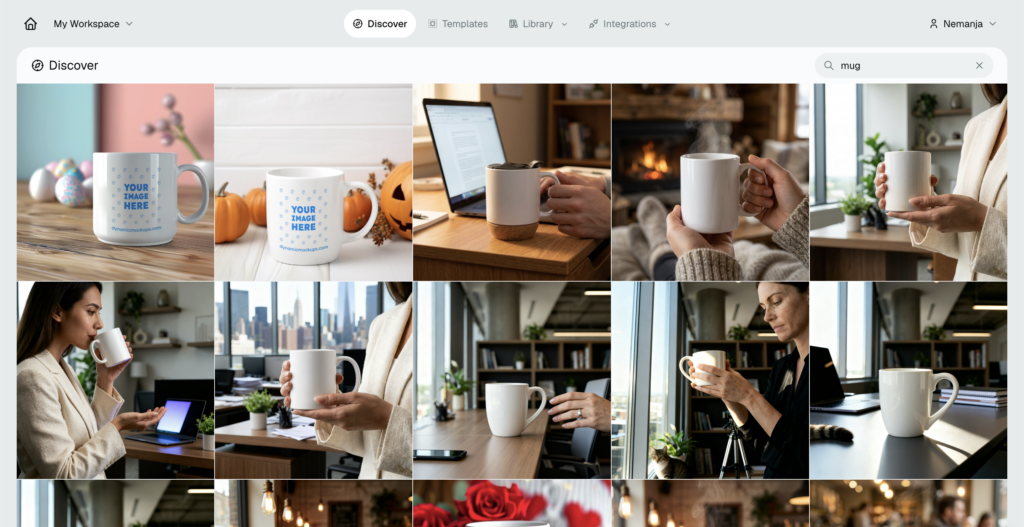
Pick a scene that already looks like the buyer you want. A cozy home for wall art, a bright studio for apparel.
Step 2: Upload Your PNG Design
Inside the editor, upload your artwork as a transparent PNG or JPG if you want all-over print. It lands directly on the product’s print area.
If your file still has a background, remove it first so only the artwork prints. A transparent PNG sits on the product, not inside an ugly white box.
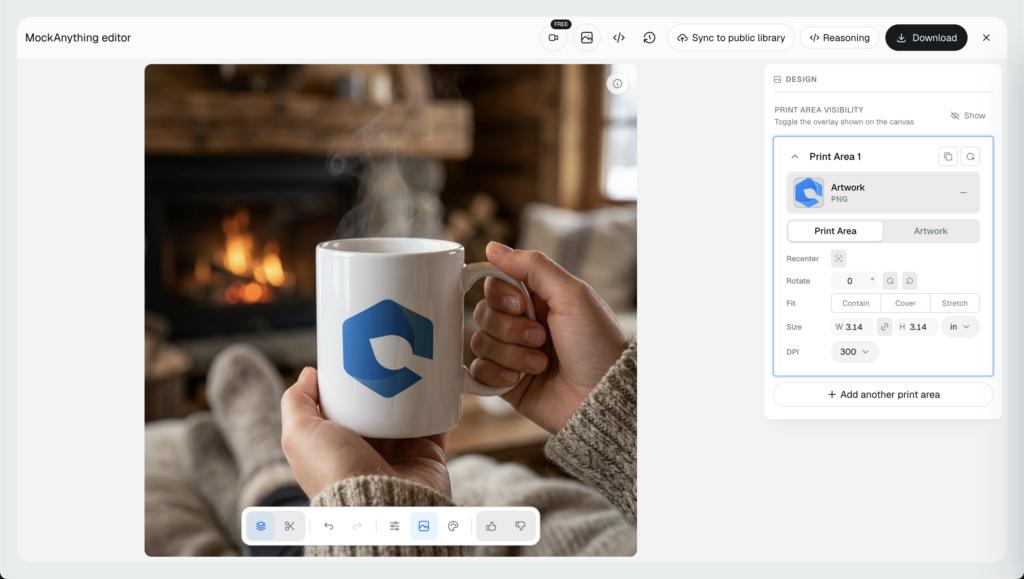
Use a high-resolution file, too. It keeps edges sharp and text readable when you export at full size.
Step 3: Adjust Placement, Size, and Opacity
Drag the design into position, then scale it to sit naturally on the product. A few controls do most of the work:
- Placement: Move the design up, down, or across the product.
- Size: Scale it to match a real print run.
- Opacity: Make the design more subtle or bold to suit the fabric.
Check that the whole design sits inside the print area. Anything past the edge gets cut in a real order, so leave a little breathing room.
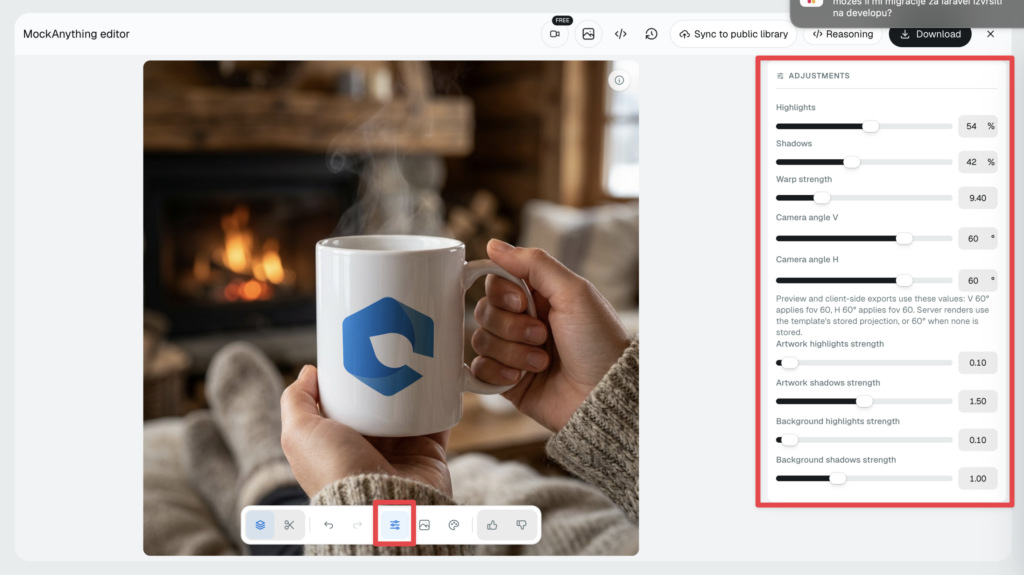
The rendering engine warps your artwork to follow folds, curves, and seams, so it reads as printed on rather than pasted over.
Step 4: Swap the Product or Background Color
This is where one template becomes a full set of Etsy product mockups.
Change a shirt from white to black, a mug from glossy to matte, or the backdrop to suit a season. Each swap is a new variant you can save as its own image. For seasonal refreshes, our Q4 prep guide with AI prompts shows which scenes to build for Halloween, fall, and Christmas.
Think in sets. A tee in five colors is five listings, or five of the ten photos on a single listing.
Step 5: Download High-Res or Send to Your Listing
Export the finished mockup as a high-res PNG or JPG. Repeat for each color and scene, then upload the set straight to your listing.
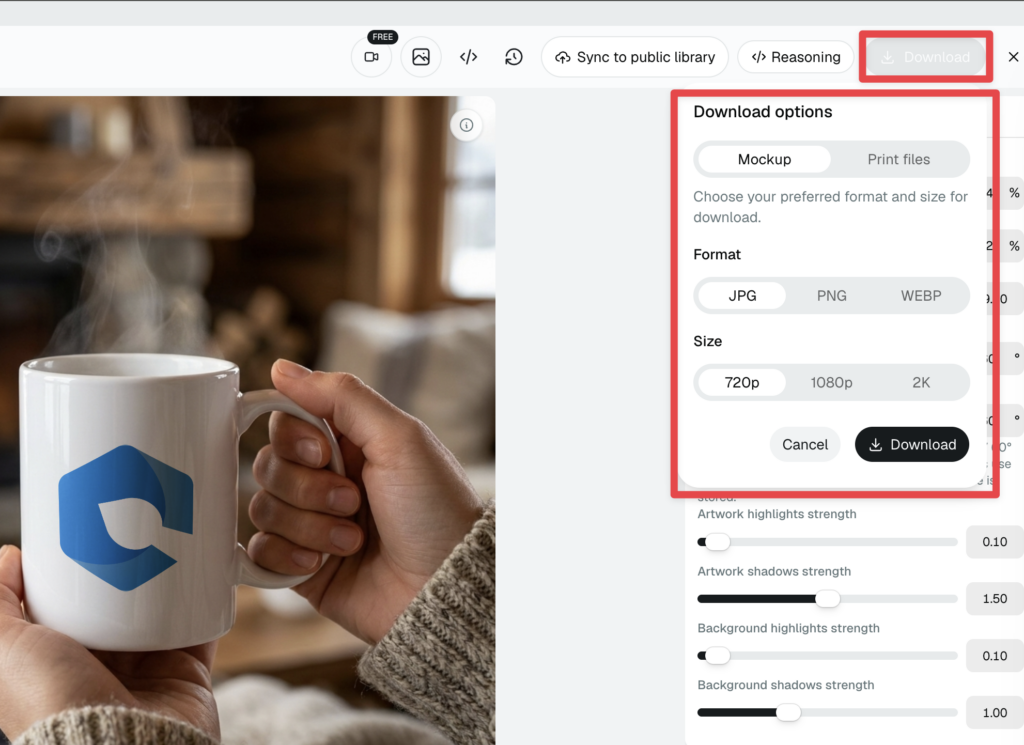
Etsy gives you up to 10 image slots per listing, so fill them. Lead with your cleanest product shot, then stack color variants and a lifestyle scene behind it.
That’s five steps, one software. Do it once to get the flow and the second mockup takes seconds.
Also, our Etsy integration lets you upload finished mockup image directly to our Etsy listing once you connect your Etsy store.
Create Lifestyle Etsy Mockups With MockAnything AI
Templates cover the products most sellers list. But some listings need a scene no stock template has, like your candle on a styled nightstand or your print hanging above a real sofa.
That’s the job MockAnything AI does.
Type a prompt describing the scene you want, or upload any product photo, and you get back a photorealistic mockup you can reuse and restyle whenever you launch something new.
The thing here is that our MockAnything AI is really good at creating manufacturable, accurate product mockups, so you will get the real product as a lifestyle mockup that sells well.
Prompts can be plain: “white mug on a wooden kitchen table, morning light,” or “framed wall art on a beige living-room wall.” Upload a photo of your real product and the AI keeps its exact shape.
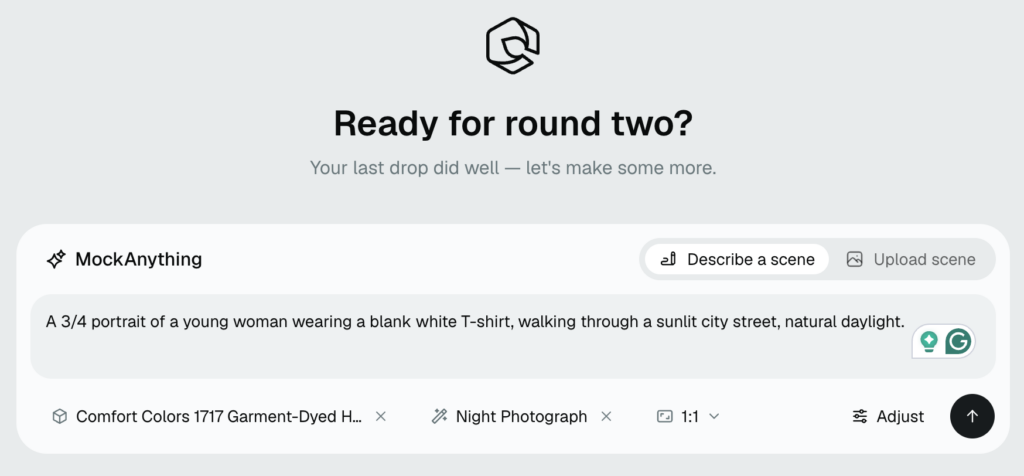
Save that scene once, and every future design drops straight into it, so your tenth mockup is as quick as reusing a template.
This is important on Etsy because context sells. Also, you don’t want to reuse templates that many other Etsy sellers use as well. Using our MockAnything AI tool, you can basically create mockups that follow your brand style – and that’s the full power of it.
Shoppers don’t just want your product on a white square. They want to see it in a room like theirs, on a desk like theirs, in their own hands.
Etsy’s own research is blunt about it. In the platform’s buyer surveys, 90% of shoppers said photo quality was extremely or very important to their purchase decision, ahead of shipping cost and reviews. The trend is steady, too: in the 2024 Etsy Buyer Survey, nearly 70% of buyers named clear, high-quality photos and detailed descriptions as what matters most.
Lifestyle mockups for Etsy deliver what a plain flat-lay can’t: context, real-world scale, and a sense of how the product is actually used.
Launching something seasonal? Just tell it to MockAnything and you will get the scenes, warm autumn tones, a cozy holiday interior, a bright summer table, with no photo studio and no props.
Start with the MockAnything AI to build scenes from a prompt, then browse the lifestyle product mockups use case for ideas you can copy across your shop.
Browse 100,000+ Free Etsy Mockup Templates
Not every listing needs a custom AI scene. Most days, a strong template is the fastest route.
Our library holds 100,000+ free mockup templates built around the products Etsy sellers actually list: t-shirts, hoodies, mugs, wall art, tote bags, phone cases, throw pillows, and blankets.
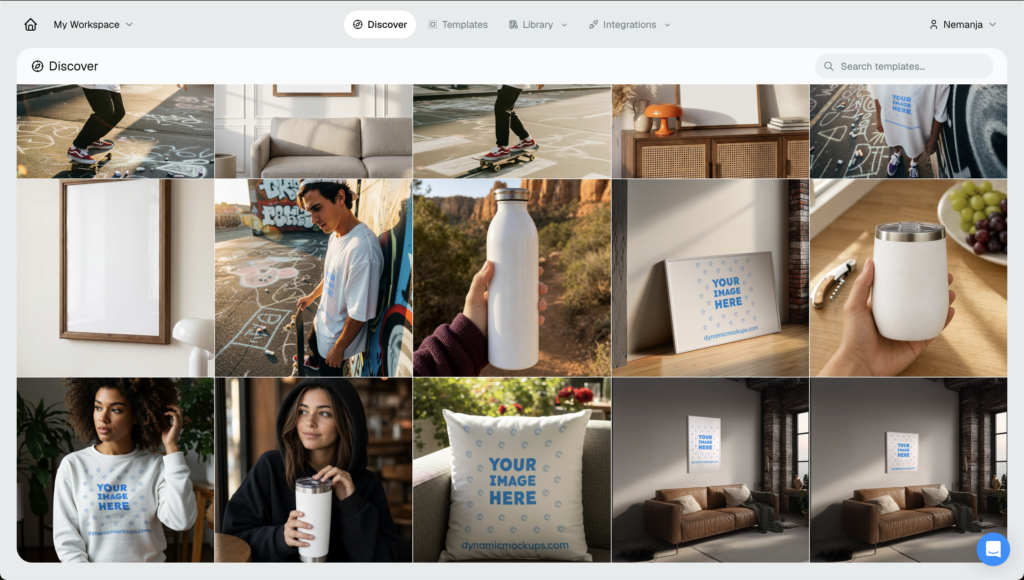
New templates get added regularly, so the odd and seasonal products tend to be covered too, think ornaments in December or beach towels in June.
With that much choice, the skill is picking well. Three things to check:
- Relevant scene: Match the model, setting, and mood to the buyer you want.
- Consistent style: Keep a similar look across listings so your shop reads as one brand.
- Room for your design: Choose angles and print areas that show your artwork clearly.
One quick fundamental: your main image has to be clear and readable at thumbnail size, because that tiny square is what shoppers judge before anything else. A survey by Weebly found that 75% of online shoppers rely on product photos when deciding to buy, and on Etsy that call often happens at thumbnail scale.
For the rest of the checklist, framing, lighting, and staying consistent, see our product mockup best practices.
All of it is free to use for the start, with no credit card required to get started.
How Dynamic Mockups Helps You Create Etsy Mockups Free
One tab, one workflow, every mockup your shop needs. That’s the point of building it all in the browser.
Three features carry most of the work:
- ✨ AI Mockup Generator: Prompt-to-mockup for custom and lifestyle scenes, powered by MockAnything AI.
- ✨ Template library: 100,000+ ready-made templates across apparel, drinkware, wall art, and accessories.
- ✨ Bulk Mockup Generator: Apply one design to dozens of products, or many designs at once, from a single upload.
It also slots into how you already sell, whether that’s an Etsy shop, a Shopify store, or both.
Start with a single mockup today. When one at a time isn’t fast enough, you can create thousands of Etsy mockups at once from a folder of designs, which is how sellers refresh a whole shop in an afternoon.
The free plan is enough to make and download real Etsy mockups and feel if this tool is good for you, so you can test it on a live listing before you think about upgrading.
No Photoshop, no Canva, no monthly software stack to manage. Just your design, a browser, and a finished photo.
Create your first Etsy mockup free. →
Showcase your E-commerce products like big brands, without costing a fortune. Sign up today. No credit card required.
Frequently Asked Questions
How do I create mockups for Etsy for free?
Open Dynamic Mockups in your browser, pick a free template from the 100,000+ library, upload your transparent PNG, adjust placement and color, then download a high-res image. It’s free to start with no credit card required. Most sellers go from blank canvas to a shop-ready photo in under two minutes, no Photoshop or Canva needed.
Do I need Canva or Photoshop to make Etsy mockups?
No. Canva and Photoshop are solid design tools, but they aren’t purpose-built mockup engines, so realistic product rendering is limited or bolted on. A dedicated mockup generator handles placement, resizing, color swaps, and photorealistic warping in one browser tab. You skip the two-app detour and keep everything editable, which means faster listings and more good photos.
Can AI create Etsy product mockups from a prompt?
Yes. With MockAnything AI, type a prompt like “white mug on a wooden kitchen table, morning light” and get back a photorealistic mockup. You can also upload a photo of your real product and the AI keeps its exact shape while building the scene around it. Save the scene once and every future design drops straight in.
Are mockups allowed on Etsy listings?
Yes. Mockups are standard practice on Etsy, and the platform gives you up to 10 image slots per listing to fill. Just make sure your mockups honestly show the product you’ll ship, since accurate photos set the right buyer expectations. Lead with a clean product shot, then stack color variants and a lifestyle scene behind it.
What is the best mockup generator for Etsy sellers?
Look for one that combines a big template library, AI scene generation, and bulk export in a single browser tab. Dynamic Mockups offers 100,000+ free templates, MockAnything AI for custom lifestyle scenes, and a bulk generator for whole-shop refreshes. It’s free to start with no credit card required, so you can test it on a live listing first.
![Leggings Mockup Generator: Add All-Over Prints Free [2026]](https://dynamicmockups.com/wp-content/uploads/2026/08/leggings-mockup-generator-cover-768x403.png)