Etsy
Etsy
On this page
Why Do My Etsy Mockups Look Like Everyone Else’s?
Your Etsy mockups look like everyone else’s because most print-on-demand sellers pull from the same small pool of popular templates. When you and a hundred competitors all download the top few Placeit scenes and the same free or cheap mockup packs, the same models, poses, and backgrounds repeat straight down the search grid.
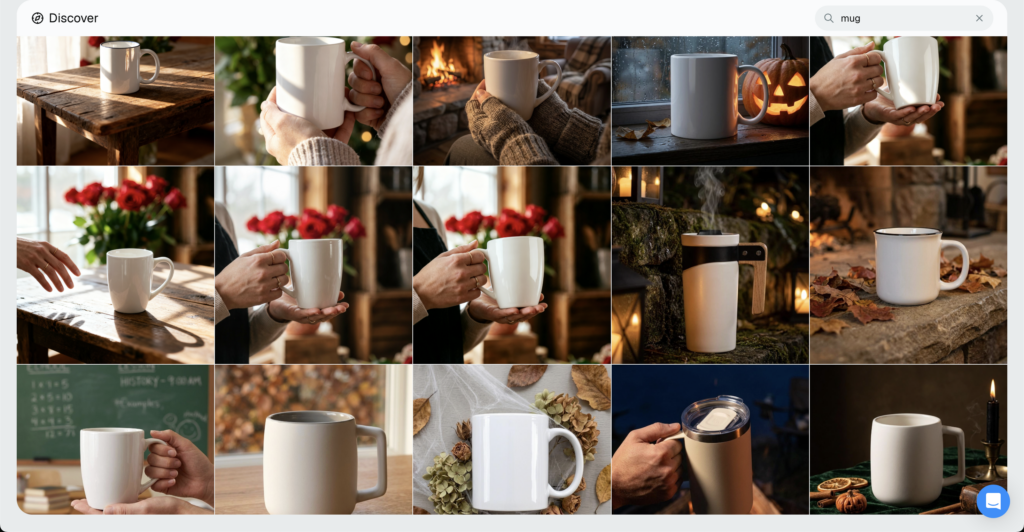
Same shirt on the same model. Same mug on the same wooden table.
It isn’t your imagination, and it isn’t only happening to you. Mockup reviews in 2026 keep flagging the same weak spot: Placeit is packed with templates, but everyone reaches for the same popular handful, so competing shops end up wearing a near-identical look.
The fix is quick to explain. Swap the overused templates for less-common ones, and generate unique AI scenes no competitor has, so your thumbnail breaks the pattern instead of vanishing into it. Think about this as creating your own brand style using unique lifestyle mockups and the right AI tools that can achieve that.
Short answer is here just to highlight the real issue. Below is the full version, including how to spot the problem in your own listings and fix it this week – in just a couple of days actually.
The Real Cause: Everyone Uses the Same Popular Placeit Templates
Template platforms show you their best-performing templates first. Sort by popular, glance at the top row, grab one of the first scenes you see. Everyone else in your niche is doing the same thing, on the same day, from the same top row.
There’s a reason it happens. A template with thousands of downloads feels like the safe choice, so it keeps getting picked, which pushes it higher, which gets it picked even more.
The result is a tiny rotation of mockups carrying thousands of shops. Placeit alone carries more than 38,000 templates, yet the few pinned to the top of each category are what most sellers actually use.
Now flip to the buyer’s side of the screen.
A shopper searches “minimalist tote bag,” and the grid fills with a dozen listings using the same flat-lay on the same linen surface. Scroll a little and it’s the same model against the same neutral wall, over and over.
Wall art gets the same empty room. Mugs get the same kitchen counter. Phone cases get the same hand holding the same phone at the same angle.
Free template packs make it even worse. The same bundles get passed around in Facebook groups and resold on Etsy itself, so a whole cluster of shops opens with matching photos before a buyer sees a single product.
It gets sharpest when a design trend takes off. Everyone chasing the same trending phrase tends to grab the same trending mockup too, so an entire page of results can look like one shop uploaded it fifty times.
At that point the template works against you. It was meant to make you look professional. Instead it makes you blend into the shop three rows up.
It’s impossible to create a brand with this approach.
Widening the pool is the first move. Switching to Placeit alternatives with a wider template pool gives you scenes most sellers have never touched. For anyone hunting a Placeit alternative for Etsy sellers who are tired of blending in, that’s the fastest change you can make.
Why Looking the Same Costs You Sales on Etsy in 2026
Here’s where sameness gets expensive. Etsy’s 2026 search leans on how shoppers behave, not only the words in your title.
Higher click-through rate, favorites, add-to-carts, and purchases raise your listing quality score, and listings with stronger performance earn more visibility over time. Keywords decide whether you qualify to appear. Engagement decides how far you climb.
Put plainly, Etsy’s 2026 algorithm rewards visual differentiation, because different is what earns the click.
That sets up a simple loop. A distinct thumbnail earns the click, the click feeds your ranking, better ranking earns more impressions, and more impressions bring more clicks.
A generic mockup runs the loop backward. If shoppers scroll past, Etsy reads that as weak interest and shows your listing to fewer people, so the gap between you and the standout shops keeps widening.
Timing raises the stakes. Etsy gives new and updated listings a testing window of about 7 to 14 days, and weak engagement shrinks their visibility while strong engagement expands it. A borrowed mockup can quietly waste the exact window that decides whether a listing ever gains traction.
Now add the screen most people shop on. Nearly half of Etsy purchases happen inside a fast-scrolling mobile feed, where a repeated image is the easiest thing in the world to skim past.
So a bland, borrowed mockup quietly caps your traffic. You never even see the sale you lost, because the shopper’s thumb was already moving before your listing registered.
The math is unforgiving. Two shops can sell the same quality product, but the one with the mockup that stops the scroll gets the click, the sale, and the ranking bump that brings the next buyer in.
This is also why lifestyle scenes tend to win. A wall print shown in a styled room reads as more finished and desirable than the same print on a blank wall, and that added context lifts clicks and saves.
Saves matter more than they look. A shopper who favorites your listing is telling Etsy it stood out, and a distinctive scene is far more save-worthy than the tenth copy of a stock studio shot.
Want to know when a styled mockup beats a plain product photo, and when it doesn’t? Here’s how mockups compare to real product photos.
How to Tell If Your Mockups Are Too Generic
You don’t need software for this. You need just 30 seconds and to be honest with yourself.
- Search your main keyword on Etsy the way a real buyer would type it.
- Screenshot the results grid on your phone, since that’s where most shopping happens.
- Find your own listing in the grid and check whether it stands out or sinks in.
Then scan for the usual red flags:
- Same model, same pose: your apparel sits on the same person in the same stance as three of your neighbors.
- Same flat-lay surface: the identical wood, marble, or linen under the product in listing after listing.
- Same neutral wall: the blank backdrop every print shop reaches for by default.
- Stock scenes on repeat: a setting you recognize instantly because a dozen competitors already run it.
If your Etsy listing photos look the same as the shops directly above and below you, that’s the problem sitting in plain sight.
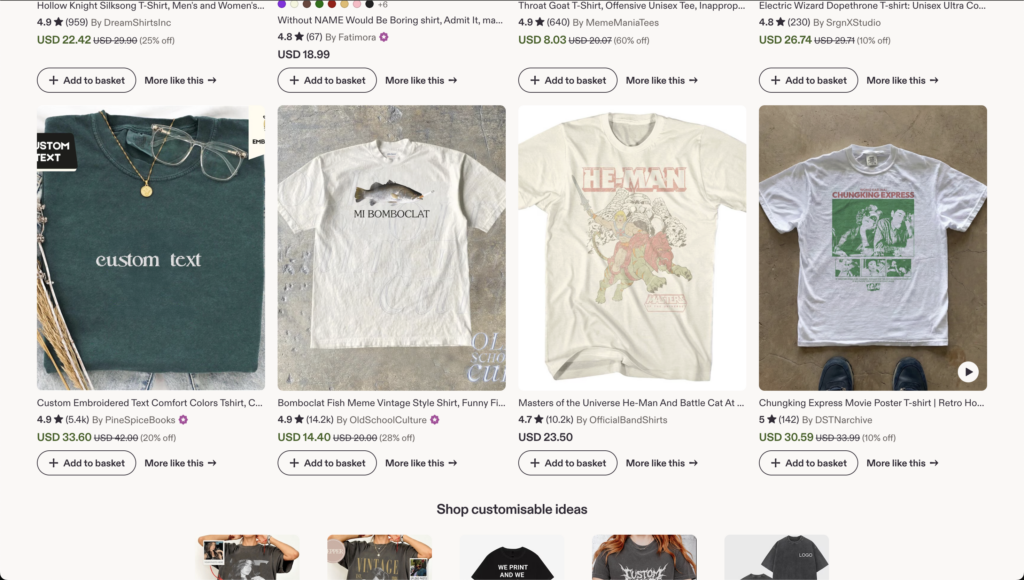
Try one more quick check: squint at the grid until the details blur. If your thumbnail dissolves into the pack, so does your listing when a buyer is scrolling at speed.
Now the honest test. Could a returning buyer pick your shop out of that grid without reading the shop name?
If the answer is no, that’s a recognition gap, and it usually travels with a few other common Etsy shop mistakes new sellers make. The good news is that this one is fast to fix.
How to Make Your Etsy Mockups Stand Out
Standing out doesn’t take design skills or a studio. It takes a bigger pool and a better mockup tool that can actually create lifestyle mockups that can stand out without having design skills. Here’s how to make Etsy mockups stand out without opening Photoshop.
- Pull from a much larger library: the more templates you can reach, the lower the odds you land on the same scene as your competitor. A deep 100,000+ free mockup templates library means you choose from thousands of options, not the popular dozen at the top of one platform.
- Generate scenes no one else has: the MockAnything AI mockup generator turns any product photo or prompt into a reusable mockup, so you can place your design in a setting no competitor is using. That’s how you end up with unique Etsy product mockups instead of borrowed ones.
- Build a setting around the product: Using the MockAnything AI tool in Dynamic Mockups – you can put a mug in a real kitchen or a tee on a real person in a specific moment and vibe, so the photo tells your brand’s story rather than a stock studio’s.
- Vary background, color, and angle: change the wall color, swap the surface, shift the camera angle, then hold a consistent style across listings so the whole shop reads as one brand at a glance.
- Bulk-create, then A/B test: generate several thumbnail variations at once, run them for a week or two, and keep the scene that earns the most clicks. Let real buyers pick the winner.
- Save a template and reuse it: once a scene works, lock it in and apply it across every listing so the shop shares one ownable look a buyer can spot instantly.
Consistency is the part most sellers skip. A single standout photo helps one listing, but the same recognizable style across your whole catalog is what turns a browser into a returning buyer.
Picture a mug shop that always shoots on the same warm, sunlit windowsill with a book and a plant just out of focus. A buyer who liked one listing recognizes the next before they read a word. That recognition is something competitors can’t copy just by downloading the same template.
The real goal is a shop a buyer remembers after the first visit. Unique scenes make that possible even when every competitor is drawing from the same small well of templates.
How Dynamic Mockups Helps You Break the Template Sameness
Everything above runs on one toolkit, and it’s built for this exact problem.
Dynamic Mockups gives you three things that pull you out of the crowd:
✨ A library of 100,000+ professional templates, so you’re not fishing in the same small lake as every other seller.
✨ MockAnything AI, which turns any product photo or just a prompt into a reusable mockup set in a scene your competitors don’t have. This is a great opportunity to build mockups in your brand style.
✨ Export all your mockups in batch with hundreds of designs you have and do A/B tests easily.
All of it happens in the browser. Color swaps, background changes, and full custom scenes take a few clicks, with no Photoshop and no design background required. If you’re starting from zero, here’s how to create Etsy mockups without Photoshop.
In practice, that means you can build a lifestyle mockup once, save it, and roll it across your catalog in an afternoon. New listings inherit the look automatically, so your shop stops looking like a template dump and starts looking like a real, expensive brand.
It’s free to start, and there’s no credit card required. Sign up today and start creating.
Pick your next listing and build one scene no other shop in your niche is running. See if the thumbnail earns the click.
Showcase your Etsy products like big brands, without costing a fortune.
Sign up today. No credit card required. →
Frequently Asked Questions
Why do my Etsy listing photos look like everyone else’s?
Because most sellers pull from the same small pool of popular templates. Template sites show their best-performing scenes first, so you and your competitors grab the same top-row picks on the same day. The result is a search grid full of matching models, flat-lays, and neutral walls. Widening your template pool and generating fresh AI scenes breaks the pattern fast.
How do I make my Etsy mockups look unique?
Pull from a much larger template library so you rarely land on a competitor’s scene, then generate settings no one else has using AI. Turn any product photo or prompt into a reusable mockup, build a custom scene around the product, and vary the background, color, and angle. Hold that style consistent across listings so your whole shop reads as one recognizable brand.
Do generic mockups hurt my Etsy ranking in 2026?
Yes. Etsy’s 2026 search leans on shopper behavior, so click-through rate, favorites, add-to-carts, and purchases all feed your listing quality score. A generic thumbnail gets scrolled past, Etsy reads that as weak interest, and your listing shows to fewer people. A distinct scene earns the click, and that click feeds better ranking and more impressions over time.
Can I create unique Etsy mockups with AI for free?
Yes. Dynamic Mockups lets you turn any product photo into a reusable mockup with Mock Anything AI, then drop it into a fresh setting using the AI background generator. It all runs in the browser with no Photoshop, so you build scenes no competitor has in a few clicks. It’s free to start, with no credit card required.
Is it a problem to use the same mockup templates as other sellers?
It can be. When a whole cluster of shops uses the same popular template, your listings blend into the search grid instead of standing out. On mobile, where nearly half of Etsy purchases happen, a repeated image is easy to skim past. You don’t have to abandon templates, just pick less-common ones and add scenes no one else is running.