



![How to Create Mockups for Etsy in Minutes [No Photoshop or Canva]](https://dynamicmockups.com/wp-content/uploads/2026/07/how-to-create-etsy-mockups-no-photoshop-cover-768x403.png) Etsy
Etsy
On this page
What Is a Seamless Pattern Mockup?
A seamless pattern mockup is a product image where a repeating design tiles across the entire surface, so the motif reads as continuous printed artwork rather than a graphic pasted on top.
Picture wrapping paper covered edge to edge, or leggings where the print wraps all the way around the leg. Gift boxes, all-over-print apparel, fabric, blankets: for these products, the surface design is the product.
If that’s what you sell, presentation carries more weight than it does for a single logo on a tee. Your buyer is judging the repeat itself, how the motifs flow and whether they hold together at the edges.
Two things decide whether a seamless pattern mockup looks real:
- A truly tileable file: the repeat has to meet at every edge with no visible seam.
- The right tile scale: the motifs need to sit at the size the buyer will actually receive.
Get both right and the image sells the pattern. Get them wrong and it looks like a screenshot dropped onto a box.
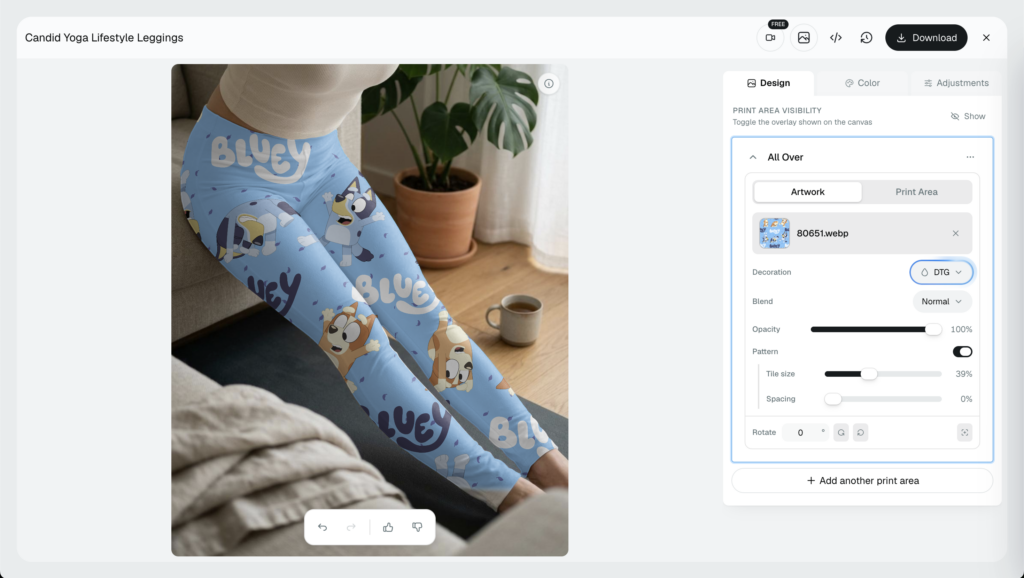
Here’s the good news. You can build a repeat pattern mockup for free in your browser, with no Photoshop and no plugins. This is the narrow version of our wider guide on how to make mockups without Photoshop; here we’re focused only on seamless repeats and dialing in the tile scale.
Let’s get into it.
Why Tile Scale and Repeat Make or Break It
A pattern lives or dies at its edges.
On a real product, the repeat has to stay coherent across every face you can see. Motifs bend around a corner, tuck under a lid, or run off the edge of the paper the way ink behaves in the real world.
What they should never do is restart, stretch, or rotate at a random angle just because they hit a seam. When the repeat breaks like that, buyers can feel something is off even if they can’t name it.
Direction matters here too. If your motifs have a clear top, like lettering, animals, or flowers on stems, a tile that rotates them at the seam reads as a mistake the moment someone looks closely. Non-directional prints are more forgiving, but you still want the pattern placed with intent, not spun to fill space.
Then there’s scale, which trips up more sellers than the file does.
- Too large: you get three or four giant motifs and a lot of empty product, so the design looks sparse and the pattern barely shows.
- Too small: the motifs pack in so tight the whole thing turns to busy mush and the colors muddy together from a step back.
Both share the same cost. The mockup misrepresents what actually arrives in the box, and a buyer who ordered from a too-large preview opens a much busier product than they expected.
So run the honesty test. The motifs, spacing, and colors from your source file should stay recognizable in the mockup. Lay your artwork next to the finished product and they should match.
This is also where a plain AI prompt gets you into trouble. Type “put my floral print on a gift box” and you hand the pattern to a model that might redraw the motifs, shift the colors, or invent a repeat that was never in your file.
Positioning the pattern yourself is what keeps it accurate. You’re placing your exact artwork on the surface, not asking software to imagine it.
How to Make a Seamless Pattern Mockup in 4 Steps
Here’s the whole flow, start to finish, in a single browser tab. It runs on Mock Anything AI, part of our AI mockup generator, which builds a product scene from a text prompt and then lets you drop your own design onto it.
Step 1: Generate a Blank Product Scene
Open MockAnything AI and describe the product you want. Type something like “gift box” or “woman wearing leggings and practicing yoga on a sunny morning” and it creates a clean, photorealistic lifestyle scene for you to work on.
Rather start from something ready-made? Pick an existing POD product instead. Either way, you now have a blank surface waiting for your design.
Step 2: Upload Your Pattern Artwork
Add your repeat file, the tileable design you want printed across the product.
Your file does the heavy lifting, so check that the edges already match before you upload. A repeat that isn’t truly tileable will show seams no matter how good the mockup engine is.
Step 3: Turn On Pattern Mode and Set the Tile Scale
Switch the Pattern setting on. Instead of placing your artwork once, the editor tiles it across the whole surface.
Now set the tile scale. Drag it up and the motifs grow bigger and fewer; drag it down and they shrink and repeat more often. Watch the product as you go and stop when the repeat sits the way a buyer would see it in hand.
This is the step that separates a believable all over print mockup from an obvious paste job, so give it a few seconds.
💡 Pro tip: move the scale in small steps and glance at the full product between each nudge. Big jumps make it hard to feel where the repeat actually looks natural.
Step 4: Save the Template, Then Download
Happy with it? Save the result as a template and download your image.
The template keeps your artwork and your pattern settings attached to it. Reopen it next week and everything sits exactly where you left it, which is what makes reruns and product variations quick.
That’s how to mockup a pattern without Photoshop, start to finish. No plugins, no exporting between apps. For a related walkthrough on a specific marketplace, our Etsy guide shows how to create mockups in minutes with MockAnything AI with the same tool.
How to Dial In the Tile Scale for a Clean Repeat
Scale is where most of the realism comes from, so it’s worth slowing down for. Four habits make it easier to get right the first time:
- Start tileable: begin from a file whose edges match, so the repeat shows no seam where tiles meet.
- Preview at real size: judge the tile at the size the product ships, not the size you designed it on screen.
- Keep resolution high: upload your sharpest artwork so fine lines and small details stay crisp at print scale.
- Save the setting: store the scale as a preset or template so it carries across products and future reruns.
Two of those deserve a note.
If the left edge of your file doesn’t meet the right, no scale setting will hide it, so fix the file before you ever touch the slider.
And the preview point matters more than it sounds. A wrapping paper motif that looks great zoomed in can turn fingernail-small once the sheet is laid flat, so a design that felt bold on your monitor ships looking thin.
Match the scale to the product’s real size, as well. A small item like a zip pouch needs a tighter repeat before any of the pattern shows, while a duvet cover can carry much larger motifs without looking bare. The same file often wants one scale on a mug and a different one on a blanket.
Here’s a fast gut check before you export. Shrink the mockup to a thumbnail. If the pattern still reads as the pattern at that size, it will do its job in a crowded search result, which is where most buyers meet it first.
Why the Pattern Setting Costs Nothing Extra
Here’s the part that surprises people. Pattern isn’t a paid add-on or a separate tool in Dynamic Mockups.
It already lives inside our editor, so you just switch it on and start tiling. No upgrade, special plan tier, no extra fee needed.
That matters because most pattern mockup generator options push you toward one of two bad deals: a stock gallery where you can’t control the repeat, or a Photoshop smart-object file you have to buy and know how to operate.
Our version runs live in our existing editor. You position and scale the repeat and watch it update on the product in real time, so you’re steering the result rather than guessing at a text prompt and hoping.
Working live also means faster iteration. Try a big motif, drop to a small one, then settle somewhere between, all in a few seconds with nothing to re-render or re-prompt.
There’s a quieter benefit to editing this way, too. Foreground objects stay on their own layer.
So the lid on a gift box, the band around a candle, or the ribbon on a package can be adjusted on its own while the pattern underneath stays untouched. You end up with an accurate surface and a tidy scene at once.
And you can do all of this on the free plan, with no credit card required. Test your real artwork, at real scale, before you spend money scaling everything to the sky.
Apply the Skill to Your Product: Gift Box, Wrapping Paper, Leggings
The four steps don’t change from one product to the next. Only the generated scene and the surface geometry do. Learn it once and you can point the same flow at anything you print a repeat on.
A few common routes:
- Gift boxes and packaging: generate a box scene, then tile the pattern so it wraps cleanly over the lid and down the sides.
- Wrapping paper: the classic repeat. Preview at full-sheet size so the motifs don’t shrink to nothing once the paper lies flat.
- Leggings and all-over-print apparel: the print has to flow around a curved, moving surface, so scale carefully and follow the repeat down the leg.
- Home decor: blankets, throw pillows, and duvet covers all rise or fall on how the pattern sits at room scale.
Reusing one scale across products has a payoff beyond speed. Your shop starts to look like a considered collection instead of a pile of one-offs, and a browsing customer reads that as a brand.
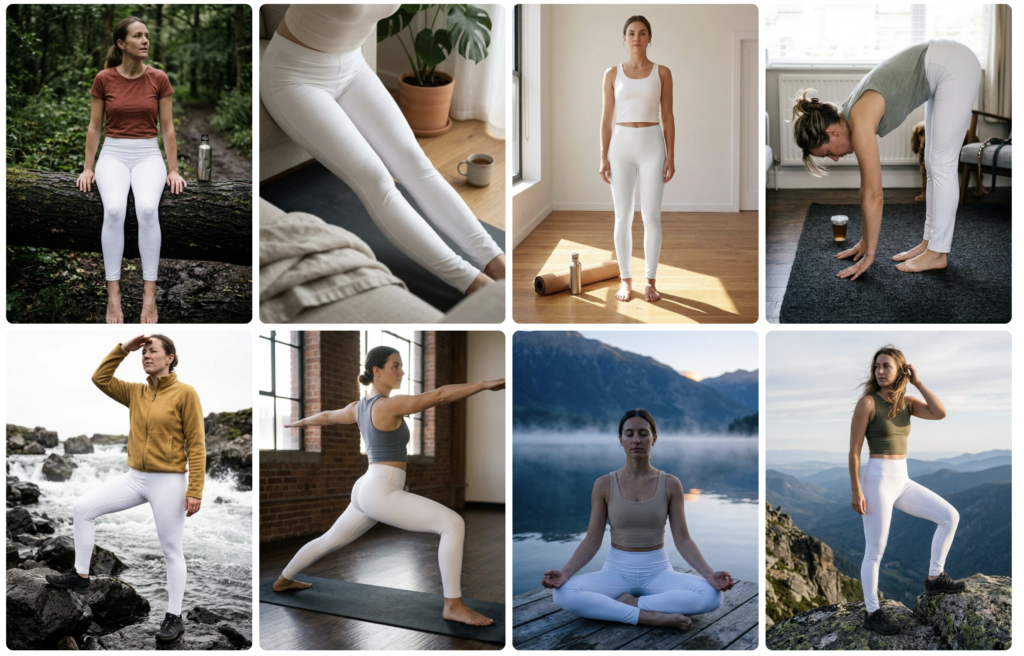
Need a base to start from? Browse our 100,000+ free mockup templates to find the product closest to yours, or generate a fresh scene from a prompt when the library doesn’t have your exact item.
If apparel is your lane, see our free Leggings Mockup Templates to start with, they are all generated using MockAnything AI tool that you have access to as well.
The workflow stays the same every time. Sign up free, generate a scene from a prompt, upload your pattern, and switch on Pattern mode to see your own artwork tiled on a real manufacturable product.
No Photoshop, no credit card, no guesswork. Start with one product today, then reuse the template for the rest of your range.
Frequently Asked Questions
What is a seamless pattern mockup?
A seamless pattern mockup is a product image where a repeating design tiles across the whole surface, so the motif reads as continuous printed artwork instead of a graphic pasted on top. Think wrapping paper covered edge to edge or leggings where the print wraps around the leg. For these products, the surface design is the product itself.
How do I make a pattern mockup without Photoshop?
You can make one in your browser in four steps, no plugins. Generate a blank product scene with Mock Anything AI by describing your product, upload your tileable repeat file, switch on the Pattern setting so it tiles across the surface, then set the tile scale and download. Save it as a template to reuse the same settings later.
What tile scale should I use for a seamless pattern mockup?
Match the scale to the product’s real size. Too large and you get a few giant motifs with lots of empty product; too small and it turns to busy mush. A small zip pouch needs a tighter repeat, while a duvet cover carries larger motifs. Preview at real size, shrink to a thumbnail, and check the pattern still reads.
Is the Dynamic Mockups Pattern feature free to use?
Yes. Pattern isn’t a paid add-on or a separate tool. It already lives inside the editor, so you just switch it on and start tiling, with no upgrade, no plugin, and no extra fee. You can position and scale your repeat live on the free plan, with no credit card required, and test your real artwork before spending a cent.
Can I use a seamless pattern mockup for gift boxes, wrapping paper, and leggings?
Yes. The four steps don’t change from one product to the next; only the scene and surface geometry do. Generate a box scene and tile the pattern over the lid and sides, preview wrapping paper at full-sheet size, or follow the repeat down the leg on leggings. Learn it once and point the same flow at anything you print a repeat on.
![How to Make a Gift Box Mockup From a Prompt [2026]](https://dynamicmockups.com/wp-content/uploads/2026/08/gift-box-mockup-cover-768x403.png)