



 Knowledge
On this page
What Is a Real-Time Mockup (And Why Render Speed Sells)?
A real-time mockup renders the instant a design or logo is dropped in. No spinner, no “your preview is loading,” no waiting for the image to appear. The shopper sees their artwork sitting on the product the moment they upload it. That’s the best way to do real-time personalization for your customers.
So does render speed actually affect sales? Yes, very. An instant preview holds a buyer’s momentum at the exact second they are most interested, and it cuts the bounce that a slow image causes.
This is not an empty promise. Our engine renders a single MockAnything mockup in about 800 milliseconds and generates 12.5 mockups per second, the fastest rendering available on the market.
For years, putting a design on a product meant one of two slow paths: open Photoshop and wrangle smart objects, or email a designer and wait. Real-time rendering removes the wait.
And the wait is the thing that costs you, whether the person watching the export bar is a shopper on your product page or you, at midnight, the night before a launch.
That speed shows up in three places that touch your revenue: drop-off, conversion, and how fast you can fill a catalog. Let’s take them one at a time.
The Hidden Cost of a Slow Product Preview
Picture the moment a shopper drops their logo onto your product to see how it looks. The spinner turns. And turns.
Two seconds in, they are wondering if the page froze. Four seconds in, the urge to buy has cooled. That flash of “I want this” is fragile, and a loading bar is enough to break it. And sometimes it takes about a minute to get the image with their logo back.
A slow preview does more than test patience. It reads as low quality. If the tool feels clunky, the product behind it feels clunky too, and trust drops before the image even finishes loading.
A customizer is the first promise your store makes. Let it stall, and buyers assume the shipping and the support will stall too.
The data backs this up. Google found that the probability of a visitor bouncing rises 32% as a page’s load time goes from one second to three seconds, per Shopify’s roundup of load-time research.
The pages that convert best are the fast ones. Ecommerce conversion rates peak on pages that load in one to two seconds, while the average unoptimized product page takes 6.1 seconds, according to Queue-it’s site-speed data.
It gets worse on phones, where a lot of POD browsing happens. On mobile, every extra second of delay can cut conversions by up to 20%, reports WP Rocket.
None of these numbers describe a broken website. They describe an ordinary one that is merely slow, which is the state most stores quietly live in without ever seeing the sales they miss.
Here is the same idea without the jargon:
| Preview experience | What the shopper feels | Likely outcome |
|---|---|---|
| 5+ second spinner | Doubt, friction | Tab closed |
| Instant render | Momentum, control | Add to cart |
We have written before about how product images impact conversion rates, and speed is the part most sellers forget. A great mockup that shows up late still loses the sale.
The real cost of a laggy preview is the sale that never happens, quietly, with no error message to tell you it is gone.
Real-Time Mockups Turn Browsers Into Buyers
Speed does not only prevent losses. It creates sales you would not have made otherwise.
When a buyer can drop in their own name, logo, or photo and see it on the product right away, something shifts. They stop picturing a generic item and start looking at their version of it.
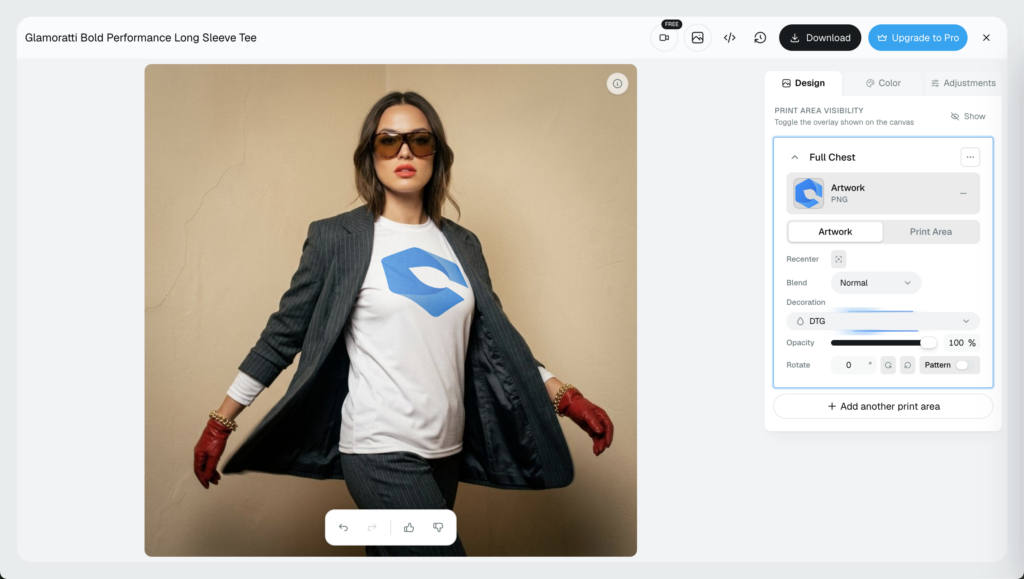
That is the pull of a real time product preview. Seeing “mine” instead of “one of those” raises intent and quiets the hesitation that keeps a cart half-full.
It also answers the silent question behind most custom orders: will this actually look right? A live preview shows them, so they buy with confidence instead of crossing their fingers.
That confidence pays off after the sale, too. When a buyer has already seen the exact thing they are getting, you field fewer “this isn’t what I pictured” refunds down the line.
A live product mockup fits anywhere a buyer makes a choice:
- Product pages: Show the design on the exact color and style they pick.
- Configurators: Let them build the item and watch it update as they go.
- Personalization flows: Names, monograms, and uploaded logos, previewed on the spot.
- Gift and bundle builders: Preview the finished set before checkout.
💡 Pro tip: Our embeddable mockup editor drops that live preview straight onto your product page, so the “that’s mine” moment happens well before checkout.
If you sell customizable products, you can add a live product configurator to your site and let the instant mockup preview do the selling for you.
Want to know what that speed is worth to your store? Test it.
Put a live preview against a static image on the same listing and read the numbers. Our guide to A/B testing your product images shows how to set that up without guessing.
The odds are good going in. 65% of ecommerce stores report higher conversion rates after adding personalization, per OptiMonk’s research.
The same speed sells offline, too. A promo rep on a call can drop a client’s logo onto a hoodie or tote and show it live, with no sample order and no two-day wait for a designer to mock it up.
By the time most competitors email a proof, the deal is already moving. Showing beats describing every time, and showing instantly wins the room.
Faster Catalog Turnaround: Ship Listings While the Trend Is Hot
Now scale the problem. One design on one product is a single image. That is not how print-on-demand works.
Say you have 200 designs and you want each on 30 products: mugs, tees, hoodies, posters, phone cases. That is 6,000 listing images. Do them by hand in Photoshop and you will still be exporting next month.
Render speed is the bottleneck between your designs and your live listings. At 12.5 mockups per second, a queue of thousands clears in minutes, not days.
This is where bulk mockup generation earns its keep also as our Batch Render Mockups API, turning a folder of designs into a full catalog of product images in one pass.
Look at what that changes for the same 6,000 images:
| Method | 6,000 product images | Fits a trend window? |
|---|---|---|
| Photoshop, by hand | Weeks | No |
| Mockup tool, one by one | Days | Rarely |
| Bulk real-time rendering | Minutes | Yes |
Speed also decides what you can sell in time. Trends and seasons run on short windows.
A design that goes live while a trend is peaking earns. The same design uploaded a week after the moment passed mostly collects dust.
Think of a phrase that blows up on TikTok on a Monday. The sellers who list it Monday night catch the wave, and the ones still exporting images on Friday are selling to a room that already emptied out.
Faster product images are what let you list holiday drops, meme designs, and trend pieces while people are still searching for them. Miss the window and the best artwork in your shop never gets seen.
More images live in less time means more SKUs working for you, and every extra listing is one more chance to convert.
What 12.5 Mockups Per Second Means for Your Bottom Line
Here is the concrete version. Our engine renders 750 mockups in 60 seconds.
That number comes from a custom rendering engine we built in-house that processes mockups in parallel instead of one at a time. Most tools render in a line. Ours renders in a crowd.
Parallel infrastructure is the whole trick. When a hundred images do not have to wait in single file, a catalog that used to take an afternoon finishes before your coffee cools.
And none of it asks you to babysit a render queue. You upload, the engine does the work in the background, and the finished images land ready to list.
And 12.5 per second is the baseline, not the ceiling. Capacity scales with your volume, so the busier you get, the more the system keeps pace instead of backing up.
That matters most for the people with the heaviest queues: agencies pushing client catalogs, brands running big seasonal drops, and stores wiring previews into their own site through the API.
This is not a lab benchmark either. See how Matesy redefined e-commerce speed with Dynamic Mockups for a real store putting that throughput to work.
Throughput is easy to admire and easy to underrate, so here is what it actually buys you:
- Faster previews: buyers stop bouncing at the moment they are ready to click.
- Faster catalogs: more SKUs go live while trends are still paying out.
- Fewer dead sessions: nobody sits staring at a spinner.
Every one of those is a spot where a sale was slipping away. The link between mockup speed and conversion is just those small saves, added up across every visitor you get.
How Dynamic Mockups Delivers Real-Time Mockups at Scale
So how do you put real-time mockups to work without a developer or a Photoshop license? Three tools carry the load.
Mock Anything AI turns any product photo or a prompt into a reusable manufacturable product mockup. Upload a photo of something you already sell or just describe with the prompt, and the AI maps the print area with real warp and curves, so a design follows fabric folds or a mug’s curve like it belongs there.
One photo or prompt becomes a template you can reuse forever, on every design you ever make.
The Render Mockup API is the engine behind live previews. It drops in logos and colors and renders fast enough to power a real time mockup generator right inside your own site, app, or embeddable editor, at that sub-second speed.
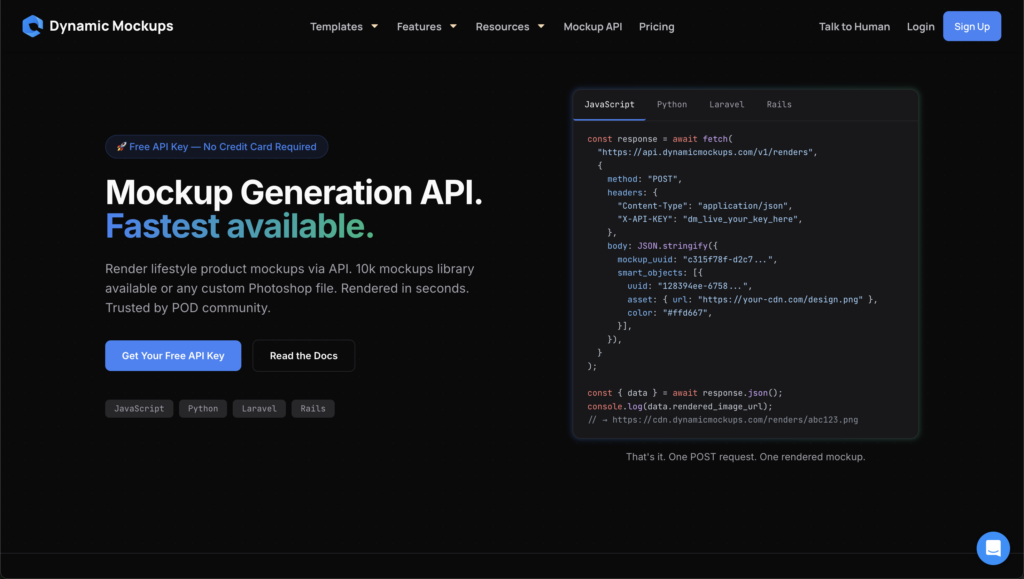
That is what lets a shopper preview their own artwork on your page without your team touching a single file.
Bulk generation handles the whole catalog at once. Feed in a set of designs and our AI mockup generator fans them across thousands of on-brand product images in a single run, with an AI background generator on hand for lifestyle scenes.
💡 Pro tip: Start with one product photo or prompt in MockAnything AI, turn it into a reusable template, then run bulk generation to spread it across your entire catalog. One upload, a hundred listings.
You do not need a big-brand budget to move this fast. You can start for free with 100,000+ mockup templates waiting for you in our library and watch your first design render in under a second.
Showcase your e-commerce products like big brands, without costing a fortune. Sign up today. No credit card required. →
Frequently Asked Questions
What is a real-time mockup?
A real-time mockup renders the instant a design or logo is dropped onto a product. There is no spinner and no loading wait. The shopper sees their artwork sitting on the item the moment they upload it. Dynamic Mockups renders a single mockup in about 800 milliseconds, so the preview appears almost immediately and keeps buyers engaged at their peak interest.
Do faster product previews actually increase conversions?
Yes. Speed holds a buyer’s momentum at the exact second they are most interested, and it cuts the bounce a slow image causes. Google found the chance of a visitor bouncing rises 32% as load time goes from one to three seconds. Conversion rates peak on pages that load in one to two seconds, so a faster preview directly protects sales.
How fast can Dynamic Mockups render mockups?
Our custom engine renders a single mockup in about 800 milliseconds and generates 12.5 mockups per second, which works out to 750 in a minute. It processes images in parallel instead of one at a time, so a queue of thousands clears in minutes rather than days. Capacity also scales with your volume, so the system keeps pace as you grow busier.
Can I add live mockup previews to my website or store?
Yes. Our embeddable mockup editor drops a live preview straight onto your product page, and the Render API powers real-time previews inside your own site, app, or configurator at sub-second speed. Shoppers can drop in their own logo, name, or photo and see it on the product without your team touching a single file. No developer marathon required.
How many mockups can I generate in bulk at once?
Bulk generation handles whole catalogs in a single run. Feed in folder of designs and the engine fans them across thousands of product images at once, at 12.5 renders a second. A job like 6,000 listing images clears in minutes instead of weeks. You upload, the engine works in the background, and finished images land ready to list.
![9 Tips to Start a Print On Demand T-Shirt Business From Zero [2025 Step-by-step Guide]](https://dynamicmockups.com/wp-content/uploads/2024/07/cover-1-768x403.webp)