



 Ecommerce
On this page
What’s the Best PhotoRoom Alternative for Product Mockups?
The best PhotoRoom alternative for product mockups is Dynamic Mockups with Layouts, especially when you have designs but no product photos. PhotoRoom cleans up and resizes a photo you already shot. Dynamic Mockups renders the product straight from a template, so you get finished images even when the photo never existed.
Here’s the split in plain terms.
PhotoRoom takes a photo you own and makes it cleaner, brighter, and correctly sized for each channel. It can’t show a product you never photographed, and it needs a separate photo for every color you sell.
Picture the usual print-on-demand morning. You finished a design last night, the blank tee is a stock item from your supplier, and you need a listing image, four social sizes, and an ad by lunch.
There’s no sample on your desk to point a camera at. That’s the exact moment a photo editor runs out of road.
This gap matters most for a specific crowd:
- POD sellers who design on a screen and never pick up a camera.
- Pre-order and launch teams, where the physical sample hasn’t shipped yet.
- Multi-channel sellers who need every social, marketplace, and ad format from artwork alone.
Dynamic Mockups starts from a library of 100,000+ mockup templates, so a flat design becomes a photorealistic product on a tee, mug, or poster in seconds.
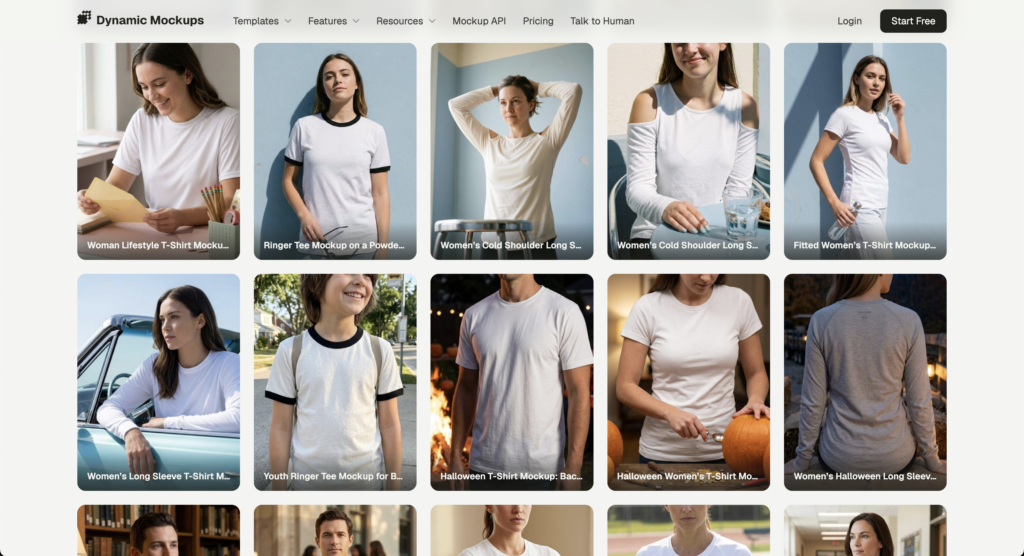
A design that would otherwise sit in a queue waiting for a sample becomes a live listing the same day.
If that sounds like your setup, you want a free PhotoRoom alternative that renders instead of resizes. Here’s how the two actually compare.
What PhotoRoom Does Best (and Where It Stops)
Let’s give PhotoRoom its due. As a photo cleanup tool, it’s one of the best an online seller can pick up.
PhotoRoom for product images is genuinely good at one job: making a photo you already have look sharper. Here’s where it shines:
- Background removal: its AI background remover strips the backdrop off a product shot in a click.
- AI backgrounds: drop the cutout onto a studio scene with generated backgrounds instead of renting a lightbox.
- Realistic shadows: add AI shadows so the product sits in the scene instead of floating above it.
- Batch editing: run the same treatment across a whole folder with the batch editor.
- Resize for every channel: reframe one photo into the sizes each marketplace and social platform wants.
That last one is the pitch PhotoRoom leans on: one image, every format. Its resize workflow fills the extra canvas with AI instead of stretching the product, which keeps a catalog looking consistent from the first SKU to the last.
For a store sitting on a hundred real product photos in mismatched sizes, batch mode is exactly what it’s for. Set the dimensions once and the whole catalog falls in line.
It’s a real strength when you need to resize product photos for every platform you sell on. Nobody’s arguing the tool isn’t good.
But look at where each feature begins. Every single one starts with a photo you already have.
Remove a background, and you needed a photo. Add a shadow, and you needed a photo. Resize for Instagram, and you needed a photo.
With nothing to upload, there’s nothing to output. That’s the ceiling.
Take a designer working in Illustrator. They’ve got a print-ready file and a supplier’s blank mug, but no photo of the two together, so PhotoRoom has nothing to open.
Then there’s the colorway tax. Every color you sell needs its own source photo, so a six-color hoodie range means six separate shoots before PhotoRoom has anything to clean or resize.
For a store that adds new colors every season, that bill keeps landing. A physical sample has to exist, get photographed, and get edited before a single listing goes live.
None of this is a knock on the tool. If your product is already in hand, PhotoRoom is a fair pick, and it isn’t the only one. We’ve rounded up other AI tools for product photos if editing real shots is all you need.
PhotoRoom vs Dynamic Mockups: Feature-by-Feature [2026]
So how does PhotoRoom compare to a tool that renders the product from scratch? Here’s PhotoRoom vs Dynamic Mockups, feature by feature.
| Capability | PhotoRoom | Dynamic Mockups |
|---|---|---|
| Render from a design, no photo | ❌ Needs a photo | ✅ Built for it |
| Colorway variants without new shoots | ❌ Photo per color | ✅ Recolor, re-export |
| Social formats | ✅ Yes | ✅ Yes |
| Marketplace formats | ✅ Yes | ✅ Yes |
| The 10 IAB ad sizes | ⚠️ Manual sizing | ✅ Built in |
| Bulk export as one named ZIP | ⚠️ Batch export | ✅ One named ZIP |
| Background removal and replace | ✅ Core strength | ⚠️ Basic |
| Resize or clean an existing photo | ✅ Core strength | ⚠️ Not the focus |
| Free tier | ✅ Yes | ✅ Yes |
Read it top to bottom and the pattern is clear.
The two overlap on the things a photo editor does well: cleanup, background swaps, and resizing. They split on rendering from a design, handling colorways without a camera, and dropping every size into a single ZIP.
Take the ad row. Display networks run a set of standard IAB sizes, and sizing a photo into each one by hand is slow, fiddly work. Getting them as a ready set is a different day entirely.
The ZIP row matters more than it looks. Forty images with clear names drag straight into your listings and ad manager. Forty untitled exports turn into an afternoon of sorting.
Among PhotoRoom competitors, that dividing line is the one worth watching. A tool that only edits photos can’t help you when the photo doesn’t exist yet.
If you’re weighing options, run one test. Hand the tool a design with no photo and see if anything comes out. That single check sorts the resizers from the renderers.
Layouts: One Design, Every Format, Exported as One ZIP
Layouts is the part a photo editor has no answer for.
You generate one mockup from your design, then Layouts turns it into finished images for every channel you sell on. It runs on our AI mockup generator, so the render reads like a real product photo, not a flat sticker pasted on a shirt.
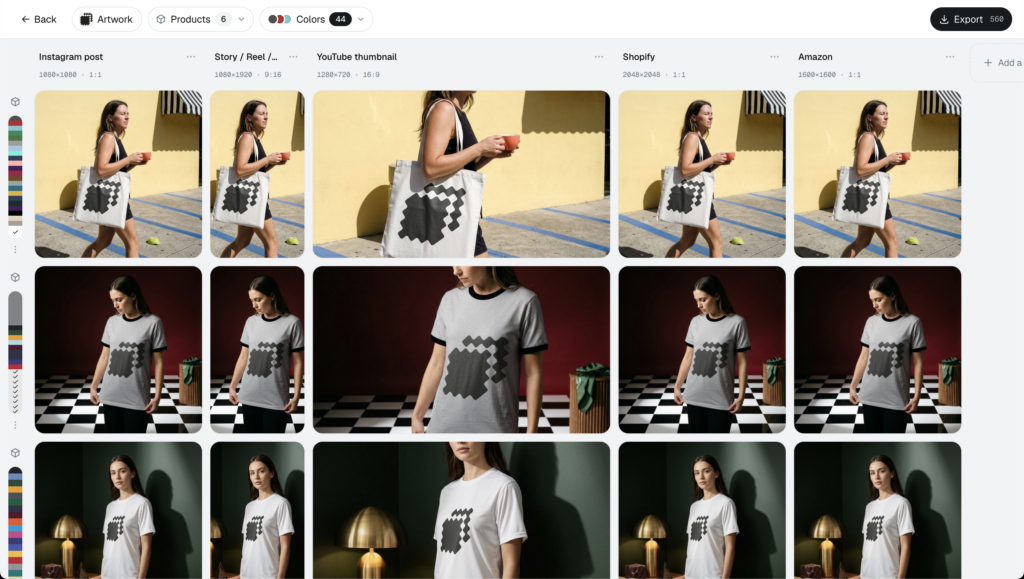
Pick your outputs and Layouts composes them in minutes:
- Social: feed and story sizes for Instagram, TikTok, Facebook, and Pinterest.
- Marketplace: listing-ready dimensions for Etsy, Amazon, and Shopify.
- Ads: the 10 IAB ad sizes that display networks actually run.
Say you launch one new design. Instead of building a listing photo, then a square post, then a story, then a banner one at a time, Layouts hands you the whole set from a single render.
Doing that by hand means one artboard per size in Photoshop, exported one at a time. A twelve-image set can eat an afternoon. Layouts turns it into a few clicks.
Now the colorway part. Selling that same design in six colors? Recolor the product and re-export the entire set. No new shoot, no re-editing, the same layouts across every variant.
That’s six full channel packs from one composition, and none of them needed a camera. A photo editor would need six photographed samples to reach the same place.
Everything lands as named files in one ZIP, upload-ready. You’re not renaming forty exports by hand before they go live, and you’re not hunting for the story crop in a messy download folder.
The whole thing sits on our free template library and bulk rendering, so quality holds even at volume. That makes short work of product mockups for social media, where every platform wants a slightly different crop.
💡 Pro tip: For a full catalog, pair Layouts with our bulk mockup generator. Feed it a design set, and every product renders across every format in one run, all from the free template library.
Running paid social on top of that? Our layouts feature will export the visuals for every channel where you are running ads.
Mockup or Resize? Which Tool Fits Your Workflow
Both tools earn a place, and plenty of sellers use them together, a render for launch day and a photo editor once real samples arrive. The real question is what’s actually on your desk right now.
Reach for PhotoRoom when you have the physical product and a photo of it. You want that shot sharper and sized for each platform. That’s its home turf, and it’s very good there.
A ceramics maker with the mug in hand and a decent phone photo is a perfect PhotoRoom user. Clean the background, add a shadow, size it for Etsy, done.
Reach for Layouts when there’s no photo yet. The design lives in a file, the sample hasn’t shipped, or the colorway doesn’t exist outside your head. You still need every channel image by tomorrow morning.
An agency pitching a concept before samples exist has nothing to photograph. A render puts the idea in front of the client the same afternoon.
The rule of thumb is short. Product in hand with a photo taken, use a photo editor. Design in a file with the sample missing, render it.
Here’s the one claim a photo editor structurally can’t make: a mockup with no photo shoot. If the product was never photographed, there’s nothing to resize, and Layouts renders it anyway.
How to Create Every Channel Image From One Design
Here’s the whole workflow, start to finish.
- Pick a template. Choose the product you sell, a tee, mug, tote, or poster, from the library.
- Drop in your design. Upload your artwork and place it on the product.
- Choose your formats. Select the social, marketplace, and ad layouts you need. Like Etsy, Reels, YouTube, etc.
- Multiply by colorway. Recolor the product for each variant in your range.
- Export the ZIP. Download every image as named, upload-ready files.
Five steps, minutes of work, and no gear beyond a browser. The same job with a camera means a sample, a set, and an editing pass for every color.
Change the design next week and you rerun the same five steps. The full set rebuilds into a fresh ZIP, no re-shoot required.
Composing all of that costs nothing. It’s free to start, no credit card required, and you only pay when you need more volume or automation.
Make every social, marketplace, and ad image from a single design, no camera and no Photoshop.
Showcase your E-commerce products like big brands, without costing a fortune. Sign up today. No credit card required. →
Frequently Asked Questions
Is there a free PhotoRoom alternative for product images?
Yes. Dynamic Mockups has a free plan with no credit card required. It renders your product straight from a design using 100,000+ templates, then exports social, marketplace, and ad formats. Unlike a photo editor, it works even when you have no product photo to upload, so a flat design becomes a listing image in seconds.
Can PhotoRoom make a product mockup from a design without a photo?
No. Every PhotoRoom feature starts with a photo you already have, so background removal, shadows, and resizing all need an image to open. With just a print-ready design and a blank supplier product, there is nothing to upload. Dynamic Mockups renders the product from the design itself, no photo shoot needed.
What is the difference between PhotoRoom and Dynamic Mockups?
PhotoRoom cleans and resizes a photo you already shot, so it is great for background removal, shadows, and multi-channel sizing when the product is in hand. Dynamic Mockups renders the product from a design, so you get finished images with no photo at all, plus colorway variants and every format exported as one named ZIP.
How do I create product images for every social media format at once?
Use Dynamic Mockups Layouts. Generate one mockup from your design, then pick your outputs: Instagram, TikTok, Facebook, and Pinterest feed and story sizes. Layouts composes the full set in minutes and hands them back as named files in one ZIP, upload-ready. You skip building each artboard by hand in Photoshop and export the whole pack in a few clicks.
Does PhotoRoom need a separate photo for each product color?
Yes. PhotoRoom edits photos, so every color you sell needs its own source shot. A six-color hoodie range means six samples photographed before it has anything to clean or resize. Dynamic Mockups skips that colorway tax: recolor the product in the editor and re-export the full channel pack for each variant, no new shoot required.
![Vamp Romantic Aesthetic: Product Mockups for 2026 [Guide]](https://dynamicmockups.com/wp-content/uploads/2026/08/vamp-romantic-aesthetic-mockups-cover-768x403.png)