If you’re still only using static images for your print-on-demand store, you’re leaving serious money on the table.
Video mockups have become essential going into 2026, whether for paid ads, organic social media posts, or product page highlights on your store’s website.
Here’s the problem: hiring a model to film your products is time-consuming, expensive, and in most cases, completely unnecessary.
Today, you’ll learn how to generate hyperrealistic video mockups for your store in just a few clicks. No camera, no models, and no expensive software required.
Why Video Mockups Matter for Print-on-Demand in 2026
The shift from static images to video isn’t just a trend; it’s backed by compelling data that should concern every POD seller.
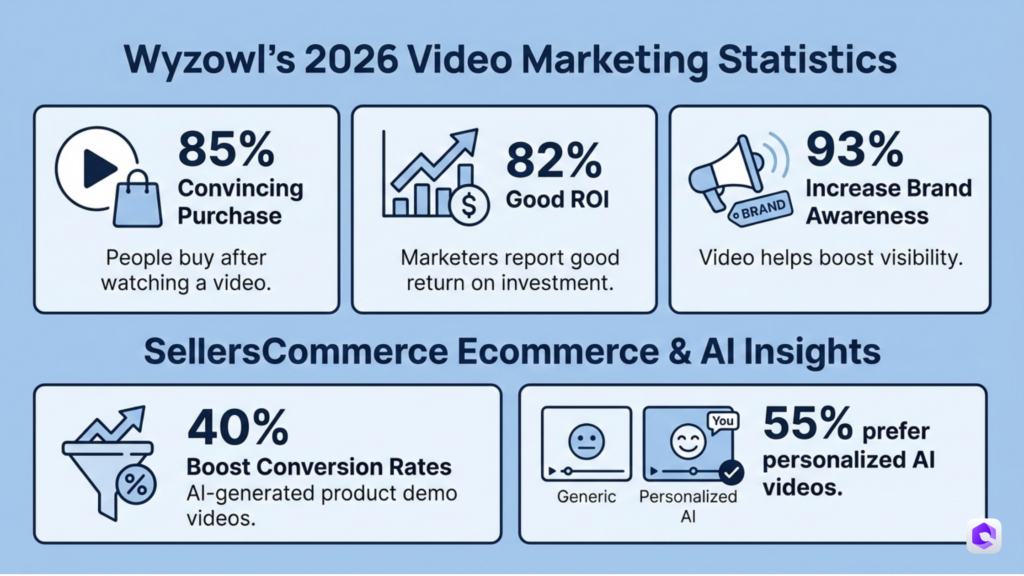
According to Wyzowl’s 2026 Video Marketing Statistics, 85% of people have been convinced to buy a product or service by watching a video.
Even more striking, 82% of marketers report video marketing has given them a good ROI, while 93% say video has helped increase brand awareness.
The numbers get even better for ecommerce specifically. Research from SellersCommerce shows that AI-generated product demonstration videos boost conversion rates by 40%, and over 55% of consumers prefer personalized AI-generated videos over generic content.
Higher Conversion Rates
Video content consistently outperforms static images when it comes to turning viewers into buyers.
While the average ecommerce conversion rate hovers around 1.89% across all industries, stores incorporating video into their product pages see measurable lifts in performance.
Short-form videos under 60 seconds achieve engagement rates of 50%, dramatically outperforming static formats. When you consider that 82% of all internet traffic is expected to be video by 2026, the writing is on the wall.
Better Social Media Performance
Platform algorithms favor video content, giving it more reach and engagement than static posts. Here’s what the data shows:
- TikTok converts 45.5% of users into buyers, the highest conversion rate among social platforms
- Instagram Reels viewers discover new brands at a 57% rate through the feature
- YouTube Shorts achieve an engagement rate of 7.91%, the highest of all short-form video platforms
For print-on-demand sellers, this means your video mockups get distributed wider and perform better organically without spending a dollar on ads.
Competitive Advantage in Saturated Markets
The POD space is crowded. Thousands of sellers compete for attention on Etsy, Amazon, and Shopify. Video mockups help you stand out in ways that static images simply can’t.
Whether you’re creating content for:
- Paid advertising (Facebook Ads, TikTok Ads, Google Shopping)
- Organic social media (Instagram Reels, TikTok, YouTube Shorts)
- Product page highlights (auto-play videos on listing pages)
- Email marketing campaigns (GIFs and embedded video)
Video mockups give you a tangible edge over competitors still using flat images.
For more strategies on standing out, check out our guide on how to promote your print-on-demand business.
Traditional Methods vs AI-Powered Video Mockups
Before we dive into the tutorial, let’s look at your options for creating video mockups:
| Method | Cost | Time | Quality | Scalability |
|---|---|---|---|---|
| Hiring Models & Photographers | $500-5,000+ per shoot | 2-4 weeks | High | Low |
| Stock Footage | $50-500 per clip | Hours to find | Variable | Medium |
| AI-Generated Video Mockups | $0.10-1 per video | 2 minutes | High | Extremely High |
Why AI is the Future for POD Sellers
Traditional photoshoots require:
- Finding and booking models
- Renting studio space
- Hiring photographers and videographers
- Coordinating schedules
- Post-production editing
- Reshoots when products change
AI-powered tools like Dynamic Mockups eliminate all of this friction. You can generate dozens of unique video mockups in the time it would take to schedule a single photoshoot, and update them instantly when you add new designs.
The AI video generator market is projected to grow from $534.4 million in 2024 to $2,562.9 million by 2032, representing a CAGR of 19.5%. This explosive growth reflects how quickly businesses are adopting AI for video creation, with 50% of small businesses already using AI-generated video tools.
How to Create Video Mockups with MockAnything AI & MotionMockups
Here’s your complete step-by-step tutorial for creating professional video mockups without any video production experience.
Prerequisites
Before you start, you’ll need:
- A free Dynamic Mockups account (no credit card required)
- Your product design or artwork file ready (PNG, JPG, or PDF format)
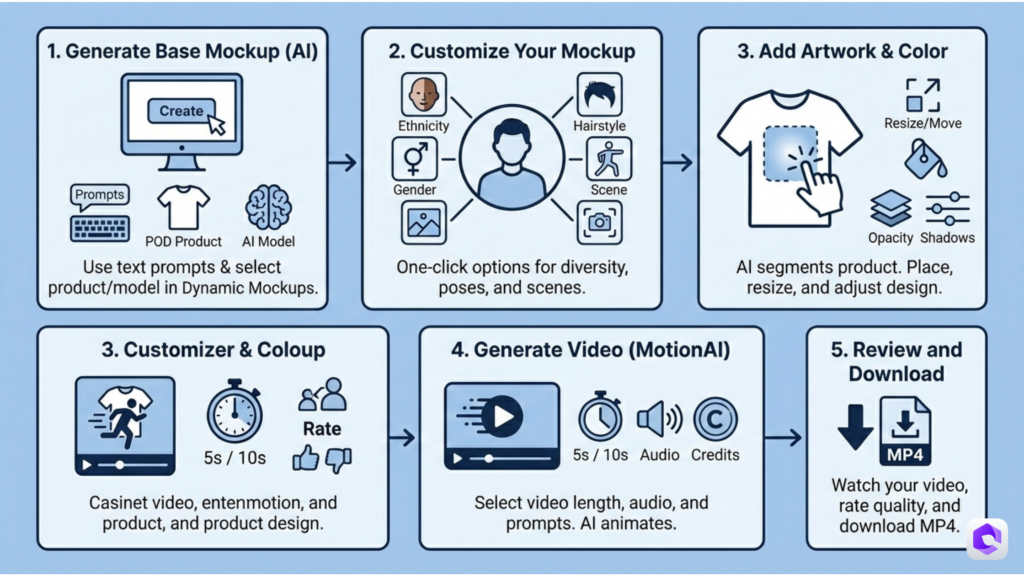
Step 1: Generate Your Base Mockup with MockAnything AI
First, navigate to the MockAnything AI section inside your Dynamic Mockups dashboard and click “Create a Mockup.”
Creating Effective Prompts
The AI works from text prompts that describe the scene you want. Here are some examples:
Good prompts:
- “Young woman in casual streetwear walking through urban downtown”
- “Professional man in office environment holding coffee mug”
- “Fitness enthusiast at modern gym after workout”
Tips for better prompts:
- Be specific about the setting and mood
- Include details about lighting (natural, studio, golden hour)
- Mention the person’s activity or pose
- Describe the overall vibe (casual, professional, energetic)
If you’re stuck, use ChatGPT to generate prompts for specific scenarios. Just describe your target audience and the feeling you want to convey.
Selecting Your POD Product
Dynamic Mockups includes a searchable POD product database. For this tutorial, we’ll select a Soft T-shirt, one of the classic POD products. You can also choose from:
- Hoodies and sweatshirts
- Tote bags
- Mugs and drinkware
- Phone cases
- Wall art and posters
- Pillows and blankets
Choosing AI Models
Select from various AI models optimized for different styles. For this example, we’ll use Nana Banana Pro, but feel free to experiment with others to find what works best for your brand aesthetic.
Click the arrow to generate your image.
Step 2: Customize Your Mockup
Once your base mockup generates (usually takes ±40 seconds), you have powerful one-click customization options (5 credits per customization):
- Ethnicity variations: Create diverse representation for your audience
- Gender options: Generate both male and female versions
- Hairstyles: Different hair lengths and styles
- Poses: Standing, sitting, casual, formal and more
- Custom scenes: Change backgrounds and environments
- Angles: Front view, side view, three-quarter angle
This level of customization ensures your mockups feel unique and authentic, not generic or AI-generated. Creating 5-10 variations of the same design across different models and scenes gives you abundant content for A/B testing in matter of minutes.
Step 3: Add Your Artwork
Click “Add Artwork and Color” to proceed to the design placement phase.
Here’s where Dynamic Mockups really shines: you don’t need any Photoshop skills. The software automatically segments the product area using AI, doing all the hard work for you.
Placement and Adjustment
Simply select the area where you want your artwork to appear (in this case, the t-shirt). The AI handles the complex segmentation and perspective mapping.
Once your artwork appears on the mockup:
- Move it around to find the perfect position
- Increase or decrease size to match your design needs
- Upload your own artwork from your computer
- Turn it into a pattern for all-over prints
- Change colors of the product itself
Advanced Settings
For more control, adjust:
- Opacity: Make designs more subtle or bold
- Highlights: Add shine for metallic or glossy effects
- Shadows: Create depth and realism
- Blend modes: Match your design to the fabric texture
This is your final static mockup. If you’re satisfied, proceed to the next step.
Step 4: Generate Video with MotionMockups AI
Now for the magic: turning your static mockup into a video.
Click the Video Mockups button at the top right corner. This opens the MotionMockups AI modal.
Custom Prompts (Optional)
You can add custom prompts to guide the video’s motion and style:
Example prompts:
- “Model walking confidently down city street”
- “Person turning slowly to show off the design”
- “Casual movement with natural gestures”
- “Close-up focus on the product with subtle motion”
If you don’t provide a prompt, the AI will generate appropriate motion based on enhanced prompt in our system.
Video Settings
Choose your preferences:
Video Length:
- 5 seconds: Quick, snackable content perfect for ads
- 10 seconds: More engaging, works great for Reels and TikTok
Audio:
- Include audio: Natural ambient sounds
- Exclude audio: Silent video (you’ll add music later)
For most use cases, we recommend starting with 10-second videos with audio included. You can always trim them down or add different music during editing.
Credit Cost
Generating a 10-second video with audio typically costs 160 credits. Processing takes up to 2 minutes, though often completes faster. Regular 5-second video without audio is 40 credits.
Click Generate Video when ready.
Step 5: Review and Download
When your video finishes processing, you’ll see your mockup come to life. The image now moves naturally, with realistic motion that mimics actual video footage.
Rate the Video
Before downloading, rate the video quality using the thumbs up or thumbs down buttons. This feedback helps improve the AI model for everyone.
Download Options
Click the download button to download the MP4 file in 1440×1440 dimensions.
Prefer a video tutorial? Check it out below:
For more best practices on creating effective product mockups, read our article on product mockup best practices.
Pro Tips for Creating High-Converting Video Mockups
Now that you know the mechanics, here are expert strategies to maximize your results.
Tip 1: Create Variations for A/B Testing
Never rely on a single video mockup. Create at least 3-5 variations testing:
- Different models (gender, age, ethnicity)
- Various settings (indoor, outdoor, urban, natural)
- Multiple angles (front view, side profile, action shots)
- Different times of day (morning light, golden hour, evening)
Run these as separate ad sets or posts to see which resonates best with your audience. The data will guide your future mockup creation.
Tip 2: Match Video Style to Your Target Platform
Platform algorithms favor native content. Tailor your mockups accordingly:
For Instagram Reels & TikTok:
- Vertical format (9:16)
- 7-15 seconds max
- High energy, quick cuts
- Trending audio if possible
For Facebook Ads:
- Square format (1:1) or vertical
- 6-15 seconds
- Clear product focus
- Silent-friendly (captions)
For YouTube Shorts:
- Vertical format (9:16)
- 15-60 seconds
- Storytelling approach
- Hook in first 2 seconds
Tip 3: Leverage the AI Photoshoot Feature
Don’t stop at video mockups. Dynamic Mockups includes an AI Photoshoot feature that generates multiple background variations of your static mockups.
Create 4 variations for the same design, then turn each into a video. This gives you a content library of unique video assets from a single design, enough to fuel weeks of social media posts.
Tip 4: Optimize Video Length Per Platform
According to platform research, optimal video lengths vary:
- TikTok: 21-34 seconds (highest engagement)
- Instagram Reels: 7-15 seconds (before viewers swipe)
- Facebook: 15-30 seconds (attention span limit)
- Product pages: 6-10 seconds (auto-play loops)
- Email: 10-20 seconds (keep it concise)
Generate different lengths for different uses. Most mockup videos work best in the 10-15 second range as a baseline.
Tip 5: Batch Create Videos for Efficiency
Plan your mockup creation in batches:
Weekly batch session:
- Generate 10-15 base mockups (30 minutes)
- Customize and add artwork to all (45 minutes)
- Queue 10-15 video generations (2 minutes active time, processes in background)
- Download and organize all videos (20 minutes)
This gives you 10-15 unique video mockups in about 90 minutes of active work, enough content for 2-4 weeks depending on your posting frequency.
Tip 6: Maintain Brand Consistency
Even with AI-generated content, keep your brand recognizable:
- Use consistent color schemes in your designs
- Choose models that reflect your target demographic
- Select settings that match your brand vibe (urban vs. natural, casual vs. formal)
- Develop a style guide for prompt writing
For help building a cohesive brand, see our guide on how to create branding mockups.
Video Mockup Best Practices for Different Platforms
Each platform has specific requirements and best practices for video content. Here’s your complete platform guide for 2026.
Instagram & Facebook Ads
Optimal specifications:
- Format: Square (1:1) at 1080×1080px or Vertical (9:16) at 1080×1920px
- Length: 15-30 seconds
- File size: Under 4GB
- Aspect ratio: 1:1 for feed, 9:16 for Stories and Reels
Best practices:
- Add captions (85% of Facebook videos watched without sound)
- Hook viewers in first 3 seconds
- Show the product clearly by second 5
- Include clear CTA by second 10
- Test both square and vertical formats
According to Firework’s research, videos under 1 minute average a 50% engagement rate, outperforming static formats by a wide margin.
TikTok
Optimal specifications:
- Format: Vertical (9:16) at 1080×1920px
- Length: 15-60 seconds
- File size: Up to 287.6 MB
- Frame rate: 30fps minimum
Best practices:
- Always use vertical format (TikTok algorithmically prioritizes 9:16)
- Add trending sounds for more reach
- Keep key content centered (UI elements can obscure edges)
- Front-load value (viewers decide to keep watching in 2-3 seconds)
- Use text overlays for context without sound
TikTok videos with captions get a 95% boost in brand affinity and 58% increase in recall.
Product Pages
Optimal specifications:
- Format: Square (1:1) or horizontal (16:9)
- Length: 6-15 seconds
- Auto-play: Yes
- Loop: Yes
Best practices:
- Keep it short and looping
- Show multiple angles if possible
- Demonstrate product in use
- Ensure silent viewing makes sense
- Optimize file size for fast loading
Research shows that pages with video are 53x more likely to appear on Google’s first page, making video mockups an SEO asset.
Email Marketing
Optimal approach:
- Use animated GIFs rather than full videos (better email client support)
- Keep file size under 1MB for deliverability
- 10-second loops work best
- Thumbnail should be compelling as fallback
- Link to full video for more engagement
Alternatively, embed a static mockup with a “play” button that links to the full video hosted on your website or YouTube.
Optimal specifications:
- Format: Vertical (2:3 or 9:16) recommended
- Length: 6-15 seconds
- Resolution: At least 1000×1500px
- Aspect ratio: 2:3 ideal
Best practices:
- Add text overlay describing the product
- Use lifestyle shots rather than plain backgrounds
- Create multiple pins from one video (different thumbnails)
- Include keywords in description
For more platform-specific guidance, check out best print-on-demand sites to see where video mockups perform best.
Measuring Success: Video Mockup Performance Metrics
Creating video mockups is just the start. Tracking performance helps you optimize and improve.
Key Metrics to Monitor
Engagement Metrics:
- View rate: Percentage of people who watched
- Average watch time: How long people stay engaged
- Completion rate: Percentage who watch to the end
- Engagement rate: Likes, comments, shares per view
Conversion Metrics:
- Click-through rate (CTR): Views that led to clicks
- Conversion rate: Clicks that led to purchases
- Cost per acquisition (CPA): Ad spend divided by conversions
- Return on ad spend (ROAS): Revenue divided by ad spend
Platform-Specific Metrics:
- Saves (Instagram/Pinterest): Shows intent to return
- Shares (TikTok/Facebook): Indicates viral potential
- Profile visits (All platforms): Brand discovery indicator
Benchmarking Your Performance
According to industry data:
- Good video engagement rate: 4-8%
- Excellent video engagement rate: 8%+
- Average video CTR: 1.5-3%
- Strong video CTR: 3%+
Compare your video mockup performance against these benchmarks. If you’re underperforming, test new variations focusing on:
- Different hooks in the first 2 seconds
- More diverse model representation
- Varying scene settings and lighting
- Alternative video lengths
Tools for Tracking
- Native analytics: Instagram Insights, TikTok Analytics, Facebook Ads Manager
- Google Analytics: Track traffic from video posts to your store
- Shopify Analytics: Monitor conversion rates from video traffic sources
- Third-party tools: Later, Hootsuite, Sprout Social for cross-platform tracking
For more testing strategies, read our article on ecommerce A/B testing ideas.
Common Mistakes to Avoid
Even with AI tools, these mistakes can undermine your video mockup performance.
Mistake 1: Over-Complicated Scenes
The problem: Too many elements competing for attention distracts from your product.
The fix: Keep backgrounds simple and complementary. The product should always be the hero. A busy urban street can work, but a crowded carnival probably doesn’t.
Mistake 2: Inconsistent Branding
The problem: Random mockup styles confuse your audience and dilute brand recognition.
The fix: Develop a consistent aesthetic. If you’re a minimalist brand, don’t suddenly post mockups in cluttered environments. Create templates for prompt writing that maintain your brand voice.
Mistake 3: Ignoring Platform Specifications
The problem: Wrong video dimensions lead to cropping, poor display, and lower engagement.
The fix: Always check current platform specs before creating mockups. Save templates for common formats (1:1, 4:5, 9:16) and batch create videos for multiple platforms simultaneously.
Mistake 4: Not Testing Variations
The problem: Using only one mockup style means you never discover what resonates best.
The fix: Create at least 3 variations per design and track performance. Let data guide your creative decisions, not assumptions.
Mistake 5: Poor Quality Artwork
The problem: Low-resolution designs look pixelated and unprofessional in video mockups.
The fix: Always upload the highest quality artwork files. For t-shirts and apparel, use at least 300 DPI PNG files at 4500×5400 pixels minimum. For print quality, go even higher.
Mistake 6: Forgetting Mobile Optimization
The problem: 70% of video consumption happens on mobile, but creators often only preview on desktop.
The fix: Always preview your video mockups on a mobile device before publishing. Check that text is readable, products are visible, and nothing important gets cut off.
Mistake 7: No Clear Call-to-Action
The problem: Beautiful video mockup, but viewers don’t know what to do next.
The fix: End with a clear CTA, either in the video itself or in the caption. “Shop now,” “Link in bio,” “Swipe up,” or “Tap to see more” guide viewers toward conversion.
Alternative Tools & Methods
While Dynamic Mockups offers the best value for POD sellers, here’s how it compares to alternatives:
Placeit: Good for static mockups, limited video options, subscription-based ($14.95/month)
Smartmockups: Solid static mockup library, no AI video generation, subscription required
Custom photoshoots: Highest quality control, but 10-100x more expensive and time-consuming
Stock video + editing: Requires video editing skills and has licensing restrictions
Dynamic Mockups stands out by combining:
- AI-generated mockups (no photoshoot needed)
- One-click video generation (no editing skills required)
- Affordable credit-based pricing (pay only for what you use)
- POD-specific product database (optimized for sellers)
- Bulk creation tools (scale efficiently)
For a deeper comparison, check out our alternatives comparison guides.
Conclusion: Video Mockups Are Essential in 2026
The data is clear: video content dramatically outperforms static images across every metric that matters: engagement, conversions, reach, and ROI.
With 85% of consumers convinced to buy after watching product videos and 82% of all internet traffic expected to be video by 2026, print-on-demand sellers can’t afford to ignore this shift.
The good news? You don’t need a production crew, expensive equipment, or video editing expertise.
AI-powered tools like MockAnything AI and MotionMockups make professional video mockup creation accessible to any POD seller, regardless of budget or technical skill.
Your Action Plan
- Sign up for a free Dynamic Mockups account (no credit card required)
- Create your first video mockup following this tutorial
- Test it on your best-selling product and measure the results
- Scale up by batch-creating videos for your entire catalog
- Optimize continuously based on performance data
The POD sellers who embrace video mockups now will have a significant advantage over those who wait. Start creating your first video mockup today and watch your engagement and sales grow.
Create Your First Video Mockup Free →
Frequently Asked Questions
Q: How much do video mockups cost on Dynamic Mockups?
A: Video mockups cost credits based on length. A 10-second video with audio costs 160 credits. Without audio – 80 credits. As for 5-second video – 40 credits and with audio – 80 credits.
Q: Can I use video mockups for commercial purposes?
A: Yes! All mockups created with Dynamic Mockups are licensed for commercial use, including on marketplaces like Etsy, Amazon, and Shopify.
Q: Do I need video editing skills?
A: No. The AI handles all video generation automatically. You can use the videos as-is or trim them in simple tools like Canva or CapCut if desired.
Q: How long does it take to generate a video mockup?
A: Most video mockups process in 1-2 minutes. You can queue multiple videos to process simultaneously.
Q: Can I customize the model’s appearance?
A: Yes! You can adjust ethnicity, gender, hairstyle, pose, and scene settings to match your target audience.
Q: What’s the difference between MockAnything AI and MotionMockups?
A: MockAnything AI generates the base lifestyle mockup image. MotionMockups then transforms that static image into a video. They work together in sequence.
Q: Do the video mockups look realistic?
A: Yes. The AI creates hyperrealistic motion that mimics actual video footage. Most viewers can’t tell the difference from traditionally filmed content.
Q: Can I create mockups for products other than t-shirts?
A: Absolutely! Dynamic Mockups supports hoodies, mugs, tote bags, phone cases, wall art, pillows, blankets, and many more POD products.