If you’ve ever dreamed of turning your creativity into a steady income stream, Etsy is one of the best places to start.
From handmade goods and digital designs to personalized gifts, the platform gives you a global marketplace with endless possibilities.
And the best part? You don’t need a business degree or a big budget to begin. All you need is a great idea and a little guidance.
In this article, you will learn how to make money on Etsy and build a successful store from scratch!
Key Takeaways
- Start with what shoppers already want
The most successful Etsy shops focus on trending, high-demand products, such as personalized jewelry, printable art, or custom home décor. You don’t have to reinvent the wheel, just sell what people are already searching for.
- Use keywords that help your listings get found
Most Etsy buyers use the search bar to shop. That means using real keywords in your titles, tags, and descriptions is essential. Think like a shopper and use tools like eRank or Etsy’s own suggestions to guide you.
- Your photos are your first impression
Clear, bright, high-quality images help buyers trust your shop. Use natural light, show different angles, and include lifestyle photos to help people picture your product in their lives.
- Dynamic Mockups makes your Etsy shop look professional
With instant product mockups, AI-generated scenes, and easy design tools, Dynamic Mockups helps you create scroll-stopping listings that look polished and sell better. It’s free to try and perfect for Etsy sellers who want to stand out.
How to Make Money on Etsy in 6 Easy Steps
With 95.5 million active buyers searching for unique, personalized, and handcrafted items, Etsy is a powerful platform for turning your skills into a thriving business. If you’re ready to start selling but not sure where to begin, these six easy steps will walk you through everything you need to know.
Step 1: Sell What People Already Want
The first step to making money on Etsy is choosing the right product to sell. In 2025, some niches are clearly outpacing others, and tapping into those trends can give you a strong advantage.
So, what’s selling well right now? In the table below, you’ll find some of the best-selling Etsy product categories along with examples of successful shops and current trends to help guide your decision.
| Category | Popular Products | Trends | Successful Shop |
| Handmade Jewelry | Necklaces, rings, earrings, bracelets | Minimalist, personalized, dainty designs | CaitlynMinimalist – 3.5M+ sales |
| Home Décor & Crafts | Wall art, candles, throw pillows, planters | Comfort, simplicity, coastal charm | ilovelotus – 869K+ sales |
| Digital Products | Printable wall art, planners, invitations, templates | Passive income, instant delivery, no inventory | PlannerKate1 – 2M+ sales |
| Custom Clothing & Accessories | Handmade garments, personalized apparel, creative accessories | Minimalist graphics, retro, personalized fashion | NunusStudio – 147.4K+ sales |
| Beauty & Self-Care | Handmade soaps, body butters, skincare items | Clean ingredients, wellness-focused, eco-packaging | LittleFlowerSoapCo – 151K+ sales |
| Pet Supplies | Custom collars, engraved tags, pet portraits, “pet & me” accessories | Personalization, practical + cute | SoGoodSoWood – 496K+ sales |
| Weddings & Party Supplies | Invitations, engraved glassware, party banners, cake toppers, favor bags, themed décor kits | Customization, celebration-themed sets | DesignMyPartyStudio – 712.9K+ sales |
Step 2: Set Up Your Etsy Shop
Once you’ve got a product idea ready to go, it’s time to open your Etsy shop. To get off to a strong start, make sure you focus on these key essentials:
1. Shop name – Pick a shop name that reflects your niche or style and is easy to remember, spell, and search for. If your first choice is taken, try adding a relevant word or niche-related twist, like turning “LunaCrafts” into “LunaCandlesCo.”
2. Shop branding – Branding makes your shop feel cohesive and professional, even if you’re just starting. Upload a clear profile photo or logo, create an eye-catching banner, and ensure your overall look aligns with the vibe of your products.
3. Shop About – Use the “About” section to share your story, what inspired you to start, what you create, and why it matters. Shoppers love knowing the person behind the products, so keep your tone casual, warm, and genuine.
4. Shop policies – Set clear policies for shipping, returns, processing times, and common FAQs to protect yourself and keep customers informed. It’s better to answer potential questions upfront than deal with misunderstandings later.
5. Product listings – Start with at least 5–10 listings to give your shop a complete look, each including quality photos, a strong title, detailed description, and relevant tags.
Choose accurate categories and attributes, and set a price and quantity that reflect your costs and production ability.
6. Shipping setup – Decide whether to charge for shipping separately or include it in your price to offer “free shipping,” which can boost visibility and sales.
Enter accurate package weight and size, and use Etsy’s tools to calculate postage and choose domestic or international delivery options.
Step 3: Help Shoppers Find You
Now we get to one of the most important parts of making money on Etsy: getting your products in front of shoppers.
The majority of Etsy buyers find products through the Etsy search bar, so mastering Etsy’s search engine optimization (SEO) is crucial.
Here’s a step-by-step approach to optimizing your product listings for Etsy search:
Do Keyword Research and Use Strong Keywords
Think about what words a shopper would type if they were looking for a product like yours. These are your keywords, and you want to incorporate the best ones into your title, tags, and description. To find your keywords:
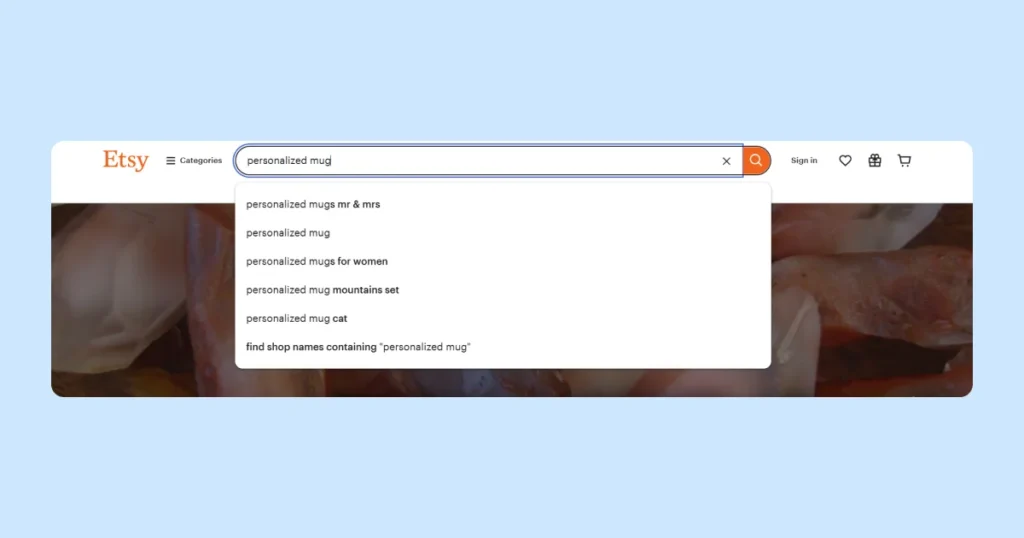
- Use Etsy’s search suggestions – Type the core noun of your item and see what phrases pop up. For example, typing “personalized mug” might show suggestions like “personalized mug gift for mom”, which indicates a popular search.
These suggestions reflect real shopper queries, so consider using them if they fit your product.
- Study competitors – Click on top-selling listings similar to yours and scroll down to see the tags they used (tags are visible on the listing page).
Also read their titles and descriptions. What keywords do they emphasize? If, say, all the best-selling candles mention “soy candle”, you’ll want to include that if applicable.
- Leverage keyword tools – Platforms like eRank, Marmalead, and Alura specialize in Etsy SEO, providing insights into keyword search volume, competition, and trends within the Etsy marketplace. For a broader perspective, you can also use Google Keyword Planner or Google Trends to identify general search interest and seasonal trends across the web.
Craft an Etsy-Friendly Title
Etsy allows you to use up to 140 characters, but that doesn’t mean you should use all of them. A great title should be both keyword-rich and easy to read. Here’s how to make it work:
- Start with the most important keywords – Lead with clear, descriptive words that shoppers are likely to search. Instead of something generic like “Sunflower Necklace”, go with “Sunflower Necklace in Sterling Silver – Boho Floral Pendant”.
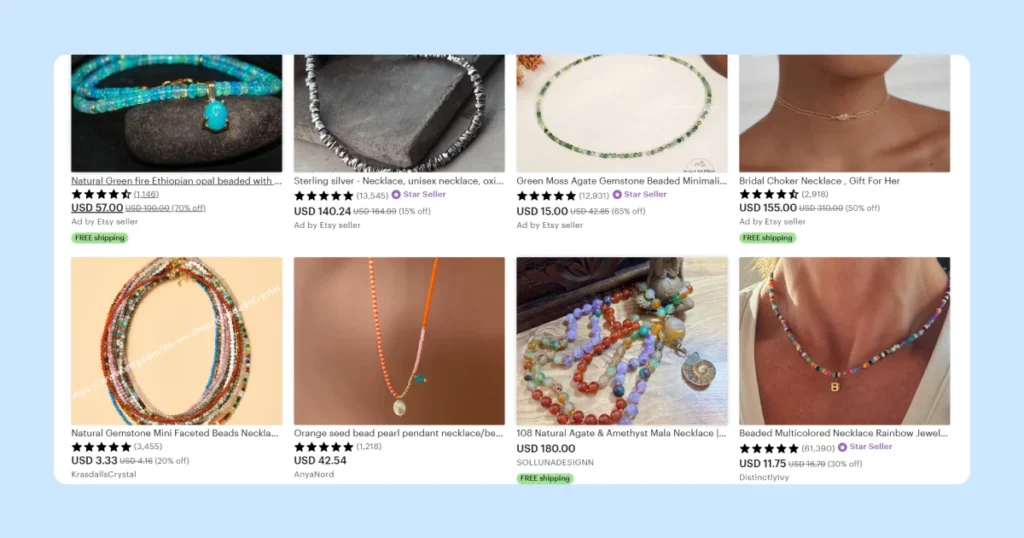
- Use terms people actually search for – Avoid getting too poetic or clever. Focus on what the item is, what it’s made of, and who it’s for. For example, “Baby Girl Nursery Wall Art” is direct, helpful, and keyword-rich.
- Keep it clean and readable – Don’t just jam a string of keywords with commas, hoping to rank for everything. Etsy’s algorithm can down-rank listings that look spammy or irrelevant. Plus, a messy title can turn off potential buyers
- Mention key details – If your item is customizable or tied to a specific season or occasion, be sure to mention this. Titles like “Custom Name Necklace | Birthstone Jewelry | Mother’s Day Gift” help match trending search terms.
Maximize Your Tags (All 13 of Them!)
Etsy gives you 13 tag slots per listing, and you should use every single one! Each tag can be up to 20 characters, and they play a big role in how Etsy connects your listing to search terms.
Here’s how to make the most of your tags:
- Use multi-angle descriptors – Tag your product from different shopper perspectives, not just what it is (“ceramic mug”), but also who it’s for (“gifts for coffee lovers”), why they’d buy it (“eco-friendly drinkware”), and how it’s used (“morning routine essential”).
- Tag for vibe and aesthetic – Shoppers often search with style in mind, like “cottagecore home decor,” “goth accessories,” or “Y2K jewelry.”
- Mirror phrases, not words – Etsy treats each tag as a separate phrase, so instead of single words like “gift,” “birthday,” “friend,” use complete search-style phrases like “birthday gift for friend” to align with actual buyer queries.
Write a Strong, Keyword-Rich Product Description
Your product description is key for both search visibility and convincing buyers to make a purchase. Here’s how to write one that’s clear, helpful, and optimized:
✅ Start with a quick summary – Open with 1–2 sentences that naturally include your main keywords and explain what the item is.
For example, “This handmade sunflower necklace is crafted in sterling silver – a perfect boho gift for nature lovers or a birthday gift for her.”
✅ Cover the essential details – Think like a shopper who can’t see or touch the product. Include:
- Materials (e.g., gold, cotton, soy wax)
- Size and dimensions
- Color options
- Care instructions (if needed)
- Format (e.g., digital vs. physical for prints)
✅ Highlight what makes it special by mentioning if it’s handmade, customizable, made in small batches or crafted with unique techniques.
Step 4: Create High-Quality Product Photos
Clear, bright, and attractive images can make a world of difference in convincing someone that your product is worth buying. Here’s how to nail your product photography, even if you’re not a pro photographer:
Use Bright, Natural Light
Natural light, such as the light you get near a window or on a cloudy day, creates a soft, even glow. Just be sure to avoid harsh sunlight, which can cast strong shadows.
If natural light isn’t an option, consider investing in a portable light box or a DIY photo studio kit.
You can also use LED daylight bulbs (5000–6500K) in clamp lamps or softboxes, as these mimic natural light and help avoid the yellow or orange tint you get from regular household lighting.
Show Different Angles and Context
Etsy allows you to upload up to 10 photos, and you should use them all. Start with a clean, well-composed main image. Then add:
- Front, back, and side views.
- Close-ups to highlight details.
- A size reference (like a mug in someone’s hand or a pillow on a couch).
- Lifestyle shots that show your candle on a cozy coffee table, or your art print on a styled wall.
💡 Pro Tip
With the Dynamic Mockups AI Generator, you can create stunning custom scenes and high-quality backgrounds in just a few clicks!
Simply enter a background description in the Background Prompt, and our AI will generate the perfect backdrop for you.
Use the Negative Prompt to remove any unwanted elements for a clean, polished result
Keep Photos Sharp and High Quality
Blurry or pixelated images can quickly turn buyers away. Always upload high-resolution photos, with a minimum of 2000 pixels on the shortest side, and ideally larger if possible (such as 3000–4000px). This ensures they appear sharp when zoomed in or viewed on larger screens.
Step 5: Price Your Products Strategically for Profit
Pricing can be one of the trickiest parts for new Etsy sellers. You might be tempted to underprice to attract buyers, but remember: you need to make a profit to make money. Here’s how to approach it:
💰 Understand Etsy’s fees – Etsy charges a 6.5% transaction fee on the total sale (including shipping) plus a payment processing fee, which is about 3% + $0.25 in the US. Be sure to include the $0.20 listing fee per item and any other platform-related expenses.
Here is a table of all Etsy’s mandatory fees:
| Fee Type | Amount | Notes |
| Listing Fee | $0.20 per item per 4 months | Charged when listing or relisting, including quantity beyond first sold |
| Transaction Fee | 6.5% of total order amount | Includes item price, shipping, gift wrap, personalization, and taxes (in some markets) |
| Payment Processing Fee | ~3% + fixed fee (e.g. $0.25) | Varies by country. U.S. is 3% + $0.25 |
| Currency Conversion Fee | 2.50% | Charged only if Etsy converts from USD to your shop’s payout currency |
| Regulatory Operating Fee | ~0.29–2.27% | Applied in some countries (e.g. EU, UK, India, Turkey, Vietnam) |
💰 Research the competition – Examine other Etsy sellers offering similar products to understand the price range customers typically expect. This will help you see where your product fits in the market based on quality, design, or uniqueness.
💰 Assign value to your time – Estimate how much your time is worth and factor that into the cost. For example, if a product takes 30 minutes to make and you want $20/hour, your labor cost is $10.
💰 Add a profit margin – Once you know your total cost, add a reasonable profit margin(at least 20–30% above your cost). This ensures you’re not just breaking even, and gives you flexibility for discounts or fee changes later.
💰 Use psychological pricing – Prices that end in .99 (like $19.99) often feel cheaper to buyers than round numbers, such as $20. On the other hand, rounded prices can give a more premium or upscale feel.
💰 Offer free shipping strategically – Including the shipping cost in your product price and listing it as “Free Shipping” can improve conversions and Etsy search ranking. Customers often feel they’re getting a better deal this way, even if the item costs slightly more.
Step 6: Provide Excellent Customer Service
Great customer service leads to great reviews, and reviews are one of the biggest factors in getting more sales on Etsy. In fact, approximately 98% of online shoppers read reviews to inform their purchasing decisions.
It also helps you qualify for Etsy’s Star Seller badge, which boosts your shop’s credibility.
Here is how you can do it:
✅ Respond quickly & kindly – Try to reply to customer messages (aka “convos”) within 24 hours, or even faster if you can. A quick, friendly response can often turn a question into a sale.
✅ Set clear expectations – Good service starts before the sale. Make sure your listings and photos are accurate and detailed. Mention things like:
- How long does personalization take.
- That each item might vary slightly (for handmade goods).
- Your processing and shipping times.
✅ Package with care & ship on time –Shipping is a big part of your review score, so send orders on time and let buyers know if there’s a delay. Pack items securely, and include a small extra, like a thank-you note, freebie, or branded card, to leave a great impression.
✅ Handle issues gracefully – Problems happen: a package might get lost, or an item might arrive damaged. What matters most is how you handle it.
- Respond quickly.
- Apologize sincerely.
- Offer a fair solution (like a refund or replacement).
✅ Ask for reviews – Once you’ve delivered a great product and experience, it’s okay to gently encourage a review. Etsy will email buyers to ask for one, but you can include a kind reminder in your packaging.
Try something like: “I hope you love your order! Reviews help my small business grow, thank you so much if you’re able to leave one!”
📌 Note
Don’t offer discounts or gifts in exchange for reviews, as it’s against Etsy’s rules.
How Can Dynamic Mockups Help You Build a Successful Etsy Store
Want your listings to stand out? With its seamless integration with Etsy, Dynamic Mockups helps you create unlimited pro-looking images in seconds, with no design skills needed.
Here are some of Dynamic Mockups key features:
✨ Embeddable iFrame Mockup Editor
Easily add our powerful mockup editor to your website so your users can design stunning, print-ready mockups without ever leaving your platform.
Why you’ll love it:
- Easy for anyone to use, yet delivers professional, print-quality results.
- Reduces errors and printing issues by minimizing unnecessary data transfers.
- Speeds up your workflow while supporting a more sustainable process.
✨ Bulk Creation
Need multiple variations fast? Create up to 100 mockups in just 10 seconds! Simply upload your designs and color options, and our AI will handle the rest.
✨ Free Mockup Library
Discover a growing collection of high-quality mockups for various products, including T-shirts, hoodies, wall art, pillows, tote bags, mugs, and more.
✨ Upload Your Custom PSD Mockups
Transform your Photoshop templates into stunning, customizable mockups with ease!
Our API makes it simple to upload your PSD files, giving you a seamless, flexible experience to bring your designs to life effortlessly.
✨ Design Library
Keep all your designs organized in one easy-to-access place! Quickly search, resize, reposition, and edit your designs with just a few clicks.
✨ Advanced Editing Tools
Explore curated color palettes to find the perfect shades, and enhance your work with rich textures, depth, and effects inspired by Photoshop.
Best of all, your design is automatically resized and positioned for a flawless fit, every time.
Get started with Dynamic Mockups for free and create stunning mockups for your Etsy store!