You’ve just opened your Etsy shop, filled it with beautiful products, and waited eagerly for the orders to roll in, but nothing’s happening.
Or maybe you’ve made a few sales, but growth has stalled, and you’re not sure why.
A single misstep can bury your shop beneath thousands of listings. However, most early mistakes are completely avoidable if you know what to look out for.
Read on to learn about the most common Etsy shop mistakes so you can avoid them and build a sustainable shop from day one.
9 Etsy Shop Mistakes You Should Avoid
Let’s check the most common mistakes you, as a new Etsy seller, may make.
1. Neglecting Product Photos or Mockups
Too many new Etsy sellers underestimate the power of great visuals.
Uploading grainy, dimly lit, or poorly composed images can instantly make even the best product look unappealing.
Shoppers can’t touch or hold your item, so your photos are the product in their eyes.
If they can’t clearly see what you’re selling, they’ll scroll right past, no matter how amazing your item actually is.
Also, listings with high-quality, professional-looking images consistently rank higher, attract more clicks, and convert better.
As a consequence, poor photos not only hurt your brand but also your visibility. Strong product photography isn’t optional. It’s your most important sales tool.
How to avoid the mistake:
Use natural lighting, neutral backgrounds, and take multiple angles, including close-ups and a shot that shows scale.
For example, a ring on a finger or a candle in someone’s hand.
| Product type | Best background color(s) | Why it works |
| Jewelry (gold/silver) | Light gray, soft beige, muted white | Enhances shine, avoids overexposure, adds elegance |
| Bright-colored items | Neutral white, light tan, concrete gray | Makes bold colors pop without clashing |
| Pastel items | Soft white, blush pink, pale lavender | Complements gentle tones, maintains a light aesthetic |
| Dark-colored products | Light gray, ivory, textured white | Creates contrast, avoids losing details in shadows |
| Natural products (wood, stone, organic) | Linen beige, natural wood, soft green | Reinforces an earthy, handmade feel |
| Modern/minimalist products | Bright white, clean gray, black (for contrast) | Matches contemporary aesthetic, looks sleek and professional |
| Digital prints/art | Clean white, desk flat lay with minimal props | Keeps focus on design, avoids color distraction |
| Clothing/fabric items | Neutral walls, light wood floor, soft natural light | Helps show drape, texture, and scale |
Additionally, tools like mockup generators can give your photos a polished, cohesive look and enable you to bulk edit and further refine your product photos without advanced Photoshop skills.
💡 How can Dynamic Mockups help?
Our AI background generator enables you to create custom background scenes by entering a simple prompt.
Thus, you can create more engaging scenes that resonate better with your audience while keeping your original design.
2. Not Creating Seasonal or Holiday Products
One of the bigger selling opportunities you may miss is not creating products around holidays, seasons, and major shopping events.
Etsy buyers shop with intention, and that intention is often linked to specific occasions, such as Mother’s Day, Christmas, Halloween, weddings, graduations, back-to-school, and more.
If your shop only offers evergreen items and doesn’t capitalize on these high-traffic periods, you’re likely leaving serious money on the table.
Why shouldn’t you miss the opportunity?
- Seasonal searches spike weeks in advance, and Etsy’s algorithm rewards listings that are already gaining traction when demand hits.
- Holidays drive emotional, gift-focused purchases. Personalized, themed, or limited-edition products often outperform standard listings during these periods.
- Shoppers often filter by phrases like “Christmas gift for mom” or “custom Halloween decor.” If you’re not using seasonal keywords and offerings, you’ll be invisible during critical sales periods.
Otherwise, competitors who embrace seasonal trends will capture traffic that you could have had.
In addition, your shop may look static or inactive to returning customers.
How to avoid the mistake
- Plan ahead: Start designing and listing seasonal products at least 6–8 weeks in advance to align with buyer search behavior.
- Refresh your existing products: Add seasonal variations, such as color schemes, packaging, and tags to current bestsellers instead of creating entirely new items.
- Use relevant keywords: Update titles, tags, and descriptions with holiday or event-specific search terms.
- Offer giftable versions: Bundles, gift wrap options, or personalized notes go a long way during the holiday season.
- Retire or archive listings: After the season ends, hide or tweak those listings for next year to avoid clutter.
How can Dynamic Mockups help?
You can easily automate mockup creation in just a matter of minutes.
Imagine you want to create 50 holiday designs on T-shirts, hoodies, and mugs in 3 different colors.
That is a staggering 450 mockup variations. With our tool, you don’t have to do them manually: simply choose your preferred color combinations and design assets and create as many combinations as you want.
You can also browse our Template Library, which spans multiple categories, including Apparel, Wall Art, Home Décor, and more, to upload your designs and tweak them further.
Don’t forget that consistency across your listings also creates a trustworthy, branded shopping experience. And that brings us to mistake number 3.
3. Not Having a Clear or Consistent Brand Identity
A scattered brand identity sends a confusing message to buyers: What exactly are you selling, and why should they trust you?
If your shop doesn’t feel intentional, shoppers are far less likely to remember you, let alone come back.
They want to feel like they’re buying from a real person or small business with a clear point of view.
If your banner says boho chic, but your listings feel minimal and modern, buyers notice that disconnect. It creates friction and affects trust.
How to avoid the mistake
Start by creating a simple brand kit. This doesn’t need to be complicated or expensive. It just needs to be consistent. You should include:
- A shop name and tagline that reflect your niche.
- A logo that looks clean and works well in different sizes.
- A cohesive color palette and font pairing.
- A consistent tone of voice, such as playful, warm, modern, or minimalist, in your product descriptions, About section, and shop policies.
Then, apply the style everywhere, from your banner and packaging to your social media and thank-you notes.
It’s quite simple. Consistency builds recognition, and recognition builds trust.
Did you know that with Dynamic Mockups’ Editor, you can create your brand assets and upload logos that you can then apply to all your products, social media material, and ads?
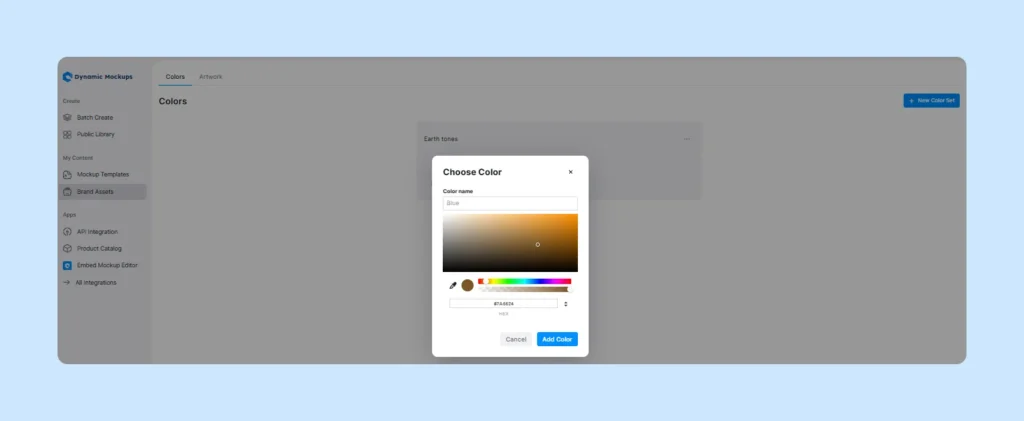
This way, you can create a uniform and recognizable look where each element tells a story about your brand.
4. Underpricing or overpricing products
Pricing is one of the trickiest parts of running an Etsy shop.
If you set your prices too low, shoppers may assume your product is of poor quality.
On the other hand, set them too high, and they’ll click away.
Many new sellers default to underpricing because they think lower prices will attract more buyers. However, that often backfires.
🚨 Why underpricing can hurt you:
- Etsy’s algorithm has become smarter. The platform now identifies and hides listings in certain categories that appear too low in price, especially next to similar items. This means that pricing too low doesn’t just shrink your profit margin, but it could actually bury your product in search results.
- In addition, low prices don’t always mean more sales. Shoppers often associate value with cost. If your handmade jewelry is $10 but looks similar to a $40 piece, customers may question its quality or authenticity.
🚨 Why overpricing doesn’t work either:
Along the same lines, pricing too high without justification, such as premium materials, branding, or packaging, can deter budget-conscious shoppers.
Etsy buyers love unique and handmade, but they still compare prices, and they’ll most likely leave your page if the price doesn’t feel “worth it.”
How to avoid the mistake: Etsy selling tips
To find your sweet spot, take the following factors into account.
| Factors | Why It Matters |
| Materials & Supplies | The base cost of what it takes to make the item. |
| Time Spent | Your labor matters, don’t underpay yourself and your skills. |
| Etsy Fees & Taxes | Account for listing fees, transaction fees, and ad costs. |
| Packaging & Shipping | Include any extras like boxes, tissue, and thank-you notes. |
| Competitor Pricing | Research similar listings in your niche and price accordingly. |
| Brand Positioning | Are you budget-friendly, mid-range, or premium? |
For starters, you can also try a markup of 2 to 3 times your total product cost (materials, labor, and overhead).
Later, you can adjust it based on your niche and audience.
5. Poor Etsy SEO Optimization
If you only list your products and assume the right buyers will just find you, well, think again.
Without strong SEO, your items are practically invisible.
Etsy’s search algorithm relies heavily on your titles, tags, categories, and descriptions to match your listings with buyer search queries. I
If you’re not speaking the same language as your customers, they’ll never even see your products, no matter how great they are.
The algorithm now prioritizes relevance, click-through rate, and conversion performance.
Therefore, your listings need to be not only keyword-rich but also accurate, intentional, and regularly updated based on real data.
How to avoid the mistake
- Use all 13 tags that Etsy provides and make them as specific as possible.
- Front-load your titles with the most important keywords, those that reflect what people are actually typing into the search bar. For example, if a shopper starts typing a phrase like “personalized keychain,” Etsy automatically shows a dropdown of popular, related searches based on real buyer behavior. You can, and should, use those suggestions by incorporating them into your product titles and tags. It’s an easy way to align your listings with what buyers are already searching for
- Avoid keyword stuffing, as it doesn’t help and can make your listings appear spammy.
- Regularly review your Shop Stats to see which keywords are bringing traffic and which are underperforming.
- Use tools like eRank or Marmalead to find trending, high-performing search terms in your niche.
6. Disregarding Etsy policies
Etsy has a clear set of policies to protect buyers, sellers, and the integrity of handmade and vintage goods.
When you overlook these rules, it can result in temporary listing removal, account suspension, or even a permanent ban.
Common policy missteps include:
- Using copyrighted images, logos, or phrases without permission is one of the fastest ways to get “caught”.
- Listing mass-produced goods as handmade, falsely labeling products as vintage, or hiding production partners.
- Late shipping, unanswered messages, excessive order issues, or too many poor reviews can lead to account restrictions.
- Trying to outsmart Etsy’s rules, such as keyword spamming, evading bans with duplicate shops, or encouraging off-platform transactions.
- Using manipulative language or “clickbait” in listings that mislead shoppers.
How to avoid the mistake
Regularly review Etsy’s Seller Policy and Prohibited Items list (they update often).
Be transparent in your listings. Provide accurate photos, honest descriptions, and realistic shipping times.
7. Not Optimizing for Mobile
Did you know that almost 70% of sales on Etsy happen over mobile phones. And although the statistics may not surprise you, perhaps you still make a common mistake: building your listings on a desktop and assuming they’ll automatically look fine on a phone.
But mobile shopping behavior is fast, visual, and convenient. A cluttered title, unreadable description, or awkward product photo can be enough to make someone swipe past.
Etsy’s mobile layout shortens long titles and cuts off key details, meaning poor formatting can hide important selling points.
Product images and text that look great on a desktop might appear cropped, blurry, or overwhelming on a phone screen.
How to avoid the mistake
- Test every listing on mobile before publishing.
- Keep titles front-loaded with keywords and key info.
- Write “scannable” descriptions and use short paragraphs, bullet points, and headers. Avoid long walls of text.
- Make your first photo count: It should clearly show the product, have good lighting, and be recognizable even at thumbnail size.
- Check formatting for spacing issues, emojis, or special characters that may display differently on mobile vs. desktops.
8. Not Using Etsy’s New Tools & Features
Etsy has introduced or updated innovative tools and features to help sellers streamline workflow, reach more customers, and make smarter decisions based on real-time data.
Yet many new sellers are either unaware of them or simply stick to the basics, missing out on some major opportunities.
Key Etsy tools you should explore more:
1. Etsy Live: Allows you to host real-time livestreams to showcase products, demonstrate how they’re made, or answer customer questions.
2. AI-powered listing suggestions: The tool suggests relevant tags, improves product descriptions, and even recommends pricing ranges based on similar listings. While these suggestions aren’t always perfect, they offer a great starting point, especially if you’re still learning what resonates with buyers.
3. Enhanced seller dashboard & analytics: The updated seller dashboard offers deeper insights into traffic sources, keyword performance, conversion rates, and customer behavior.
4. In-app marketing tools: Etsy has expanded its ad campaign management, coupon creation, and email marketing tools. You can now retarget buyers who favorited your items, send personalized thank-you discounts, or test promotions with detailed performance breakdowns.
5. Automated customer messaging & reviews management
You can now set up automated responses for common customer questions, delivery updates, or review requests.
How to avoid the mistake:
- Check the Etsy Seller Handbook regularly since Etsy updates it with every major rollout.
- Join the Etsy Community Forums to stay in the loop and learn from other sellers.
- Explore what’s new in your seller dashboard. You might discover a feature that saves you hours of work or helps boost sales.
9. Poor Customer Service and Engagement
It’s understandable that as a new seller, you want to focus all your energy on listings and products.
Unfortunately, by doing so, you may overlook the importance of reviews and effective customer communication.
Etsy tracks your response rate and shop performance.
Slow replies or unresolved issues can lower your shop’s quality score and negatively impact its visibility in search results.
Buyers expect fast, clear answers, especially for personalized or custom orders. Therefore, delayed replies often lead them to shop elsewhere.
Negative reviews often reflect poor communication, not just product quality. Things like shipping delays, missing info, or sizing questions can be forgivable if you respond helpfully.
How to avoid the mistake
- Respond within 24 hours. Even a short “Thanks for your message! I’ll follow up with details shortly.” goes a long way.
- Stay professional and friendly even when handling complaints. You shouldn’t get defensive in messages or public reviews.
- Proactively update buyers if there’s a delay or issue with an order. This builds trust and often prevents negative feedback.
- Follow up after delivery with a thank-you message or coupon code to encourage repeat purchases and show appreciation.
Etsy Shop Mistakes: Wrapping It Up
Selling on Etsy is everything but listing a great product and hoping for the best.
Effective results come from understanding how the platform works, staying updated on new tools, and avoiding Etsy shop mistakes.
Nonetheless, your Etsy journey must start with product photos.
As the first point of contact between you and potential shoppers, you need visuals that are visually appealing and consistent.
And this is where Dynamic Mockups can help: to enable you to create clean, scroll-stopping mockups that actually match your brand with zero design skills.
How Can Dynamic Mockups Help You Create Effective Etsy Mockups?
Dynamic Mockups is an automated mockup generator tool for print-on-demand businesses and eCommerce that enables you to:
✨Quickly create large batches of high-quality product mockups for items such as T-shirts, hoodies, mugs, wall art, and more, saving significant time compared to manual editing.
✨ Enhance product appeal and boost sales by generating AI-powered, realistic, visually compelling scenes that resonate with your target audience.
✨ Enhance engagement by allowing customers to personalize products visually before purchase with our online embeddable Product Configurator.
It also allows you to showcase customizable product mockups directly on product pages.
✨ Bulk upload your designs and color variations to automatically generate hundreds of unique mockup images in seconds, up to 100 variations in about 10 seconds.
✨ Customize designs using advanced editing features, including Photoshop blending modes, color pickers (with Printful and Printify color combinations), and flexible layout tools for precise placement and resizing.
✨ Use your own PSD templates or select from a growing library of free, professionally designed mockups, offering flexibility for unique branding and product presentation.
✨ Integrate with popular eCommerce platforms like Etsy and WooCommerce via API, automating the workflow from design to product listing.
✨ Organize and reuse design assets through a built-in design library, streamlining your workflow and ensuring consistent branding across all products.
Ready to test Dynamic Mockups yourself?
Sign up for Dynamic Mockups for free to boost your shop’s credibility and turn more views into sales.
Keep learning:
5 Best Mockup Sites for Etsy Sellers
Product Mockups That Convert: Best Practices from Top Stores
How to Plan a Successful Fashion Product Launch [Full Guide]