



 Knowledge
On this page
What Is a Leggings Mockup Generator?
A leggings mockup generator drops your design, or a full all-over print, onto a photorealistic pair of leggings right in your browser in minutes, no Photoshop needed. You upload your artwork, the tool wraps it around the worn, curved shape, and you download a listing-ready image in seconds.
Two pieces do the work: MockAnything AI, which turns a prompt or a product photo into a reusable lifestyle mockup, and a Pattern setting that repeats your artwork across the fabric at no extra cost. You can tweak your artwork as you wish and see a real-time preview.
Here is the part that separates a real leggings mockup from a flat one.
A good generator wraps a true seamless repeat around the leg. A weak one pastes a flat graphic that stretches, rotates, or just stops where the seams meet.
It helps to name the two jobs a mockup tool has to handle. A placed design sits in one spot, like a small logo on the hip or a wordmark down one leg.
An all-over print covers the whole garment, edge to edge, and that second job is where most tools fall apart. So an all-over print leggings mockup is only useful if the print behaves like real fabric.
This tool is built for athleisure and print-on-demand sellers who need honest product shots fast, without booking a photoshoot or a fit model. Whether you call them leggings or yoga pants, the job is the same: show the buyer exactly what they are getting.
And here’s what you can achieve in Dynamic Mockups:
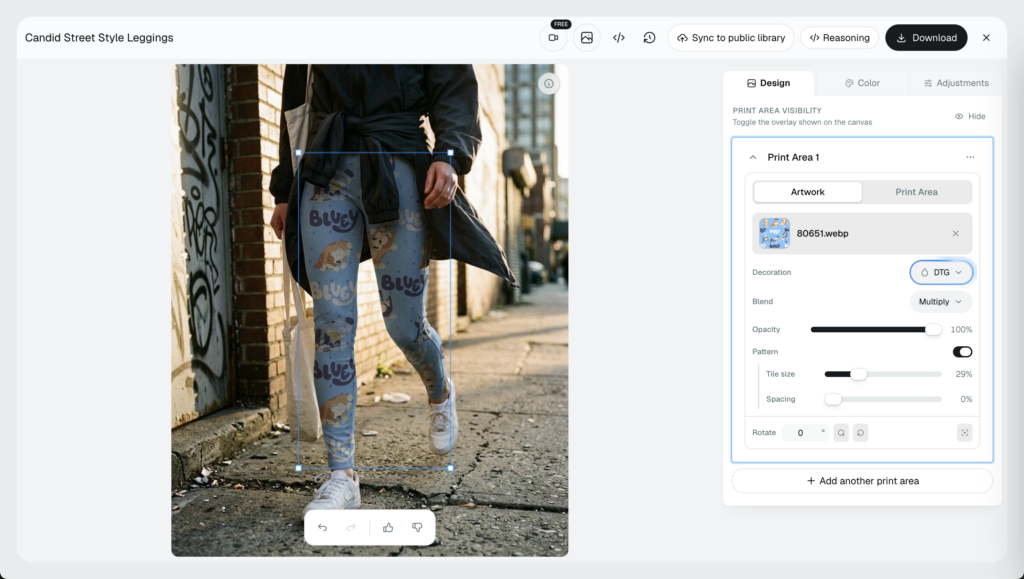
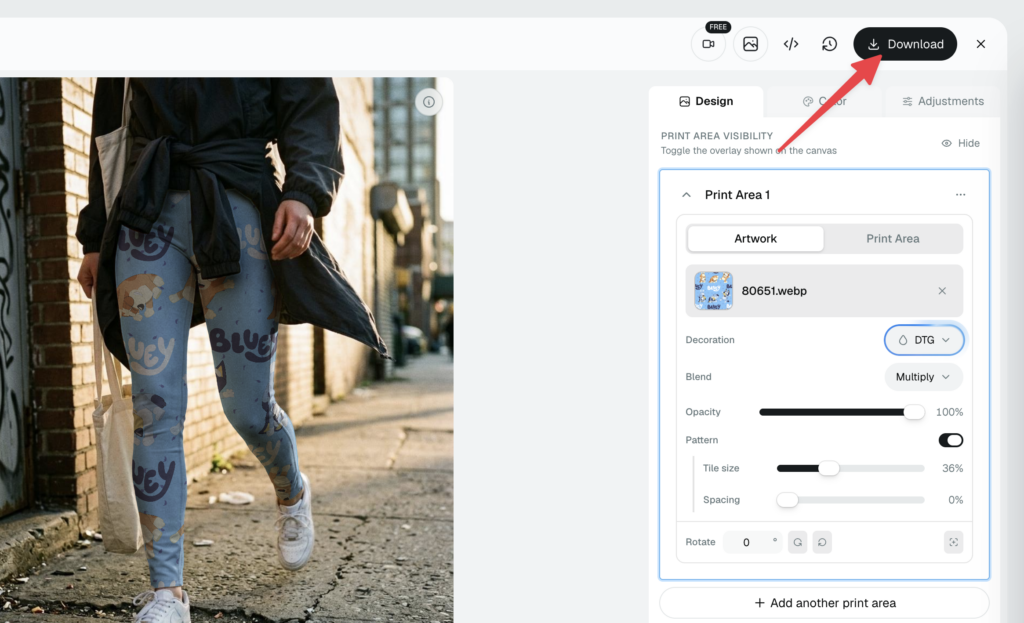
As you can see in the image, your artwork perfectly wraps around, it looks real. The best is, you can tweak the position and tile size in real-time with no extra costs.
That is true whether you sell on Etsy, Shopify, Amazon, or TikTok Shop. Anywhere the buyer shops from a thumbnail, the print in that thumbnail has to be believable.
The demand is real. The global leggings market was worth about $42.5 billion in 2025 and keeps climbing, pushed by rising athleisure and fitness trends, according to Transparency Market Research.
Print-on-demand is growing right alongside it, from roughly $10.8 billion in 2025 toward $57.5 billion by 2033, per Grand View Research. More sellers in the space means your listing image has to carry more weight.
You do not need a huge catalog of pre-built files to start, though our free mockup template library has over 100,000 templates if you want them. And if you are still comparing tools, our roundup of the best clothing mockup apps shows where each one fits.
Why All-Over Prints Break on Curved Leggings
Leggings are the hard case for mockups. The fabric curves around the hip, the thigh, and the calf, and it is broken up by seams. A flat graphic does not know any of that.
Paste a flat design onto that shape and one of three things happens. It stretches over the curve, it restarts abruptly at a seam, or it rotates in a direction real fabric never would.
There is a second problem, and it is sneakier. Scale drift.
A tile that looks right at the wide waistband turns to noise by the time it reaches the narrow ankle. The motif crowds together and stops reading as one design.
Generative scene tools add a risk of their own. Some will repaint your artwork to fit the picture, quietly redrawing your motifs so the image no longer matches the print that ships.
That is a real problem, because your buyer is judging the print entirely from that image. They cannot feel the fabric or hold it up to the light, so the photo is the product in their eyes.
Scaling a flat image bigger does not fix any of this. You just get a blurrier flat image.
What works is a repeat engine that treats your tile as a tile and multiplies it cleanly across the surface, following the curve instead of ignoring it. That is the difference between a pattern setting and a paste job.
Here is what correct looks like. Motifs bend naturally where the fabric curves and disappear around the edges, the way a printed textile actually behaves.
The repeat holds the same scale from top to bottom. And your colors stay recognizable, so the leggings in the photo are the leggings in the box.
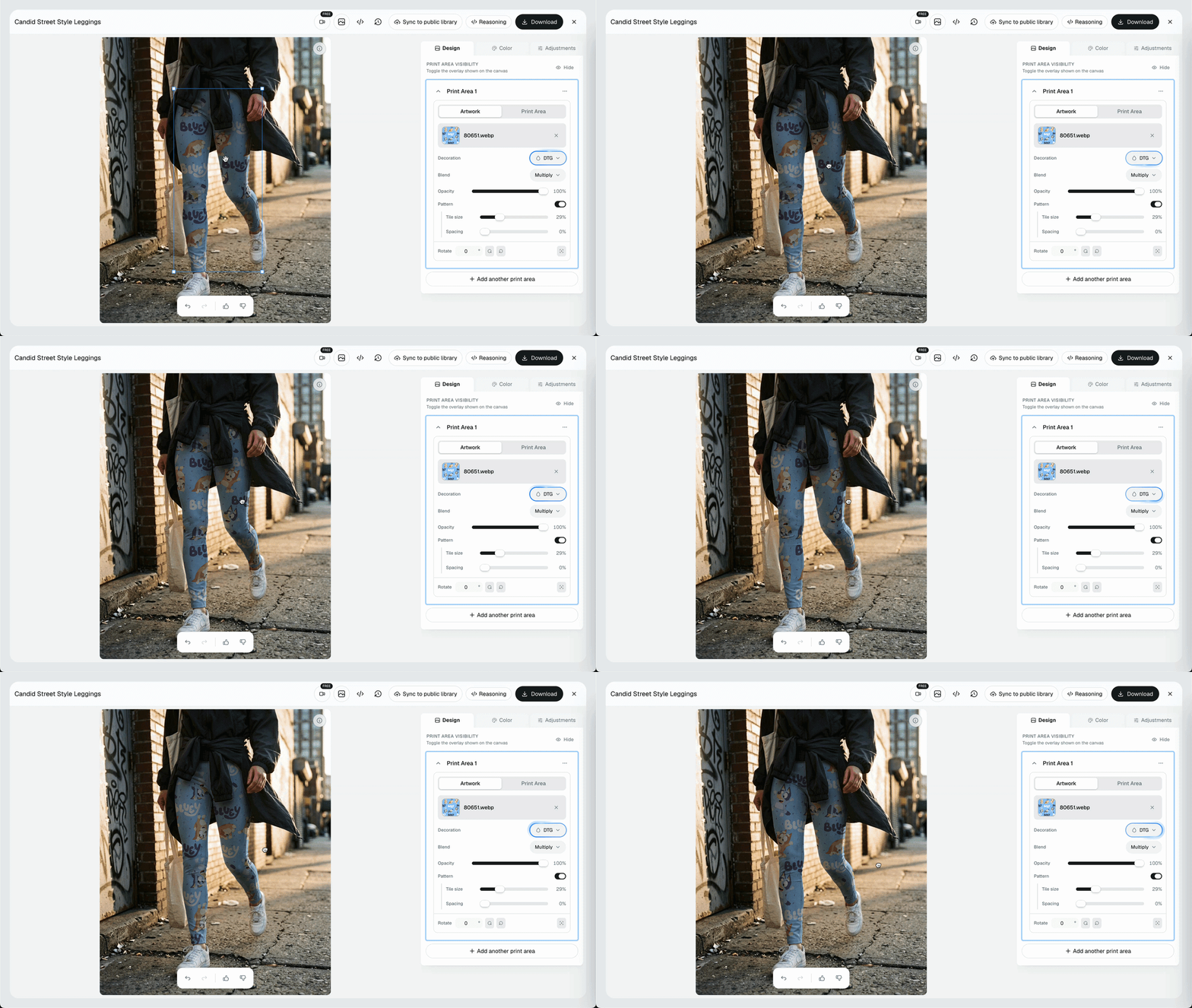
This is about returns as much as clicks. If the print that arrives looks noticeably different from the mockup, some buyers send it back and some leave a review saying so, and both cost you more than the sale was worth.
Get it right and buyers trust the listing. Get it wrong and you either lose the click or win a return, and returns are the expensive kind of wrong.
How to Make a Leggings Mockup in MockAnything AI
You can build the whole thing in one browser tab. Here is the full workflow in MockAnything AI.
Step 1: Generate or Pick Your Leggings Scene
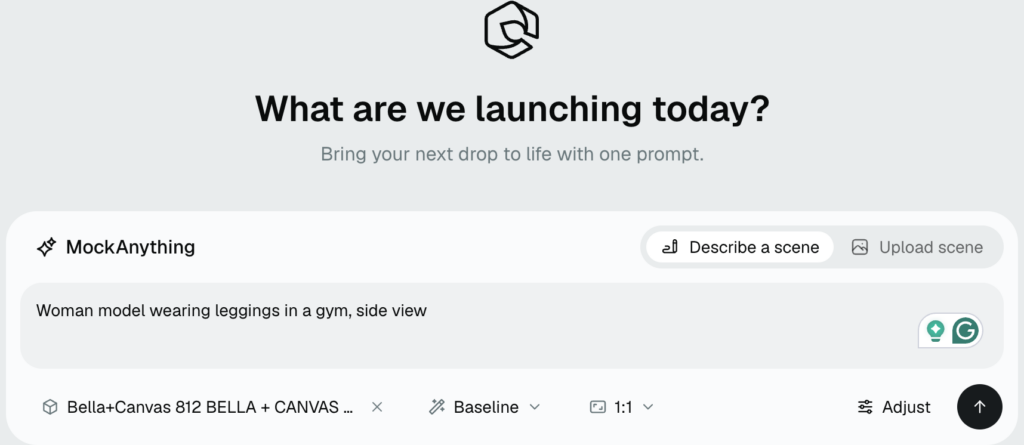
Start with the mockup scene. Type a prompt like “leggings on a woman model” or “Woman model wearing leggings in a gym, side view” and MockAnything AI generates a photorealistic lifestyle mockup for you.
Prefer something ready-made? Our Leggings Mockup Templates library is growing each day.
Match the view to how you sell. A clean flat-lay reads well as a thumbnail, while an on-model shot helps buyers picture the fit.
In this case, I’ve chosen Bella Canvas 812 leggings.
Step 2: Upload Your Seamless Artwork
Upload the all-over print you want to sell.
For a true all-over look, use a seamless tile, meaning artwork whose edges line up so it can repeat without visible joins. If your file is a single motif, tile it first so the repeat has somewhere to go. If you want the deeper method behind clean repeats and tile scale, our seamless pattern mockup guide walks through it step by step.
Export that tile at a high resolution so it stays crisp when the editor scales it up or down.
Step 3: Turn On Pattern and Set the Scale
Enable the Pattern setting. This tells the editor to repeat your tile across the fabric instead of dropping it on once.
Then drag the scale control and watch the repeat wrap the curved form in real time. A bigger scale gives you a larger, sparser motif; a smaller scale gives you a denser repeat.
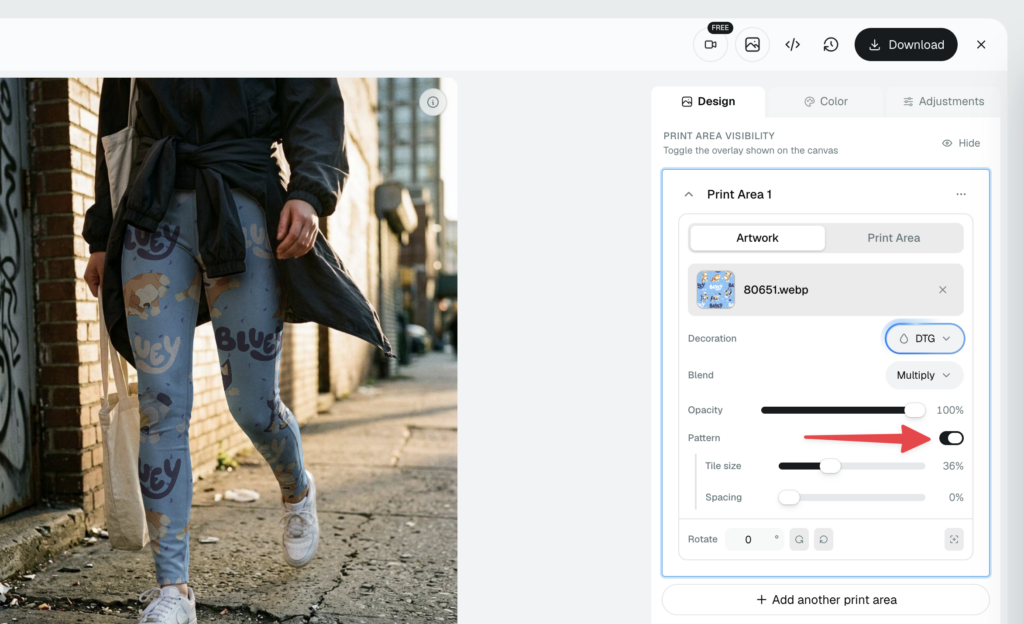
Nudge it until the motif reads clearly at both the waistband and the ankle, then leave it alone.
Step 4: Save the Template and Download
Happy with it? Save the template so the scene, the camera angle, and the Pattern setting all stay locked in.
Give the template a clear name too, so it is easy to find when the next design is ready.
Then download your finished mockup, ready to upload to your listing. No Photoshop, no plugins, no separate export step.
How to Size Your Repeat From Waistband to Ankle
Scale is where most leggings mockups live or die. Get it right and the print reads as one coherent design from waistband to ankle.
The trick is to judge the scale against the whole leg, not one flattering spot. A tile that looks perfect at the waistband can turn muddy at the ankle, so check it across the full length before you commit.
There are really only two ways to get it wrong:
- Tiles too large: the motif spreads out until the design barely registers as a print.
- Tiles too small: the repeat crowds together and collapses into visual noise.
The sweet spot sits between those two, where the motif is clearly visible at the waistband and still legible as the fabric narrows toward the ankle.
Different prints want different scales. A busy floral can run smaller, because the eye reads it as texture, while a bold geometric or a single repeated character usually needs more room to stay sharp.
Test your actual artwork instead of reusing a scale that worked on a different design. What looks balanced on a dense pattern can look sparse and accidental on a simple one.
Always preview on the curved form before you save. Motifs should bend or fade around the edges the way ink behaves on stretched fabric.
If any part of the pattern restarts hard at a seam or spins to an odd angle, your scale or your tile is off. Fix it now, not after you have built ten listings on top of it.
Remember that shoppers zoom in. On leggings especially, people look closely at print quality, so keep your final export large enough that the pattern stays sharp when they do.
💡 Pro tip: check at least two views, a folded flat-lay and a worn shot, so you catch scale drift that only shows up once the fabric curves.
One last thing to protect: your source colors and motifs. Keep them recognizable through all of this, because the whole point of a custom leggings mockup is that the buyer trusts the print they see is the print they will get.
Re-Skin Your Whole Leggings Collection From One Template
The real payoff shows up on your second design, and your twentieth.
Save the template once and it reopens with the same scene, the same camera angle, and the same Pattern setting intact. You are not rebuilding anything from scratch.
To launch a new colorway or a brand-new print, swap in a fresh seamless tile. The scene stays put, your new artwork wraps the form, and you have the next listing image in seconds.
Running a whole drop at once? Instead of editing each mockup by hand, our bulk mockup generator applies a set of designs across your saved template in a single pass.
Picture one floral base scene with five colorways behind it. Build the scene once, feed in five seamless files, and export five matching listing images that all sit in the same frame.
There is a quiet bonus here too. Because every image shares one scene, your listing gallery stays consistent across the entire collection, same angle, same lighting, same crop.
That consistency is exactly what a real brand’s storefront looks like, and it is hard to fake one product at a time.
It is also how a pile of separate designs starts to read as a collection. Shared framing tells a browsing shopper these leggings belong together, which makes the whole shop easier to buy from.
Create Your Leggings Mockups Free With Dynamic Mockups
Everything above runs inside the editor, and Pattern costs nothing to turn on. No hidden tier, no add-on, no credit card.
That free access matters more every year. The global athleisure market was worth roughly $388 billion in 2024 and is growing near 9.4% a year through 2030. More sellers chasing the same buyers means your images have to work harder to earn the click.
If leggings are just one piece of your range, our athleisure mockups and fitness and gym wear mockups pages show more ways to present worn apparel, from hoodies to sports bras.
Ready to try it? Sign up free, generate a leggings scene from a prompt, and drop your own seamless print onto it with Pattern. See exactly how the repeat wraps before you spend a dollar.
Start your first leggings mockup on our free plan.
Also, if you are interested in how Dynamic Mockups can support your business to scale in the POD or e-commerce industry, see this short introduction video for more.
Showcase your e-commerce products like big brands, without costing a fortune. Sign up today. No credit card required. →
Frequently Asked Questions
How do I make a leggings mockup with my own all-over print?
Generate or pick a leggings scene in MockAnything AI, then upload your seamless tile. Turn on the Pattern setting so the tool repeats your artwork across the fabric instead of dropping it once, and drag the scale control until the motif reads well from waistband to ankle. Save the template, then download your listing-ready image. No Photoshop needed.
Is there a free leggings mockup generator?
Yes. Dynamic Mockups lets you build leggings mockups for free, and the Pattern setting that repeats an all-over print costs nothing extra. There is no hidden tier, no add-on, and no credit card required to start. You can generate a scene from a prompt, drop your seamless print on it, and see how the repeat wraps before you spend a dollar.
Why does my print stretch or restart at the seams on leggings mockups?
That happens when a tool pastes a flat graphic onto the curved shape instead of repeating a true seamless tile. The flat image stretches over the hip, rotates oddly, or stops hard at a seam because it has nowhere to continue. Use a seamless tile and a real Pattern setting, which multiplies your artwork cleanly across the fabric and follows the curve.
Can I reuse one leggings mockup template for a whole collection?
Yes. Save the template once and it reopens with the same scene, camera angle, and Pattern setting intact. To launch a new colorway or print, just swap in a fresh seamless tile. For a full drop, the bulk mockup generator applies a set of designs across your saved template in one pass, so a fifty-piece line comes out in minutes.
Do I need Photoshop to add an all-over print to leggings?
No. Everything runs in your browser inside the editor, with no Photoshop, plugins, or separate export step. You upload your seamless tile, turn on the Pattern setting, adjust the scale until the repeat wraps the curve cleanly, then download a listing-ready image. The whole workflow takes seconds, which is the point of a mockup generator built for speed.
![How to Make a Seamless Pattern Mockup Free [2026 Guide]](https://dynamicmockups.com/wp-content/uploads/2026/08/seamless-pattern-mockup-cover-768x403.png)